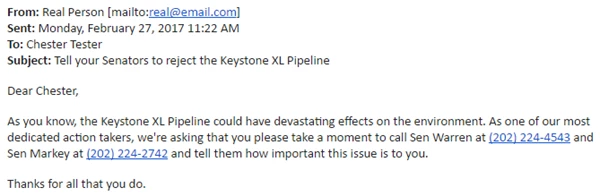
A personalized email message is six times more likely to be opened, read, and responded to.
When you're trying to motivate your supports to take action right away, you can make it much easier for them to get the information they need by using a merge field to customize your Targeted Email with the name and contact number for the correct elected official from your supporter's district.
Adding your targets
If you have a package that supports Advocacy forms, you'll also have access to five Advocacy Target Merge Fields.
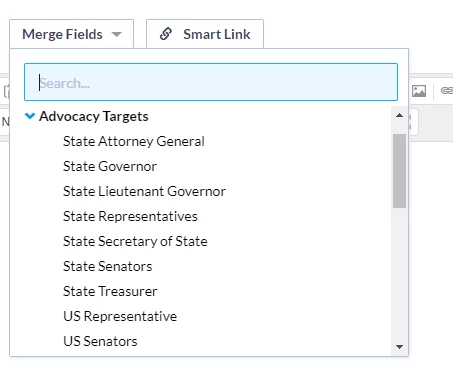
Adding these fields to your Targeted Email by selecting them from Merge Fields will automatically populate your message with the correct names and contact information of your supporter's elected officials. You can choose the type of elected official you want to include:
- State Attorney General
- State Governor
- State Lieutenant Governor
- State Representatives
- State Secretary of State
- State Senators
- State Treasurer
- US Representative
- US Senators
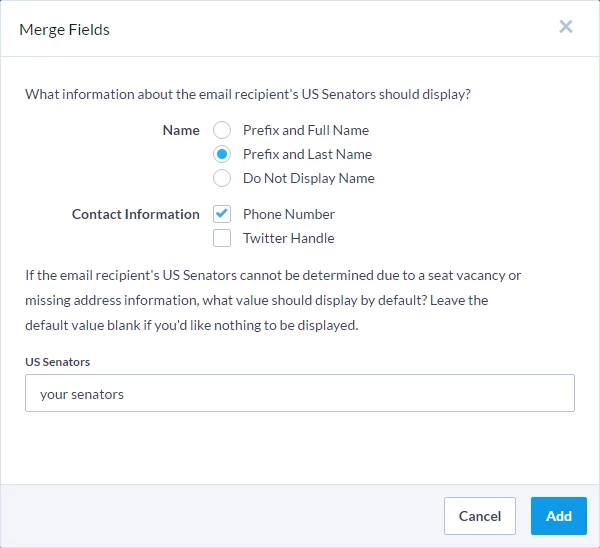
After selecting one of these merge fields, you will be able to select how you want to display the name and whether you want to include any contact information for the official.
Warning: Some State-level targets do not have Twitter handles. If you include this contact option and the official does not have a Twitter account, the text "their Twitter handle" will display in its place. To avoid seeing this message, you may need to first confirm that your target has a Twitter handle by looking them up using the Has Twitter handle filter on the Configure Advocacy step for your Advocacy form in Online Actions.
Viewing the codes and output
Once you've added your merge field, you'll see your choices reflected in the code that is inserted into your email.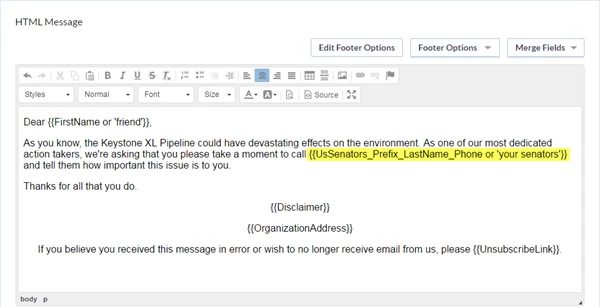
Below are some examples of how the code combinations will look, depending on the options you selected.
| Name | Contact Information | Merge Field Syntax | Sample Output |
|---|---|---|---|
| Prefix and Full Name | (none) | {{UsSenators_Prefix_FullName}} | Sen Elizabeth Warren and Sen Ed Markey |
| Prefix and Full Name | Phone Number | {{UsSenators_Prefix_FullName_Phone}} | Sen Elizabeth Warren at (202) 224-4543 and Sen Ed Markey at (202) 224-2742 |
| Prefix and Full Name | Twitter Handle | {{UsSenators_Prefix_FullName_Twitter}} | Sen Elizabeth Warren at @SenWarren and Sen Ed Markey at @EdMarkey |
| Prefix and Full Name | Phone Number, Twitter Handle | {{UsSenators_Prefix_FullName_Phone_Twitter}} | Sen Elizabeth Warren at (202) 224-4543 or at @SenWarren and Sen Ed Markey at (202) 224-2742 or at @EdMarkey |
| Prefix and Last Name | (none) | {{UsSenators_Prefix_LastName}} | Sen Warren and Sen Markey |
| Prefix and Last Name | Phone Number | {{UsSenators_Prefix_LastName_Phone}} | Sen Warren at (202) 224-4543 and Sen Markey at (202) 224-2742 |
| Prefix and Last Name | Twitter Handle | {{UsSenators_Prefix_LastName_Twitter}} | Sen Warren at @SenWarren and Sen Markey at @EdMarkey |
| Prefix and Last Name | Phone Number, Twitter Handle | {{UsSenators_Prefix_LastName_Phone_Twitter}} | Sen Warren at (202) 224-4543 or at @SenWarren and Sen Markey at (202) 224-2742 or at @EdMarkey |
| Do Not Display Name | Phone Number | {{UsSenators_Phone}} | (202) 224-4543 and (202) 224-2742 |
| Do Not Display Name | Twitter Handle | {{UsSenators_Twitter}} | @SenWarren and @EdMarkey |
| Do Not Display Name | Phone Number, Twitter Handle | {{UsSenators_Phone_Twitter}} | (202) 224-4543 or at @SenWarren and (202) 224-2742 or at @EdMarkey |
What your supporter will see
When your supporter receives the email, they should see the correct Advocacy Target based on the address and district information in their contact record.