



You can get a better understanding of the reach and effectiveness of your advocacy program by using the Advocacy Report, available in Report Manager.
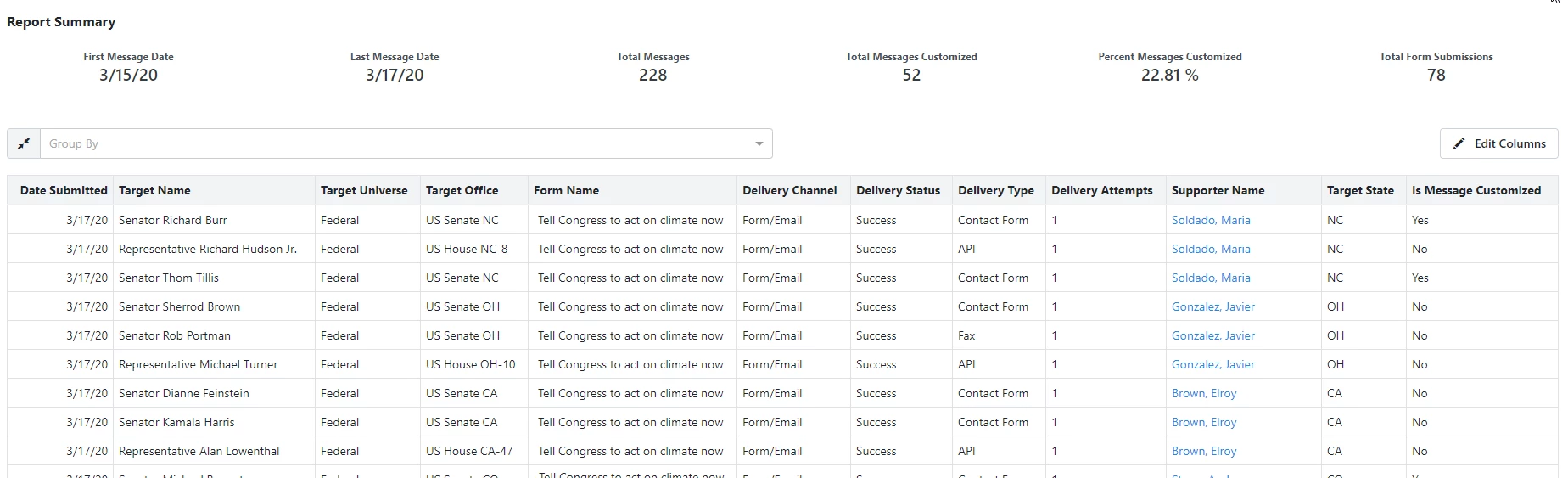
If you have an advocacy form that uses the Form/Email, Twitter, or Click-to-Call channels to deliver your message, this report will capture each advocacy message that was sent when your supporters submit your form.
The report displays one row for each advocacy message. A single advocacy form submission might generate multiple messages/rows for each supporter, depending on the number of targets you configured for the form. In some cases, you may have multiple entries for one supporter but none for others.
For example, if an advocacy form is configured to target the entire US Senate, a Massachusetts resident will generate two advocacy messages (one for each US Senator representing Massachusetts), but a District of Columbia resident won't generate any advocacy messages, since they do not have representation in the US Senate.
Viewing more details about your message delivery
You can find out more about the success of your message delivery by adding specific columns from Message Details, including:
- Delivery Attempts
- Delivery Channel (selected by default)
- Delivery Status (selected by default)
- Delivery Type
Understanding the Delivery Status
The Delivery Status column will help you track which of your supporters' messages have been successfully delivered to the advocacy target. In this column you will see one of these values:
-
Success means that the message was delivered successfully. If this is an Email delivery type, Success means the receiving email server accepted the message for delivery. We do not have insight into what the receiving email server did with the message after that (route to Inbox vs Junk folder, etc.)
-
Processing is a temporary status, that will eventually resolve to a Success or Failure status.
-
Failure appears if we have exhausted all delivery types and our automatic retry attempts.
-
No Attempt status is reserved for use with a custom advocacy target. Occasionally, you may want supporters to submit the advocacy form but prevent that message from being delivered to the target. This can be used in cases where you want to collect names to add to a message you deliver to your target offline. You can also use this setup if you're using the advocacy form solely for list-building purposes.
If an advocacy form has been configured with Twitter as the Delivery Channel, all Tweets generated through that form will display a Delivery Status of Success.
When your supporter uses Click-to-Call, if the call was completed, it will display a Delivery Status of Success.
Understanding the Delivery Channel and Delivery Type
There are three main channels for delivering your messages: Form/Email, Twitter, and Click-to-Call. Both the Twitter channel and Click-to-Call channels only have one Delivery Type available.
In the Form/Email channel, there are several Delivery Types, including:
- API
API allows you to use an integration with the target's application software and is the preferred communication method since it is the most direct.
Currently, US Representatives and US Senators are the only targets with an API delivery method available. The Communicating with Congress (CWC) APIs were specifically designed to provide advocacy vendors with an efficient means to deliver mass communications to congressional targets. Not every member of the US Senate has opted into this service, so you may see different Delivery Types in the Advocacy Report depending on the Senate target.
 Read more about Communicating With Congress API (or "CWC")
- Contact Form
If an advocacy target is not a US House member but is in a federal or state office, we can deliver advocacy messages to that target via their contact form, if it allows automated interaction. Some contact forms have enabled the CAPTCHA feature to prevent automated submissions. If a target's contact form has a CAPTCHA enabled, we attempt to deliver the message via email or fax instead.
If an advocacy target does not have an API or contact form available, we can deliver advocacy messages using an email address. We will use the supporter's email address in the Reply-To field for the email but we update the From Email address in order to ensure deliverability.
- Fax
If an advocacy target does not have an API, contact form, or email address available, we will attempt to deliver the advocacy messages to that target via Fax.
- None Available
If an advocacy target does not have any of the delivery types above available, that means we have no way to deliver the message using the Form / Email channel. This may be a temporary state, especially if the target is newly sworn in and is not yet set up with a contact form, email address, or fax. However, there are some targets to whom we cannot deliver messages via the Form / Email channel because their contact form has CAPTCHA and they do not have an API, email address, nor fax number available. If there was no delivery type available for a target, then that means we were unable to send the message to that target and the Delivery Type will reflect None Available.
Understanding the retry logic for Delivery Attempts
Whenever your supporter attempts to send a message using the Form/Email channel, Delivery Attempts will reflect how many attempts were made in order to reach the final Delivery Status of Success or Failure. (The Delivery Attempts column value will remain blank for the Twitter or Click-to-Call channels.)
The Form/Email channel has several methods for delivery and so our retry logic for each message varies depending on which type is attempted.
If we are unsuccessful in our attempt to send a message to your target using their Contact Form, we will automatically try to submit the target's contact form again four hours later, up to seven days (43 attempts max). Most of the time an automatic retry will go through successfully due to the target's contact form recovering from a spike in traffic or website maintenance. Sometimes, we have to make changes on our end for the retry to go through successfully. This might be necessary, for example, in cases where a target has updated their list of available message topics or changed the CSS selector for a form input.
If we attempt to send the message to the target via Email, the message can sometimes be delayed if the target's receiving email server indicates that it's too busy to process the request. If we receive such a response (typically 12 hours after the initial attempt), we will automatically try to send the email again 4 hours later, for up to four days (seven attempts max).
If we attempt to send the message to the target via Fax, and we receive a response of Busy or No Answer, we will automatically try to send the fax every 4 hours for up to four days (25 attempts max).
We also use fallback logic that will attempt to deliver the message to the target via Email or Fax if the API or Contact Form delivery types are not successful after repeated retries. Of course, this depends on the availability of an email address or fax number for a given target. If more than one Delivery Type was attempted, the Delivery Attempts value will reflect the number of attempts made for the final Delivery Type.