



On most sites, state and national administrators will import and maintain Polling Locations. If you have any questions about the polling locations available in your My Voters state(s), we recommend reaching out to your administrator.
If you are on SmartVAN, you can add polling locations to our spreadsheet template and send them to our support team through the Support Request system and we will load them for you.
Download the spreadsheet for SmartVAN
Early Voting Locations are stored separately.
Read more on early voting locations
Your polling locations spreadsheet
Your spreadsheet should be an Excel, CSV, or text tab-delimited spreadsheet containing the following fields:
-
Precinct ID
-
Precinct Code
-
Precinct Name
-
Polling Location
-
Location Description (optional)
-
Street
-
City
-
Zip
-
Polling Location contact information (optional)
Because Precinct ID is required and is generated by the system, the most efficient way to create your spreadsheet is to Export to Excel from Polling Locations, which you can get to from the sidebar menu. You can add information to the file as you collect it.
If you’re on SmartVAN, attach your spreadsheet in a Support Request; if you’re a state or national administrator on another site, follow the directions below for loading your file.
Bulk uploading polling locations
Navigate to Bulk Upload Wizard > Load polling locations > Next > select file > Upload.
Precinct ID will not appear in the mapping, and this is expected. The remaining columns in your file will auto-map to the fields in the system, provided that you have headers that match the field name. Otherwise, you can map these fields.
Authenticating Authority, Date Authenticated, and Contact Info Authenticated will not and should not be mapped to anything. Click Next to proceed and enter values for these fields.
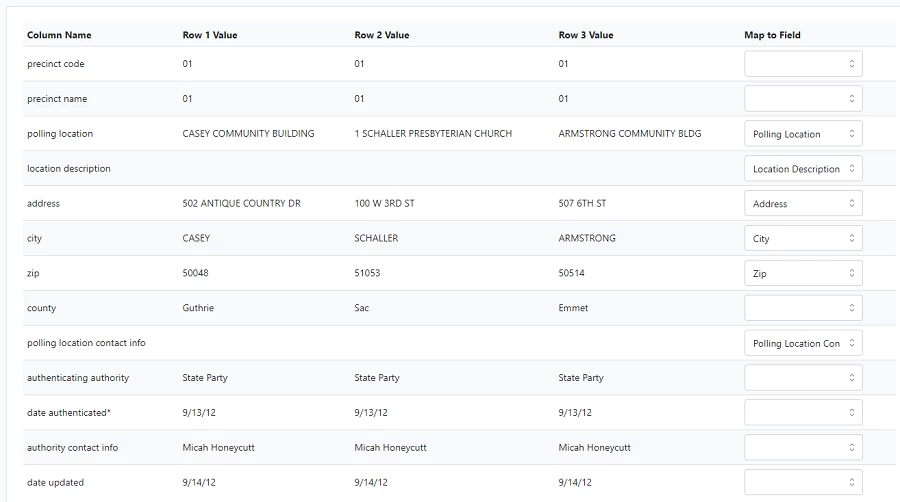
Enter Authenticating Authority, Date Authenticated, and Contact Info Authenticated > Finish. Your upload will be complete after a short period of time.