



SMS and MMS text messaging are powerful tools for reaching supporters quickly and getting them engaged as activists, donors, or volunteers. 
Using Mobile Messaging
With Mobile Messaging you create and send broadcast text messages using the same kinds of tools you may already know from other features, like Targeted Email.
- Use Create a List to build your Mobile Messaging audience
- Compose and send messages through our system
- Schedule your messages to send according to the time zone associated with your supporter’s address
- Insert merge fields to pull data from your records for personalized messages
- Use Smart Links to insert Online Actions forms pre-populated with contact information
- Use Optimized Ask Arrays to dynamically adjust your appeal to each contact
- Include media like images, videos, and emojis
- Reply to supporters directly from your Mobile Messaging Inbox
- Track results from your dashboard and run reports
- A/B Test to identify the most effective messaging
- Message contacts as part of Automation Workflows
- Target contacts you texted previously for new campaigns
Mobile Messaging works seamlessly with your current records. No additional vendors are needed to use this feature.
Understanding Pricing
Before you get started, decide whether to send messages with a short code or a toll-free number. If you already have a toll-free number, you can use it for Mobile Messaging.
Messaging credits are included in your service contract, but the amount can vary. To find out exactly what’s available to you, just reach out to your Account Executive — they’ll be happy to help.
- Short code users are charged for outgoing messages, including autoresponders to keywords.
- Toll-free users are charged for outgoing and incoming text messages.
The length and type of your message determine its cost:
- MMS costs a flat rate of 3 credits per recipient, irrespective of message length.
- SMS costs depend on the length of the message. One credit buys one 160 character message, or one 70 character message with emojis. Longer messages are segmented for transit, and while your contacts receive a single text, each segment is billed as a unique credit.
Verifying your toll-free number
Setting up Mobile Messaging first requires verifying your toll-free number. To start that process, contact your Account Executive for a Mobile Messaging signup form to complete after you have the following in place in your account:
- An active instance of EveryAction/NGP.
- Online signup and/or donation forms through Online Actions or another provider.
- Mobile Messaging specific section in your Privacy Policy.
- Mobile Messaging specific Terms of Service or Terms and Conditions added to your organization’s existing terms or as a separate page. Please include the following information:
- Organization name
- Message frequency
- Organization and use description
- Help information: a number to call and/or email address
- Opt-out info
- "Message and data rates may apply" disclosure
- Carrier liability disclaimer: "Carriers are not liable for delayed or undelivered messages"
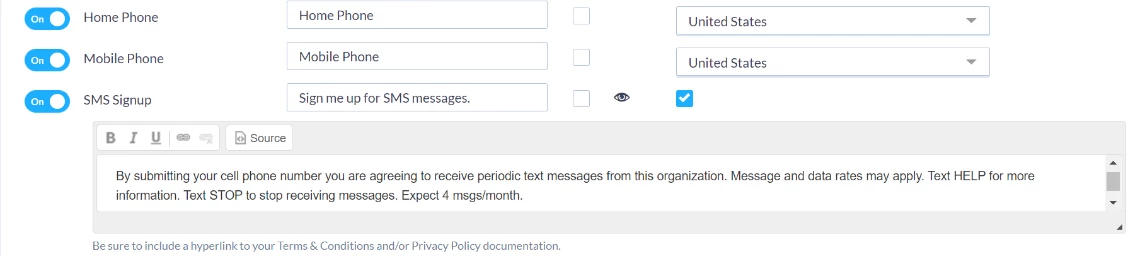
- Mobile Messaging opt-in checkbox that the supporter explicitly checks to opt-in. Please include the following information:
- Organization Name or Texting Program Name
- Description of opt-in method
- Message frequency disclosure
- Donation/fundraising disclosure
- "Message and data rates may apply" disclosure
- Help information
- Opt-out information
- Links to the Terms and Privacy Policy
Please note: Setting up an opt-in and Terms of Service is required by law for any Mobile Messaging.
The full process of verifying your toll-free number and setting up Mobile Messaging takes around 6 to 8 weeks. If you are in the verification process and have questions, please contact your Account Executive.
Building your mobile messaging list
If you want to add broadcast text messaging to your outreach efforts, your contacts will need to opt-in to receiving text messages from you first. Mobile Messaging only accepts phone numbers whose users have opted-in to receiving texts. You can create an Online Actions form to ask your supporters to for permission and manage opt-ins with bulk upload or by editing individual contact records.
A/B testing messages
Create two variants of a text based on either your content - the language, graphics, and calls to action in the body of your text - or the message type (SMS or MMS) to identify which performs best with a subset of your selected audience.
Before the test round, select a percentage of your audience to receive version A and B. The remaining contacts will receive the text winner, which is chosen automatically based the following performance metrics:
- Highest click rate
- Highest conversion rate
- Greatest average contribution
- Total raised
- Lowest opt-out rate
Replying to supporters
From your Mobile Messaging Inbox you can view incoming responses to your text campaigns and respond directly to your supporters. Text in real-time and schedule follow-up conversations. Filter your inbox by message status, sort your list from newest to oldest, and search for contacts.
Tracking your results
Track the results of your broadcast SMS messages right from your dashboard. View message use, clicks, conversions, and money raised. 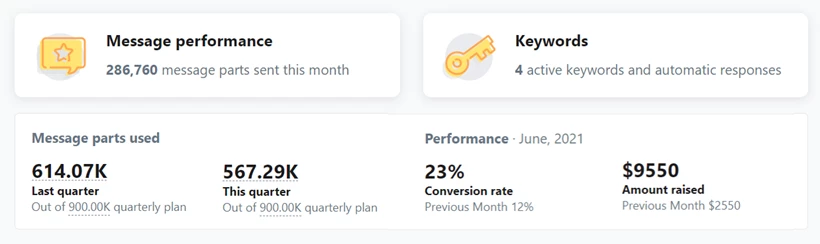
You can also run specialized reports, like:
- Mobile Messaging Performance Report
- Mobile Messaging Opt-In/Out Report
- Mobile Messaging Replies Report