


Best Practices for email deliverability: Optimizing your list
The best way to avoid spam filters and improve email deliverability is to send emails to your most engaged supporters.
You may have a history of positive engagement with your audience. If your domain is new, however, Email Service Providers (ESP) will be less confident in you and you may need to narrow your recipient list until you establish trustworthiness.
Where is the sweet spot for your organization? That depends on how each ESP views you as a sender. Your email domain reputation depends on credit score just like your financial reputation.
The two basic rules for mastering deliverability are:
-
Only send emails people want. Sending messages to contacts who have not opted in as subscribers will result in negative engagement, like unopened email and emails marked as spam. If this happens often enough, your emails may land in the spam folders of most of your recipients.
-
Create a positive feedback loop. Target your most engaged supporters, get positive engagement, and increase inbox placement throughout your list. The more interested supporters see your emails, the more likely they are to engage.

Choosing an opt-in method
Just because someone volunteers for, donates to, or becomes a member of your organization doesn’t mean they want your emails.
All marketing emails, including political and non-profit fundraising emails, must be able to show how and why a recipient opted-in to your mailing list. This supports overall deliverability and the legal requirements of the European Union, Canada, and California.
Opt-in, especially confirmed opt-in, is also a security measure preventing outside actors from compromising your email program and database by injecting low-quality data and email addresses.
There are three types of opt-ins, ordered from most to least secure:
-
Confirmed (Double) Opt-in: Supporters fill out a form sent to their email address, affirming that by clicking the link they agree to receive marketing emails.
-
Explicit (Single) Opt-in: Supporters check a box agreeing to receive marketing emails at a certain address. This process does not, however, verify that the address owner is the same person filling out the form.
-
Tacit (Automatic) Opt-in: Supporters are subscribed to your marketing emails when they take an action, like making a donation or signing a petition. You must indicate that their engagement will result in being subscribed to your list. Like the Explicit Opt-in, this process does not verify that the address owner is the same person filling out the form.
Any of these options are acceptable methods for building your contact list, but Confirmed Opt-In protects the quality of your list.
An opt-in is not needed for transactional emails, such as delivering receipts after a donation or thanking someone for their engagement.
Opting-in through Online Actions Forms
Review the Online Actions forms you’re sharing with your audience. Clarify that by submitting a form they will be added to your email list. State this explicitly in with text at the top and provide the option to opt-out.
In the Build step for your form, enable Yes, sign me up for email updates and make it visible (the eye icon is NOT crossed out). You can choose to have this option checked by default. Your audience can uncheck it before submitting the form.
Opting-in and out through other channels
Your audience can opt in or out of different types of emails with Email Interest Activist Codes, which appear on subscription preferences pages. To set these codes, find Activist Codes on the Sidebar and Add New Activist Code with the type Email Interest. Exclude people with those codes for your next round of outreach.
You can also create Self-Service pages where your supporters can manage this part of their contact record.
Diminishing your reputation with list trades and rentals
Renting or trading your list with another organization can damage your sender reputation irreparably. It also runs counter to your goals of sending emails only to recipients who want them and maintaining a positive feedback loop.
Email addresses that you rent or acquire in a trade are not opted-in and most of those contacts will not want your email. Recipients who do not want your emails will not positively engage with them. Over time, your messages will be marked as spam and, as a result, your engaged supporters will see your emails less and less.
Our Terms of Service prohibit renting and trading lists. Addresses sent from Targeted Email must be known contacts who have opted into your email program. Review the Terms of Service before you complete the Review and Deliver Message step of any draft email.

Understanding Spam Traps
Spam traps are used by anti-spam organizations and email providers to flag senders that mail addresses indiscriminately, who obtain non-opted in emails, and don’t keep clean lists.
Types of spam traps:
-
Pristine spam traps are email addresses created to ensnare spammers. Not used for any other purpose, they can only be added to your list through list trades or unethical sign-ups and indicate to providers that you’re not following best practices.
-
Recycled spam traps are email addresses that were valid at one point. After a period of inactivity, during which they hard bounce, these email addresses are turned back on and used to trap spammers.
-
Typo spam traps are email addresses with misspelled domain names, like gmil.com rather than gmail.com. Your list may include addresses like this because of innocent error, however, when providers see these addresses it signals poor list management.
When you use a traded list, you accept another organization’s list management practices. Sharing your list will increase the amount of email your supporters receive and increase competition for their attention.
If you encounter enough traps of any kind, there are several potential consequences:
-
You will be blocked and your email program shut down, at least temporarily
-
You will be required to remove inactive individuals
-
You will be required to double opt-in your entire list
Identifying interested recipients
You want to be sure that you only send messages to people who have recently expressed interest in receiving your emails. The best active email list targets anyone who has opened your messages in the last 30 to 90 days. Remove inactive addresses as soon as possible.
To assess the interest of new contacts, run a Welcome series for new contacts. Someone who doesn’t engage with this outreach is not likely to engage with your regular emails. Keep recent subscribers who have opened or interacted with the series and automatically remove inactive emails from your list.
If you’ve been sending Targeted Email for at least the last three months, you can identify your recently active contacts and sort them into different groups depending on how long it's been since they opened your messages.
From the Targeted Email Summary page section in Create A List, select Most Recent Open Date, In the range of, Custom - 0 to 30 days ago.
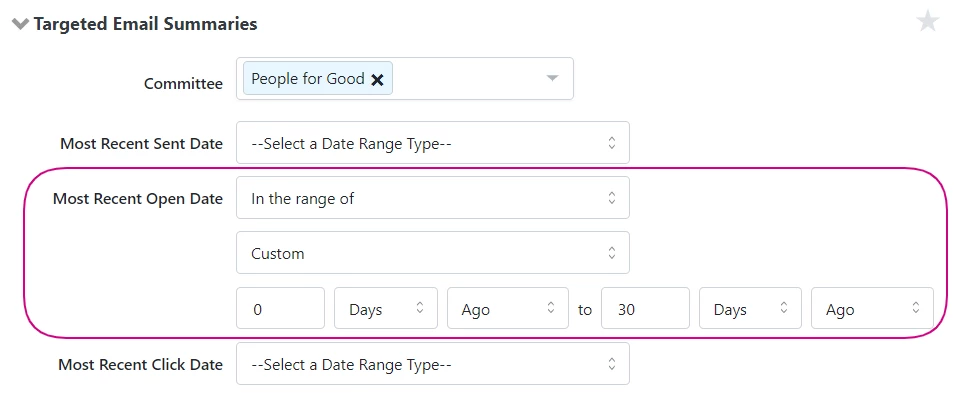
Save that search and then run one for 31-60 days and one for 61-90 days. Save them both.
Before you send your next Targeted Email, create three identical emails, one for each group and schedule them to deliver at 30 minutes intervals. This should provide a fairly accurate idea of how your email performs for each group. Taking these steps can help you identify how long your audience remains engaged before you start to lose them.
If you are new to our toolset, you can identify these same groups in your legacy system and import them using Bulk Upload. Apply Activist Codes to each group as you add them to your records.
Finally, you can maintain a healthy list of interested recipients by eliminating appended and low-scoring addresses. If you’ve invested in gathering appended emails, you may have a few contacts who don’t mind hearing from you. Ask them to opt-in and segment out those who decline. To segment out low-scoring addresses Exclude by Email Score when building an audience in Targeted Email.
As long as you reach out to people as they become less active and attempt to reengage them, you can unsubscribe disengaged contacts without concern and stay focused on growing positive engagement.
For subscribers with flagging interest, tailor your outreach to them, send an email interest survey or invite them to follow you on social media.
And when you are ready to unsubscribe addresses, schedule a Goodbye series. Use Automation to create a message alerting your contacts they'll be removed from your list if they don't opt to remain subscribed by whatever mode you set up.
Monitoring your success
To see how well your efforts are working, run an Email Performance Report. Group the report by Email Domain and sort by the recipient column to see how your email program fares across the major providers, Oath (Yahoo/AOL), Microsoft, and Google. If a particular domain has a lower than average open rate, some element of your email program is sending a red flag to that provider.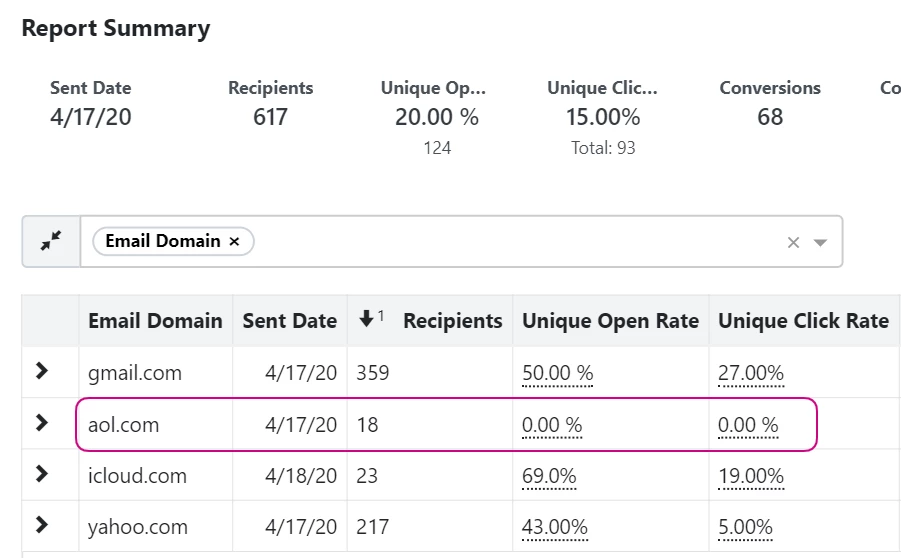
Looking for training?
Explore this feature at your own pace - join a live training session or watch a recorded webinar by clicking the link below.
How do I for email deliverability: optimizing your list? | How does for email deliverability: optimizing your list work in EveryAction? | Why can't I for email deliverability: optimizing your list? | Where do I for email deliverability: optimizing your list in EveryAction? | What is for email deliverability: optimizing your list in EveryAction? | How to for email deliverability: optimizing your list? | Can I for email deliverability: optimizing your list in EveryAction?