



'Activist Codes' are labels applied to contact records used to track groups of individuals or organizations that share interests or specific relationships. Once an Activist Code is applied to a contact record, a person can easily find information related to the code such as group affiliations, subscriptions, licensures, or memberships.
Activist Codes also track donor support making this feature useful in organizing critical information on contact records. Activist Code Reporting is another feature that helps manage code information for quick referencing.
Step 1: Navigate to Activist Codes
- From the homepage, navigate to the left-hand menu. Click Engagement > Tracking & Codes > Activist Codes.
- Or use the Search for a page field and type Activist Codes.
Step 2: Add a new Activist Code
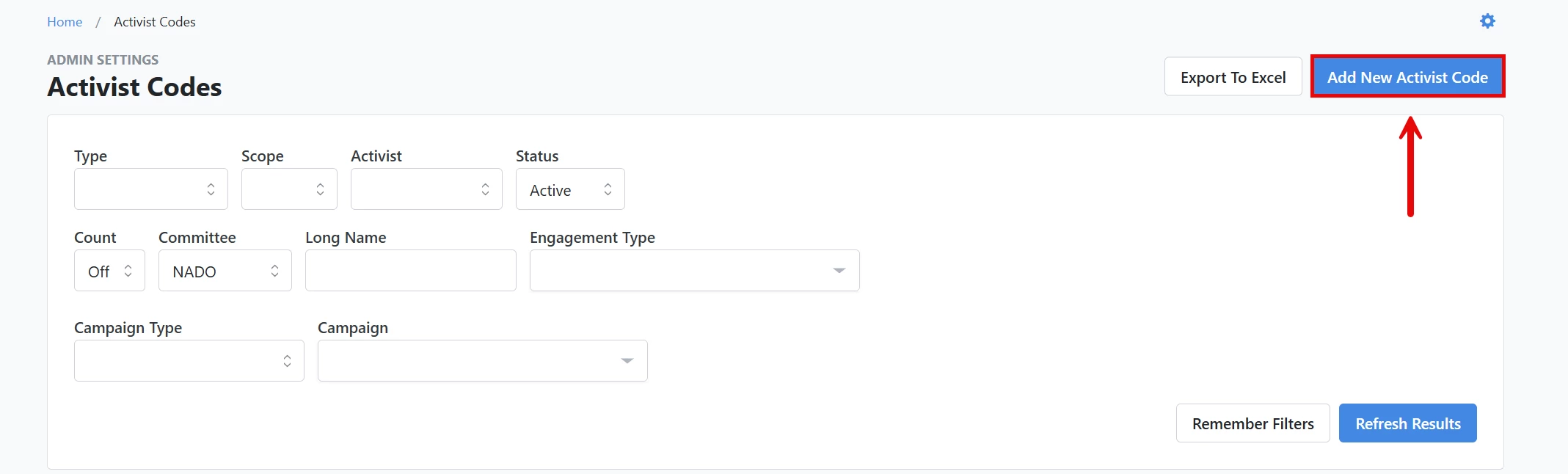
From your 'Activist Codes' list, click the 'Add New Activist Code' button near the upper right corner of the page.
Step 3: Choose your settings
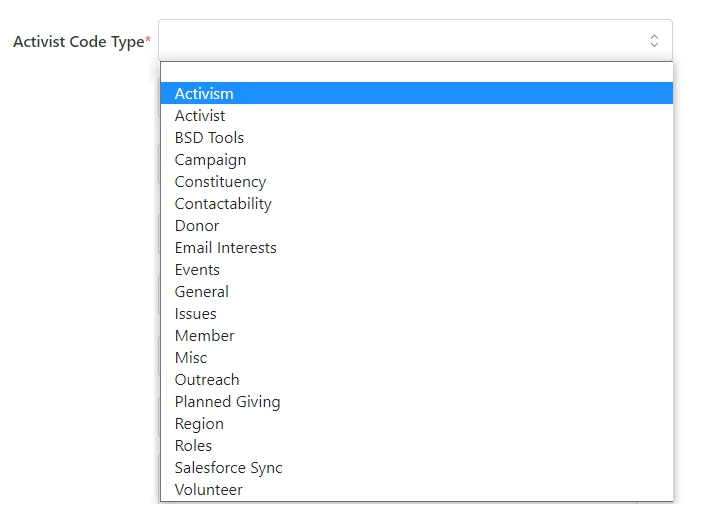
Selecting Activist Code Type
-
Your choices for Activist Codes vary depending on your package and settings.
-
Selecting an 'Activist Code Type' simplifies sorting and managing your Activist Codes. For example, 'Email Interests' is used for subscription purposes. When supporters select unsubscribe in a Targeted Email or update their e-mail on your self-service page, they can opt out of all e-mails or specific lists.
Choosing Naming Conventions
-
The system chooses between Long Name, Medium Name, and Short Name based on the fit of a particular display. It displays the Long Name whenever possible, the Medium Name when space is an issue (such as on Reports and Mobile Devices), and the Short Name when space is limited (such as in column headings on Canvass Results).
Adding a Description
-
The 'Description' field explains details about the Activist Codes and defines what is meant to be understood about the assigned voter. The description can only be viewed on the 'Administration' page.
Applying Script Questions
-
'Script Question' is an optional feature added to the canvasser's walking or calling 'Script' on 'MiniVAN' (or printed 'Report') if the user wants to ask voters questions such as, "Would you be willing to take a yard sign?"
-
If you have access to 'Scripts', you can use Activist Codes to create a Script for a Virtual Phone Bank and response tracking.
Determining Scope
-
'Scope' determines who can view records that have Activist Code assigned to them. This is typically used in organizations that are working with voter files. A public or private Activist Code determines who can view voters who have the Activist Code assigned to them.
-
Applying a public Activist Code to a voter allows every user on the site with access to that voter to see the Activist Code.
-
Applying a private Activist Code to a voter only allows users on the same Committee to see the Activist Code for that voter.
Understanding Activist Settings
-
While these people will have an Activist Code, there is no reason to assume that they are political activists. Thus, "Is Also Activist" distinguishes between people who have this Activist Code and those who are considered true activists on this issue or cause.
-
On the 'Create a List' page, users may select all Activist Codes marked 'Is Also Activist' instead of creating separate lists using the Activist Code picker.
Assigning or Removing Activist Codes
-
'Can be assigned or removed' allows the Activist Code to be assigned or removed from a contact record and is checked by default. There may be instances where removing the ability to add or remove the Activist Code from records after it has been applied, for example, restricting assignment or removal would be appropriate for ballot language requests or party delegates. Un-checking the option after the initial group is set will make the Activist Code available for searching and reporting but not modifiable unless you are an administrator for your committee.
Designating Official Types and District Roles
-
Official Types and District Roles associate the Activist Code with specific types of advanced organizational designations for voters.
Assigning multiple designations
-
Multiple assigned designations are useful in tracking engagement levels, such as when someone makes multiple requests for planned giving information. If you apply the Activist Code when they make a request (through forms, mailers, or direct requests), you will then have a record of their interest level.
-
Multiple assignment used in conjunction with District Roles options enables the assignment of multiple unique districts. For example, this could be used to specify each of the districts a volunteer or staffer is engaged.
Choosing Status
-
'Status' determines the visibility and usage of the Activist Code. By default, Activist Codes default to 'Active'. An 'Archived' Activist Code can still be used in searching, however it will not appear on standard lists. An 'Inactive' Activist Code will no longer appear on the site unless an administrator reactivates it.
Identifying Owner committee
-
The Owner committee records which committees created the Activist Code. In most cases, this will never change and is set to default.
How do I delete an Activist Code?
If you do not see the option to remove an Activist Code, please follow up with your administrator and provide them with the information they will need to remove it on your behalf. Your administrator will likely request the name of the record, the VAN ID, and the Activist Code you would like removed. Users with the correct permissions can also delete Activist Codes in bulk using the 'Bulk Upload' tool.
What else do you need help with?
Navigate back to Understanding Activist Codes.
How do I create activist codes? | How does create activist codes work in EveryAction? | Why can't I create activist codes? | Where do I create activist codes in EveryAction? | What is create activist codes in EveryAction? | How to create activist codes? | Can I create activist codes in EveryAction?