

Solved

Tracking contacts for financial households

  • January 29, 2026
  • 4 replies
  • 24 views

Forum|alt.badge.img

TLDR: We want to create a list of donors who haven’t received contact in a year, but we don’t want that list to include the spouses/partners of people who we have contacted. How do we filter contact status by household rather than by profile?


We’d like to create a list (or pull a report) that would show us who hasn’t gotten personal contact in a year. The basic process seems to be Create a List > Contact Status > Exclude contacts based on relevant results in the past 12 months. That seems to work for individuals. 


Here’s the tricky part: we contact financial households by the household, but only list it under one member (usually the primary donor). Ex: Alice and Mary give together, but Alice is our main donor. We address communications to “Alice and Mary,” but we record the contact on Alice’s profile since she’s primary. Now, when we pull the list of contact statuses, it tells us that Mary has not been contacted this year. 


There’s no filter we’ve applied that will reliably pull “secondary” household members off that list, since some of them also have donations in their name (ex: can’t filter by giving history). But getting a large list and manually looking in each person’s profile to see if their spouse was contacted takes time and seems unnecessary. It seems that there should be a field for “include FHH and/or individuals only” in the contact status menu, but there isn’t. What do you suggest? 
Best answer by Becca

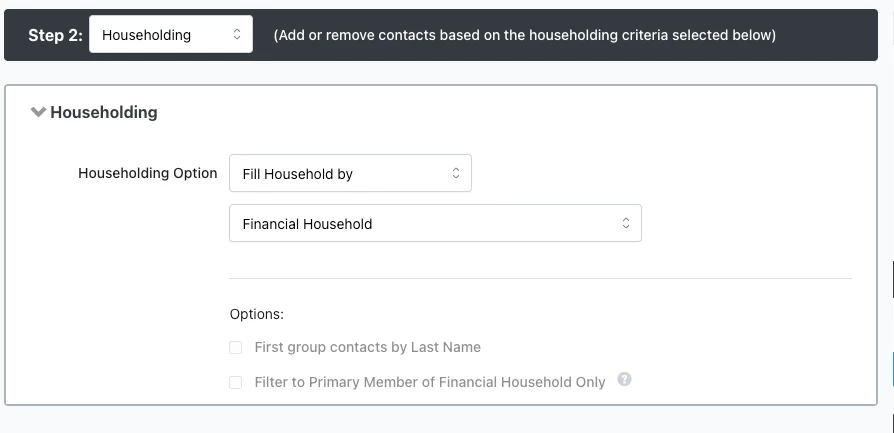
Try this: In Create a List, first run a search for anyone who HAS been contacted in the last year (and within whatever other parameters factor in for you). Then add a step for “Householding”. Next to “Householding Option” select “Fill Household by” and then “Financial Household” (screenshot 1 below). This should generate a list of anyone who was contacted as well as the members of their Financial Household. Save this as a LIST (not a Search - important). 

Then, create a NEW search where you are looking for the contacts who have NOT been contacted in the last year (and within whatever other parameters factor in for you). Then add a step to “Remove Contacts” and under the tile for “My Saved Lists” select your saved list you just created (screenshot 2 below). This should remove anyone who has previously been contacted and members of their household from your results. 

Of course with this method the results won’t be dynamic since it requires the use of a static list. If you need an ongoing list you could explore options with applying Activist Codes or Tags or some other type of code to all members of the household once the primary member has been contacted, but that could generate a lot of code types if you need donor contacts to be tracked annually or even more regularly than that, so that may not be ideal for you.


4 replies

Becca
  • First Timer
  • Answer
  • January 29, 2026

Try this: In Create a List, first run a search for anyone who HAS been contacted in the last year (and within whatever other parameters factor in for you). Then add a step for “Householding”. Next to “Householding Option” select “Fill Household by” and then “Financial Household” (screenshot 1 below). This should generate a list of anyone who was contacted as well as the members of their Financial Household. Save this as a LIST (not a Search - important). 

Then, create a NEW search where you are looking for the contacts who have NOT been contacted in the last year (and within whatever other parameters factor in for you). Then add a step to “Remove Contacts” and under the tile for “My Saved Lists” select your saved list you just created (screenshot 2 below). This should remove anyone who has previously been contacted and members of their household from your results. 

Of course with this method the results won’t be dynamic since it requires the use of a static list. If you need an ongoing list you could explore options with applying Activist Codes or Tags or some other type of code to all members of the household once the primary member has been contacted, but that could generate a lot of code types if you need donor contacts to be tracked annually or even more regularly than that, so that may not be ideal for you.


Forum|alt.badge.img
  • Author
  • First Timer
  • January 29, 2026

Thanks, ​@Becca! I’d still love to see if there’s a more direct way from Bonterra (it seems like it should be a “given”), but that will be great as an intermediate step for occasional static searches. Smart to do it all in reverse!


Paul Kittredge
Forum|alt.badge.img
  • Community Manager
  • January 30, 2026

Hey ​@Lark Valente The dirty little secret of this community forum is that "Bonterra" is just a collection of people who know somewhere between a little and a lot about various aspects of the EveryAction software. I had the pleasure of working with Becca for close to 3 1/2 years - she used to be on the EveryAction Implementations team - and her solution looks pretty good to me. It's possible that there's a cleaner solution out there, but if nothing's forthcoming from another of my colleagues, I'd go with hers.


Forum|alt.badge.img
  • Author
  • First Timer
  • January 30, 2026

@Becca ‘s response is amazing!! I definitely figured you’re an expert on some level. :) I guess I was hoping that “Bonterra” as an entity might consider making this an easy toggle switch if y’all realized that this is a basic need of organizations that isn’t easy to use in the system… and potentially bypass the “submit product feedback” purgatory just a bit... but I suppose that’s my dirty little secret here too. Thank you both for thinking through this.
