


Best Practices: Processing Donations on Mobile Devices
(4 min read)
More than one-third of the people who use online donation forms are on mobile devices. To capture more of these donors, our tools can help you make the donor experience faster and easier.
How we speed up data entry
You can make it easier for mobile users to fill in your forms by selecting Enable Auto-Scroll on Mobile when creating your custom contribution form in Online Actions. Once enabled, anyone on a mobile device who opens your form will automatically be scrolled to the first set of form fields, saving them the trouble of scrolling through additional content before getting to the actionable part of your custom contribution form.
You can select this option from the first step of your form setup.
While the autoscroll option is off by default for embedded forms, you can change this by setting the data-mobile-autofocus option to true in your embed code.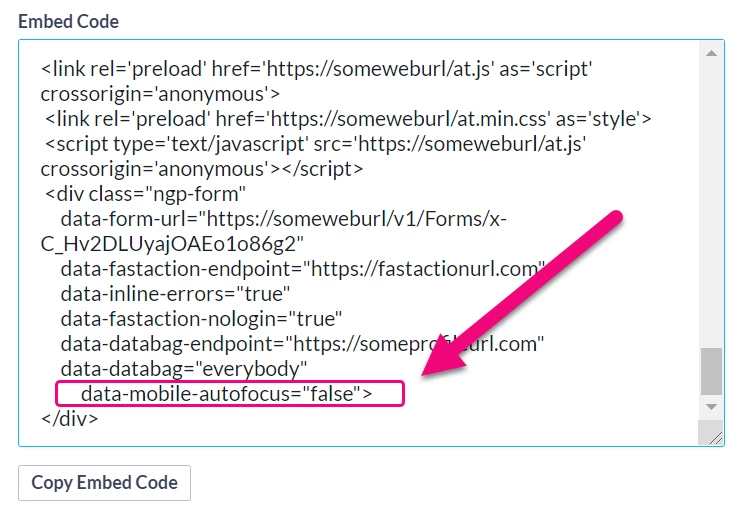
- If FastAction is enabled on the form, the browser will focus on the FastAction menu, allowing your donor to log in, sign up, or log out of FastAction. If the donor is already logged into FastAction, they will see their forms pre-filled with their personal information.
- If FastAction is disabled on the form, the browser will instead focus on the section with the first field requiring input (the numbered steps of a multi-step form or the Contribution Information section of a single-page form). We save the donor extra keystrokes by asking for the Postal Code before the rest of the address since a US Postal Code will pre-fill the City and State.
Faster credit card donations
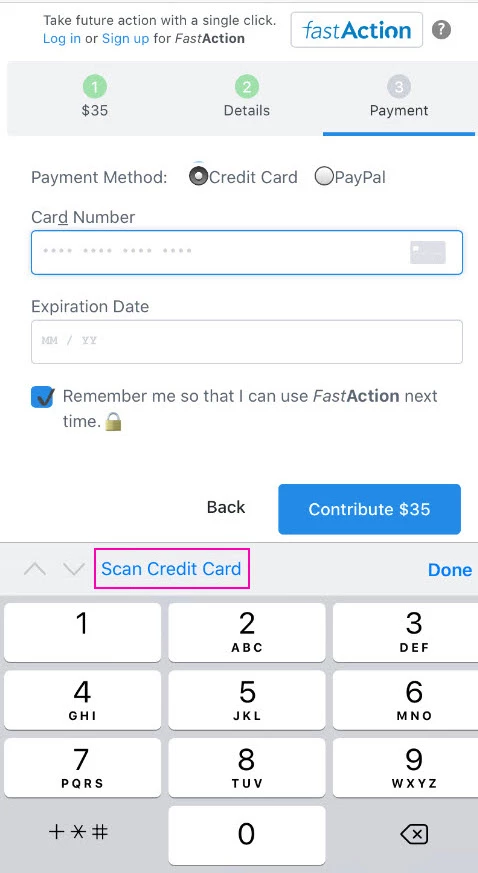
We use a feature available on many mobile devices that allows users to scan their credit card information rather than manually entering the information.
When you click on the Card Number field, donors will see the option to Scan Credit Card. Once selected, the device's camera will turn on and scan the credit card information which will then get pushed to the online form.
Easy payment with Apple Pay and PayPal
Apple Pay and PayPal are designed to make online payments easy for mobile users.
When your donors choose one of these payment methods on your custom contribution form, they can complete their donation in as little as one click, making it as easy as paying for their latte or ordering a new pair of shoes.
Apple Pay and PayPal already store your donor's name and address. When a mobile user views your form, they will be asked to select their payment method as soon as they've entered a donation amount. Their name and address will be added to the form automatically, saving them keystrokes.
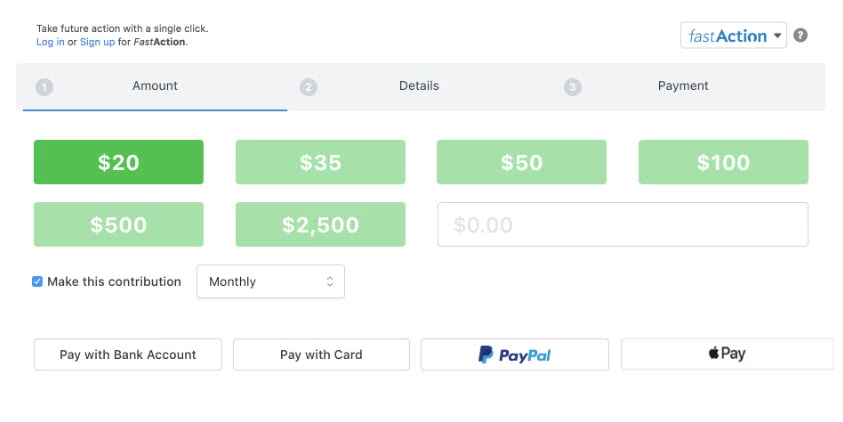
In order to take advantage of the improved workflow for custom contribution forms, you will need to add Apple Pay or PayPal to your account.
Easy payment with Google Pay
If you use NGP VAN Payments or Bonterra Payments, you can enable Google Pay as an additional payment method on your contribution and ticketed event forms. There is no additional setup required — just enable this option on the Basics step of your forms.
Using instant processing to speed up form submission
With our Instant Payment Processing setting enabled, we’ll attempt to process a donor’s gift as soon as they authorize with Apple Pay or PayPal, minimizing the data entry and review they need to do on your form.
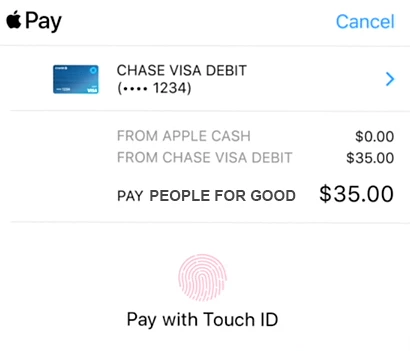
We cannot process the payment until all the required fields are populated. So, if your donor still needs to fill in some of the fields, their payment will not go through immediately. They will be returned to the form to finish filling in the required information. Also, if you offer Premiums and your donor selects one, we will direct them back to the form to complete their premium fulfillment details rather than process their gift instantly.
Instant Payment Processing is enabled on all forms with Apple Pay and/or PayPal by default, though it can be disabled if you prefer. As a best practice to improve your conversions, we recommend that you leave Instant Payment Processing enabled and then set up a secondary ask form with any optional information you want to collect from your donors. By keeping the initial custom contribution form as simple as possible, donors will be able to give more quickly. You can then request that they enter more information on your second form, without jeopardizing the conversion of their gift.
Using Kiosk Mode on mobile devices at public events
If you want to use a mobile device to help you process contributions at a public event, Kiosk Mode is a handy way to prevent your forms from auto-filling information from previous form submissions (via FastAction). Each time the page is refreshed, no previous data will appear on the form.
You can enable kiosk mode for any online page by simply adding the query string “kiosk=true” to your form’s URL.
For example: https://secure.ngpvan.com/formidentificationnumber
Becomes: https://secure.ngpvan.com/formidentificationnumber?kiosk=true
Not quite what you were searching for?
- Navigate back to the Fundraising Best Practices Resource Index.
How do I processing donations on mobile devices? | How does donations on mobile devices work in EveryAction? | Why can't I processing donations on mobile devices? | Where do I processing donations on mobile devices in EveryAction? | What is donations on mobile devices in EveryAction? | How to processing donations on mobile devices? | Can I processing donations on mobile devices in EveryAction?