



Mastercard has specific requirements for any business or organization that offers recurring billing to provide donors with clear purchase information and easy, online cancelation options. Organizations that process recurring gifts are required to provide all recurring donors with the following:
-
Confirmation for the amount and frequency for a recurring gift on the payment screen where the gift is being made
-
Confirmation email after each charge, including when first gift is created, that states the amount, frequency, and gift cancelation details
-
Ability to cancel a recurring gift online
-
Email reminders in advance of a charge for gifts billed only once or twice annually
These requirements are best practices and we recommend that you set up processes for all recurring donors, not just those giving via Mastercard.
How can donors confirm the details of their gift before finalizing it?
When a donor submits their gift, they must be able to confirm their payment information and the details of their gift in one place. Our Submit button includes merge fields for gift amount and frequency by default. It shows the donor what they are giving right after entering their payment information and before submitting.
What must be included in confirmation emails for recurring gifts?
A donor must receive a confirmation email that includes the gift amount, frequency, and details on how to cancel the gift. When you set up recurring gifts for donors, our default confirmation email includes the gift amount, frequency, and end date.
Donors must also be able to cancel their recurring gifts online. Information about how to cancel gifts should be provided in the confirmation emails sent after each gift charged. To allow donors to cancel their gifts online, we recommend setting up a self-service page that provides instructions and the ability to cancel.
How to: Create Self-Service pages
When do donation reminders need to be sent?
A donation reminder is an email that must be sent to notify donors 3-7 days before a charge is made to their credit card for any recurring gift that occurs once or twice a year. Donation reminders can be set up using an automation that links to a self-service page with information about what will be billed and how to cancel it.
To set up an automation, you will first need to create a search in Create a List that targets anyone with a Yearly or Twice a Year recurring commitment that is set to charge in the next 3-7 days.
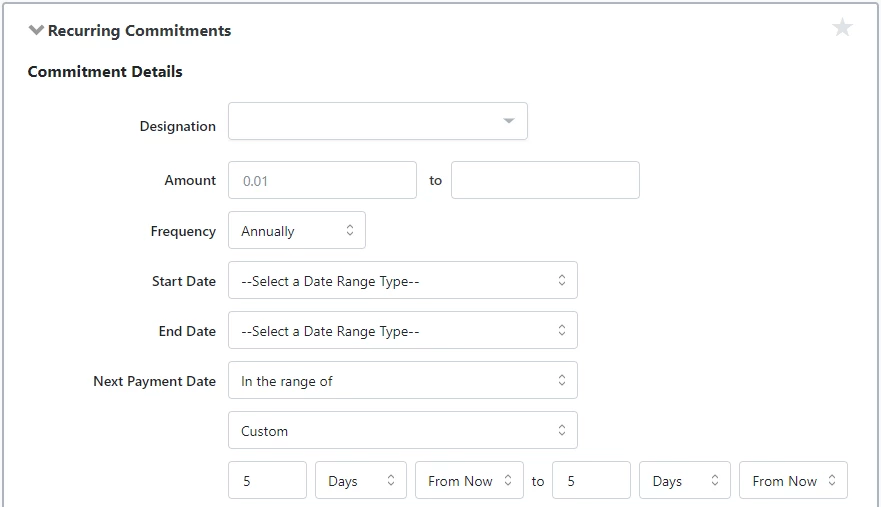
With your criteria in place, you can create an automation that will remind donors of the upcoming charge before it is due and a self-service page that provides details about the gift and the ability to cancel.
When do recurring gift email confirmations need to be sent?
A recurring gift confirmation is an email that must be sent to donors after each time their credit card is charged for a gift, including the first charge.
For recurring gifts set up through one of our forms, this can be done with a checkbox when setting up the form. This box should be checked by default. Checking this box will apply for existing recurring commitments as well as new ones.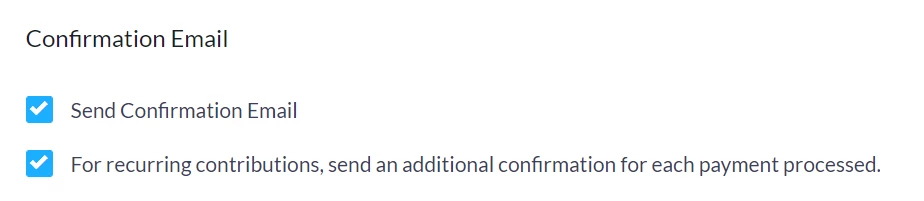
For recurring gifts set up in-app, this should be done with an automation that includes a link to a self-service page with details about the gift and cancelation instruction.