



(5 min read)
As more email providers move towards stricter privacy standards for their users, there is a change happening in email open rates as measured with traditional methods. It’s important to understand how email open rates are calculated in our system so you can adjust your tracking and reporting to get a better picture of how well your email program is really doing.
Understanding conventional email tracking
Like most broadcast email providers, we help you track your deliverability by embedding an open tracking image (sometimes called a tracking pixel) in your messages to let you know when and where your email was opened. An Open is recorded when the message is opened and the tracking image is downloaded from our server.
Accurately recording these Opens can be complicated by email programs that:
-
suppress images by default and never load your tracking pixel even if the text of the message was opened
-
pre-load all images even before the mail is opened, registering your tracking pixel as opened even if the message was never seen
For this reason, it’s important to understand that the Open rate you receive on your sent mail is just one metric available for you to track, but it may not always be the best indicator of how well your email program is doing.
Understanding Apple Mail’s privacy protection
Anyone using the Apple Mail application (available on both their mobile devices and laptops) has the choice to opt-in or out of their Mail Privacy Protection program. For those who opt-in, Apple pre-loads and caches all images in emails, effectively registering every email as an Open to senders.
According to the 2021 SparkPost Email Benchmarks Report, Apple Mail users account for as much as 38% of the email market share. This means that Apple’s policies create a high number of false-positive Opens for your program. The Date of Last Open recorded for each of these contacts in your database is also an unreliable criterion for your searches.
Tracking machine opens
Because the Apple Mail application can be used with any email address, it is not possible to segment out specific domain names to exclude from your Open data. Instead, we have separate measurements we track that will help you sort out which messages are actually opened by a person:
-
Open Count and Rate: These are your most important metrics since they will only count opens by actual people.
-
Anyone who was part of a machine open will not be included in these counts/rates unless they later open your message on a different device or platform that does not have a privacy policy in place.
-
While these rates are most likely an undercount of your total overall opens, it is the best measurement to use for test case comparisons and to monitor overall changes in your outreach.
-
-
Machine Opens Count and Rate: These metrics are available for searching and reports and can tell you how many of your email messages were automatically downloaded and marked as opened by a machine or device.
-
Since these devices always download every image even before they are opened, you will not know whether the recipient actually opened your message and read it.
-
These metrics can be used to help you find people who may not be reading your emails and who you might want to include in your outreach via other channels.
-
-
Total Open Count and Rate: The totals will combine both the machine open and the regular open rates to give you an overall open rate. Use this with caution, since including machine open rates will artificially inflate your overall open rate.
Viewing open rates in Targeted Email
The best place to see the open rates that were tracked is from the results page for each email you send. In Targeted Email, select the result link from the action dropdown menu.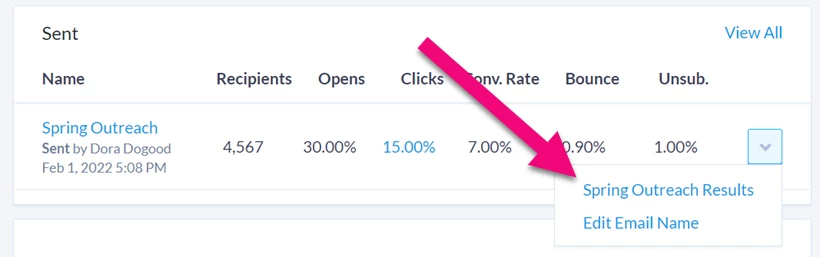
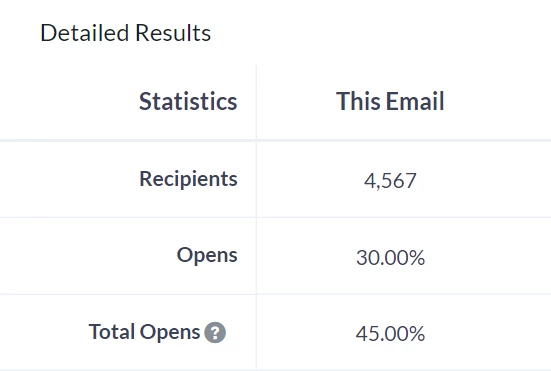
On the results page, you’ll see the Open Count and Open Rate that can help you track how many people actually opened your message. You’ll also see the Total Opens rate, which combines both your regular open rate and your machine open rate.
Using open rates in searching
You can use both the machine open rate and the regular open rate as criteria for creating a list. This might be particularly useful, for example, if you are running a multi-channel campaign and you want to be sure that your message is being seen by anyone who is part of the machine open segment - since you can’t be sure whether they actually opened your email message.
To search on the type of open, you can use the Targeted Email Summaries section in Create a List.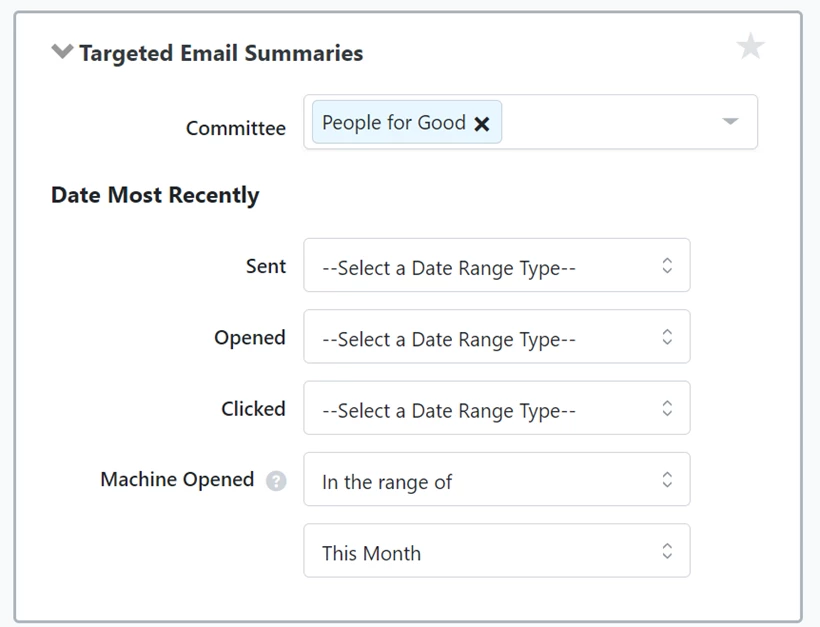
Adding open rates to reports
You can add columns to both the Email Comparison report and the Email Test Case Comparison report that will help you see the difference in open rates for each email.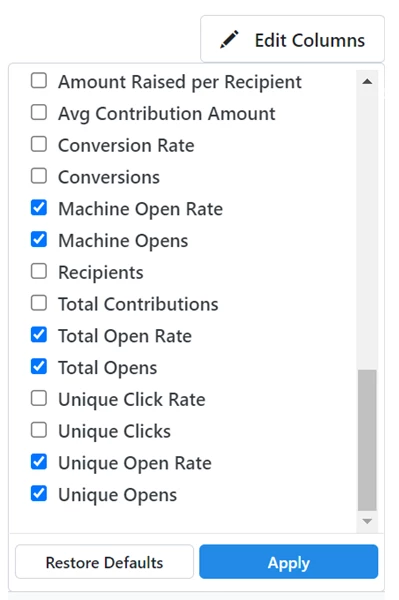
Improving your program’s metrics
While email Opens have traditionally been one measurement of supporter engagement, the ultimate goal of most programs is conversions - donations, signups, and so on. Focusing less on opens and more on conversions - while ensuring your email is wanted by your recipients - can help make sure you’re meeting your goals. You should also focus on improving your multi-channel outreach to your supporters or donors.
If you are using the Open metric in the following features, you should instead consider focusing on Clicks or Conversions for:
-
setting starting points or decisions in your Automations
-
choosing a winner in your A/B testing
-
reporting and list segmentation
-
determining Engagement points
The best thing you can do for your email program is to make sure you are sending engaging emails that are wanted by your supporters. We encourage you to continue practicing good acquisition strategies and list management techniques, including:
-
Using Confirmed Opt-in to ensure only engaged supporters are added to your list
-
Making the email list opt-in checkbox visible on all your Online Actions forms but not pre-checking it. This ensures your supporters are actively opting in to your email program.
-
Employing Welcome series and Surveys to understand how, how often, and on what topics your users wanted to be engaged on
-
Connecting with supporters using other channels like SMS, Facebook Ads, and direct mail