


How to: Use My Activists
(2 min read)
With My Activists, you can easily share non-Voter File contact records between data-sharing committees by tagging the records and assigning committee access.
If you are part of the national organization or main committee, you can:
-
share access to your database by selecting records to tag and explicitly share with each affiliate organization
-
have access to all contacts added by affiliate organizations
If you are part of an affiliate organization or subordinate committee, you can:
-
search on the contacts that have been explicitly shared with you and include them in your outreach efforts
-
use Quick Look Up to find additional contact records within the main committee and tag them as My Activists to include in your lists
-
add new contacts to the database that will be immediately accessible to the national organization
Once you’ve tagged a record to include in My Activist, shared data fields like addresses, phone numbers, public Activist Codes, and Survey Questions will be visible for all the committees in the data-sharing arrangement. Private data fields, such as emails, private Activist Codes, and Survey Questions will remain private to the appropriate committee, even if a My Activist association is made.
If you are part of an affiliate organization that needs access to search on contacts across the network, you can speak with your account administrator about obtaining a special override security permission to Search Outside My Activists.
Automatically tagging contact records
Contacts are automatically tagged with My Activist for your committee:
-
when you copy over voters into your database (either in a one-off or bulk job)
-
whenever you manually add new contacts (that is, create a single new record without copying over someone from the Voter File)
-
when you bulk upload new contacts
Manually tagging contact records
There are a few ways to manually tag contact records for sharing with the My Activist flag.
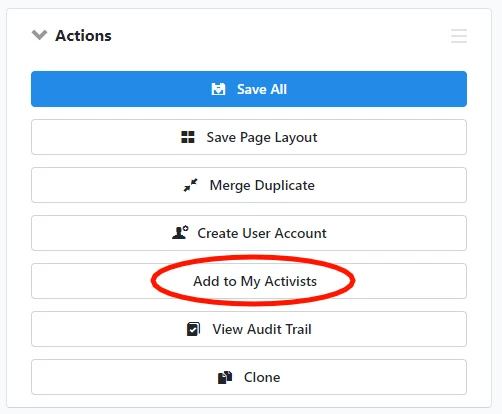
The first method is to search for an individual record using Quick Look Up. Under the Actions section of the contact details, you will see the option to Add to My Activists or Remove from My Activists.
The second way is to use the Bulk Upload Wizard to mark My Activist in bulk for a group of contacts. If you have access to more than one committee in your data-sharing setup, you can select which committee to add them to from the dropdown.
Read more about updating records using Bulk Uploader and Bulk Apply
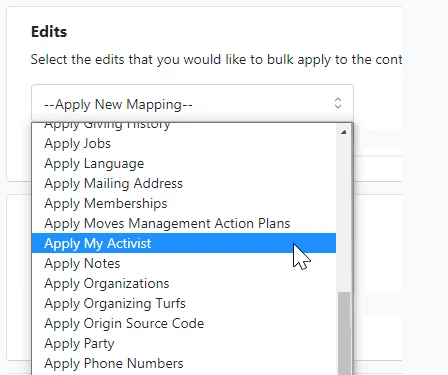
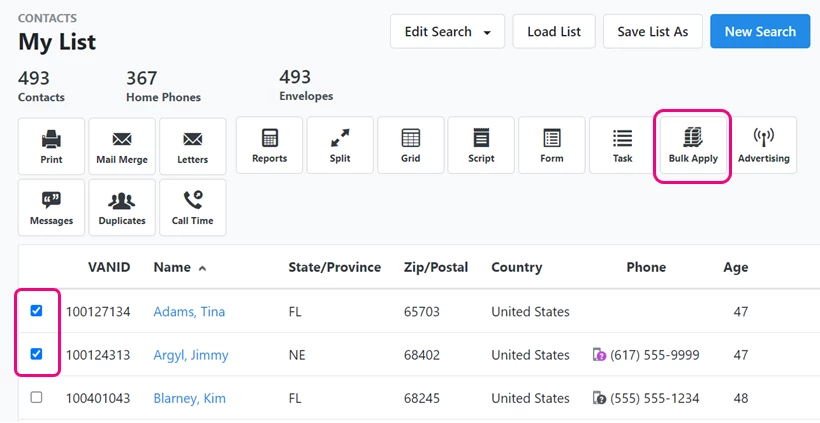
Finally, if you are on the national or main committee, you can Create a List and then tag contacts in your list as My Activists for any one of your subordinate committees by using Bulk Apply > Apply New Mapping > Apply My Activist.
Searching for My Activist contacts
In Create a List, you can use the My Activist section to find the contacts assigned to your committees.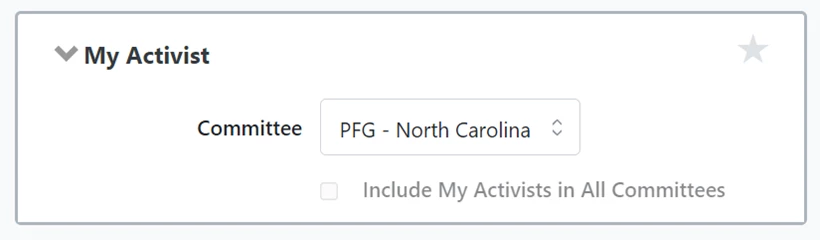
How do I how to: use my activists? | How does how to: use my activists work in EveryAction? | Why can't I how to: use my activists? | Where do I how to: use my activists in EveryAction? | What is how to: use my activists in EveryAction? | How to how to: use my activists? | Can I how to: use my activists in EveryAction?