


How to: View form submission history on a contact record
Use the Online Forms section on a person's contact record to view their form submission history. This section will display one row per form submission.
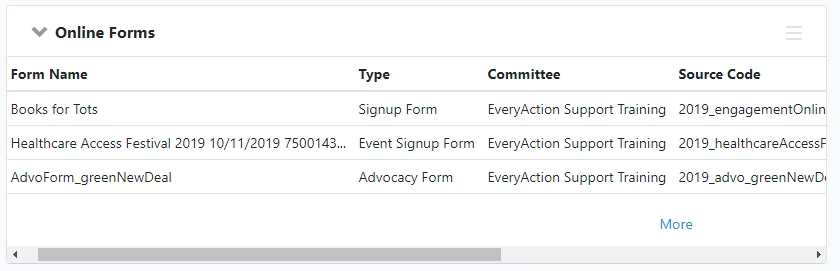
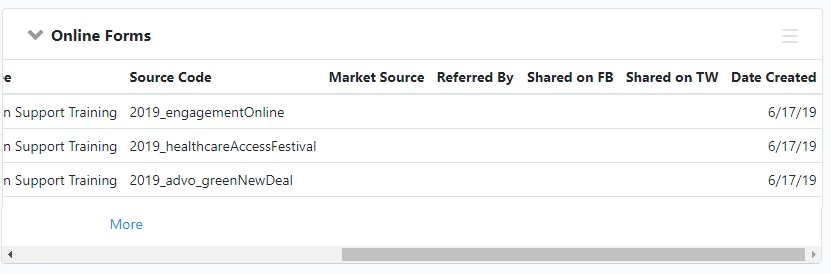
You will see the following columns in the Online Forms page section.
-
Form Name: The name of the form submitted.
-
Type: The type of the form submitted, such as Signup or Contribution.
-
Committee: The committee that created the form. Many organizations only have one committee; if that's the case, this value will always be the same.
-
Source Code: The Source Code is associated with the form submission. Source Codes are used to track unique efforts, and can be automatically associated with a form under Track Your Efforts on the Basics settings, or using querystrings.
-
Market Source: The Market Source Code can be used to indicate the marketing channel that advertised the link. You must have entered a value for Market Source Code under the Show Facebook Share Button and Show Twitter Share Button options in the Confirmation Page settings of the form, or use querystrings.
-
Referred By: The name of another contact who shared the form link on social media, and brought in the form submission of this contact record as a result. Referrer Tracking can be enabled on forms once Show Facebook Share Button or Show Twitter Share Button is enabled.
-
Shared on FB: Whether someone clicked on the Facebook share button after submitting the form. You must have enabled Show Facebook Share Button in the Confirmation Page settings of the form, and chosen to redirect supporters to a Thank You Page after submitting the form.
-
Shared on Twitter: Whether someone clicked on the Twitter share button after submitting the form. You must have enabled Show Twitter Share Button in the Confirmation Page settings of the form, and chosen to redirect supporters to a Thank You Page after submitting the form.
-
Date Created: The date of the form submission.
How do I how to: view form submission history on a contact record? | How does how to: view form submission history on a contact record work in EveryAction? | Why can't I how to: view form submission history on a contact record? | Where do I how to: view form submission history on a contact record in EveryAction? | What is how to: view form submission history on a contact record in EveryAction? | How to how to: view form submission history on a contact record? | Can I how to: view form submission history on a contact record in EveryAction?