


How to: Manage your voter registration program
(6 min read)
Our Voter Registration feature allows you to enter records into the Voter Reg tab and see how successful your voter registration efforts are.
Read more on loading voter registration applicants
How matching works
Records committed from a Voter Reg batch are pushed to My Voters on a nightly basis. Where a match cannot be made, a new record is created in My Voters.
Keep in mind that batches must be committed in order for match information to return and for records to be added to My Voters. We recommend committing your batches regularly.
Voter Reg records must have the following in order to be pushed:
-
First Name
-
Last Name
-
Address (with street number and name)
-
Zipcode (5 digits)
Voter Registration Type
When you set the batch status to Committed, it will be run against the voter file in an overnight process. The system will apply one of the following Voter Registration Types, depending on whether and how a match was made:
-
Registration Pending: People who have yet to match to a record on the voter file but have at least First Name, Last Name, Street Number, Street Name, Zip Code, and DOB. These records are added to My Voters because as someone who is running your voter registration program, you may have a better sense of whether your applicants are likely registered before the state voter file update is available. You must have Search and View Applicant Status in order to search on this information.
-
New Registered Voter: Records in Voter Reg who after a voter file update are now able to be matched to a record in My Voters. These are people who were not previously registered in the state. Consider these folks net new voters – an expanded electorate.
-
Moved Voter Pending: People in Voter Reg who matched to a record in My Voters based on name, phone number, date of birth, or the like but who have a different address than what is currently on the voter file. These are people who were registered in the state but may have moved. It’s possible that they registered recently enough that the next voter file update will match the address they provided, at which point their status will change to Moved Voter. It’s also possible that they are not registered at their current address.
-
Moved Voter: Records that previously had a status of Moved Pending Voters and matched by address in a later voter file update. This means that the address collected in your voter registration efforts now matches the voter file.
-
Existing Voter: People in Voter Reg who matched to an existing record on the voter file in My Voters. Sometimes during Voter Reg programs, people are “re-registered” using the same information that is already on file. This status indicates that there has been no change from the record that already existed in My Voters.
-
Not Enough Information: These are the records that we were not added to My Voters due to missing information. Records can be rejected if they are missing First Name, Last Name, Street Number, Street Name, Zip Code, or DOB.
Because this is an overnight process, the Voter Registration Type will not be available until the morning after the batch status was set to Committed.
Once the process is run, the system will update the status to Processed.
Keep in mind that the system will update the following statuses when a record is matched to My Voters:
-
Registration Pending > New Registered Voter
-
Moved Voter Pending > Moved Voter
Viewing voter registration information on contact records
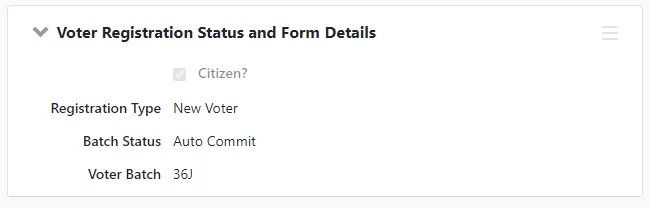
There are two voter registration page sections in the All Details contact record view that you can view in Voter Reg and My Voters. The Voter Registration Status and Form Details contains Registration Type, Batch Status, and Voter Batch.
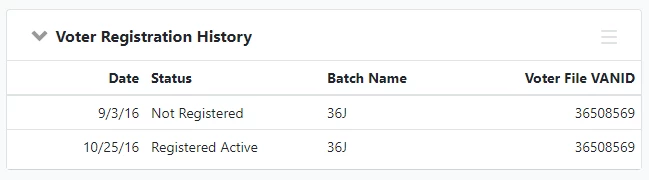
The Voter Registration History section shows the date, status, and batch. If they have been pushed over to My Voters, it will also display Voter File VAN ID In My Voters, the page section shows Voter Registration VAN ID instead.
Searching on voter registration information
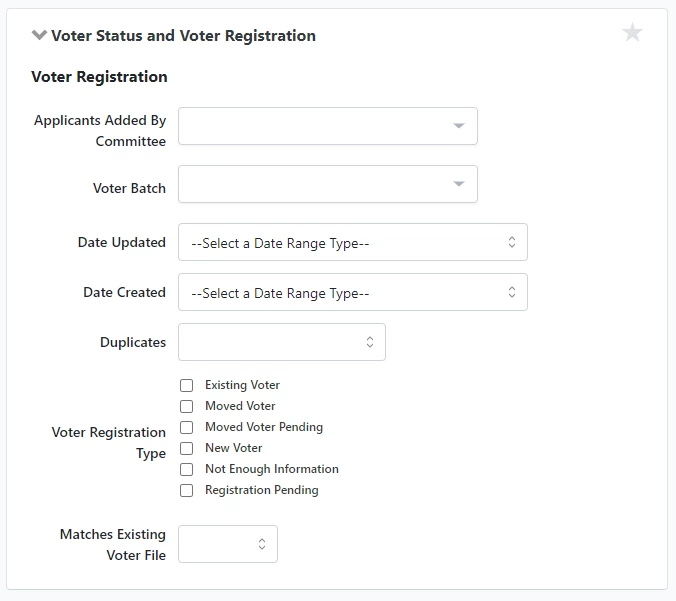
You can use the Voter Status and Voter Registration section to create a list of people based on voter registration. There are some differences when searching from My Voters than from Voter Reg.
Searching from Voter Reg
Voter Status and Voter Registration in Voter Reg has the following fields:
-
Applicants Added By Committee: Allows you to narrow results entered by committees that you have access to.
-
Date Updated: Allows you to narrow results based on when the records were last updated.
-
Date Created: Allows you to narrow results based on when the records were first created.
-
Duplicates: Choose between Exclude Duplicates or Duplicate Records Only
-
Voter Registration Type: Check one or more of the following -
-
Existing Voter
-
Moved Voter
-
Moved Voter Pending
-
New Voter
-
Not Enough Information
-
Registration Pending
-
-
Matches Existing Voter File: This will be Yes or No.
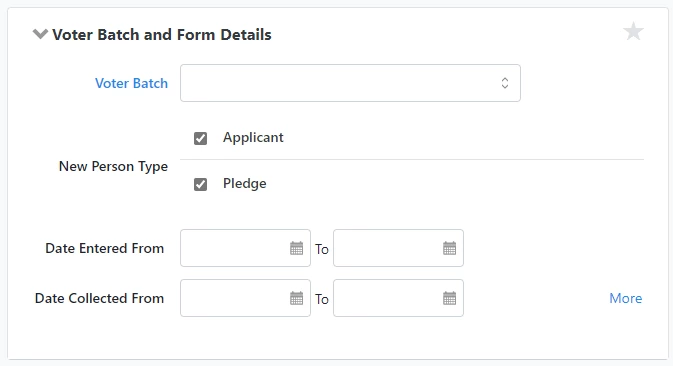
Voter Batch and Form Details allows you to search for records based on the batch they were in, whether they were an Applicant or a Pledge, and when the batch information was entered and collected.
Searching from My Voters
Voter Status and Voter Registration in My Voters has the same fields as in Voter Reg, as well as Voter Status. Once a record in Voter Reg has been run against records in My Voters, Voter Status will indicate whether the person is Active, Inactive, or Unregistered.
Reporting on voter registration
There are three reports in Voter Registration:
-
Voter Registration Status Report: See where different segments of your voter registration applicants are in the registration process. The report consists of records that matched to My Voters. Group by columns to get detailed views of registrants. For example, group by location to see how registrations collected at different locations compare to each other.
-
Registration Pending Report: This report is designed to give you insight into how long your applicants have been “pending” and have yet to officially show up on the respective state voter file. It shows people who with the status of Registration Pending and Moved Voter Pending. The Registration Pending Report can also be used as a tool to identify and combat voter suppression. By filtering and grouping by different district and self-reported demographic data, you can identify patterns to see if any particular subsets of voters are lingering in a pending status and follow-up.
-
Not Enough Information Report: Sometimes records collected as part of a voter registration program are incomplete. If incomplete records are in a committed Voter Registration Batch, the system will not be able to match or create a registration pending record in My Voters. This report provides insight into the reasons why incomplete records were not added to My Voters.
How do I how to: manage your voter registration program? | How does how to: manage your voter registration program work in EveryAction? | Why can't I how to: manage your voter registration program? | Where do I how to: manage your voter registration program in EveryAction? | What is how to: manage your voter registration program in EveryAction? | How to how to: manage your voter registration program? | Can I how to: manage your voter registration program in EveryAction?