



Anyone who submits one of your Online Actions forms with the Email Signup checkbox checked will be automatically added to your email lists. But you may find that some of these contacts were never actively interested in hearing more from you.
Read more on managing email subscriptions
Confirmed Opt-In, also known as Double Opt-In, can help you refine and enhance the engagement level of your email list. When you use a Confirmed Opt-In, you take the extra step of asking your supporter to confirm their subscription by sending them a Subscription Confirmation email. Only after responding to your email will their Confirmation status be changed to Subscribed.
When you use a Confirmed Opt-In, you can make sure you are only adding the most engaged supporters to your lists.
Why use Confirmed Opt-In?
Confirmed Opt-In helps you get better results by focusing your communication efforts and letting you take advantage of:
- Higher engagement: When supporters opt-in, you are getting more attentive and engaged supporters, increasing the likelihood that they will continue to open and click on your messages.
- Expressing consent: Consent that relies on implied opt-in can lead to problems. It's very important that subscriber consent is expressly stated and not hidden. Confirmed Opt-In allows you to show evidence of consent, so you will not fall foul of laws like the EU's General Data Protection Regulation or the Canada Anti-Spam Law.
- Protecting sender reputation: Confirmed subscribers are less likely to report your emails as spam, which can protect your sender reputation and email deliverability. In addition, you can easily filter out mistyped email addresses or email addresses that have no intention of being on a list, because the mistyped email address will not be confirmed.
Read more on optimizing your email list
Adding Confirmed Opt-In
Confirmed Opt-In is easy to add to your Online Actions forms. When a supporter takes action using a form with the Confirmed Opt-in option enabled, they will receive a Subscription Confirmation email with a link they can use to verify whether or not they would like to be subscribed to your organization’s future emails.
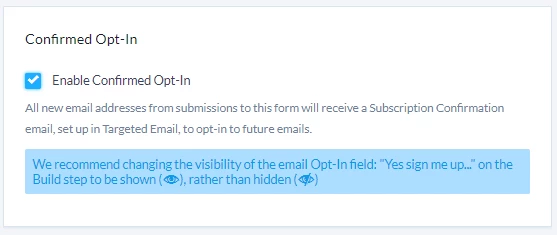
If your supporters Confirm that they want to be subscribed, then you know they are ready to hear more from you and are likely to continue engaging with your organization.
Read more on setting up Confirmed Opt-In
Managing and tracking Confirmed Opt-In statuses
We make it easy for you to manage and report on your Confirmed Opt-Ins. Using our tools, your contacts can update their subscription status themselves if you:
- Add the Confirmed Opt-In option to your Online Actions forms
- Create a Self-Service page that will give supporters the ability to manage their own subscription status
Read more on resubscribing email addresses
You can also:
- Manually update the Confirmation status
- Bulk Apply a Confirmation status to a list of contacts
If you want to track the Confirmation status for your contacts, you can use the Email Address Status Report to see the status of all of your contacts. To see a summary of how many contacts are in each status, use Group By to choose Subscription Status and Confirmation Status as filters.
Read more on managing Confirmation statuses
Looking for training?
Explore this feature at your own pace - join a live training session or watch a recorded webinar by clicking the link below.