


Best Practices for email deliverability: Improving your reputation
Some reports say that 30% of all email is sent to spam. Email providers like Oath (Yahoo/AOL), Microsoft, and Google all have their own proprietary algorithms designed to send unwanted and unauthenticated emails to spam. To pass these algorithms, your goal as a sender is to make sure every email you send is wanted by the recipient and correctly authenticated by your organization. This will separate you from the spammers, and show email providers that you are a legitimate sender.
There are some basic best practices you can use to keep your sender reputation high and ensure deliverability, engagement, and success. They're so important that we require many of them in your Terms of Service.
Send from your business email address
You can make sure that you protect your reputation as a sender by ALWAYS using a legitimate and purchased domain owned by your organization and not a free email address like @gmail.com or @hotmail.com.
Not only is it less professional to use free email addresses such as AOL, Gmail, Hotmail, and Yahoo in bulk email sends, but there are specific rules in some anti-spam systems and security issues that will flag such emails as spam. Gmail knows when you're not sending a message from their system and it will treat all your messages as spam if you use a Gmail domain address (@gmail.com) for the From and Reply-To fields in any bulk email tool.
You should always send from the same domain in order to create a domain history that is consistent and credible. Think of it like a credit score; the longer a domain exists and sends wanted email (ie pays bills on time), the more email providers will trust messages sent from that domain. Email provider algorithms are always looking for consistency and anything inconsistent will increase your chances of ending up in spam. If you just set up a new domain and you’re worried about how to prove you’re a good sender, read Best Practices for email deliverability: Warming up your email domain
Whenever you create a message in Targeted Email, be sure to use an email with your organization's domain in the From and Reply-To fields. This should be a domain that you own.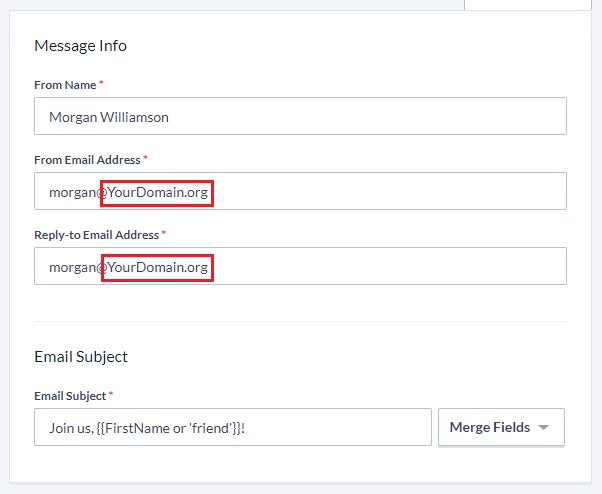
Send from an email that exists and receives emails
Email is a two-way conversation and email addresses used for From and Reply-To must exist and must accept email – which means you should avoid using a noreply@ email addresses. Replies should be regularly read and acted upon, as many email providers use responses from the email address as a sign of a well-intentioned sender. Many individuals will respond with requests such as being removed from a list, updating their email address, or being away from email for extended periods of time. Using a legitimate email address is important because not doing so can cause major deliverability issues and blacklisting by email providers.
Checking email replies can sometimes lead to fundraising and volunteer opportunities when people ask questions about your organization.
Even scanning through autoresponders is a good idea. In some cases, your recipient may no longer be using that email address and you can unsubscribe it. (If an email address does not exist, it will bounce and it will automatically be marked as Unsubscribed so it will no longer receive Targeted Email.)
Give us permission to send on your behalf
The most important step to ensure deliverability using Targeted Email is to give us permission to use each of the domains that you plan to use for sending messages. The domain is the identifier that usually comes after the @ sign in your sending address, such as yourorganization.org.
You can authenticate us for each of your email domains by adding us to your SPF and DKIM records.
- SPF (Sender Policy Framework) is a generic approval you can add as a record to your domain to approve certain mail servers to send on your behalf.
- DKIM (DomainKeys Identified Mail) is a digital signature at the top of every email sent that’s used to verify the email sent using your domain is an approved message.
You'll only need to go through the setup process once for each domain but it can require some technical know-how to implement. If this is new for you, that’s okay! All you need to do is copy and paste the below (replacing yourorganizationsdomain.org with your own domain) and send it to your IT team (or whoever manages your website or email server) and they should be able to handle it from there.
For complete instructions on how to set up these records, read Configuring my DKIM or SPF for Email Deliverability.
Once you have created SPF and DKIM records, make sure that all emails you send come from the same domain for which you created the records.
If you have any problems with the above steps or want to see if everything worked, read Troubleshooting SPF/DKIM setups for more help.
In Targeted Email, we provide our own checking tool that will tell you whether or not your SPF/DKIM values are correct. If you’ve ensured your SPF/DKIM records are properly configured but still have a failure message, try deleting the last character of the from email address (yourorganizationsdomain.org), save the email draft, add the last character back, and save again. This will force Targeted Email to check again and if everything’s good you should not see any warnings.
How do I for email deliverability: improving your reputation? | How does for email deliverability: improving your reputation work in EveryAction? | Why can't I for email deliverability: improving your reputation? | Where do I for email deliverability: improving your reputation in EveryAction? | What is for email deliverability: improving your reputation in EveryAction? | How to for email deliverability: improving your reputation? | Can I for email deliverability: improving your reputation in EveryAction?