


'Engagement Points' allows you to track how engaged your supporters are with your organization and provides a quantifiable way to gain better insight into the success of your engagement efforts over time.
Engagement Points are assigned based on your supporter's actions in Engagement Types such as contributions, form submissions, or event participation. You can use the system's default Engagement Types or create custom Engagement Types and decide how many points to assign for each action. You can link them to Activist Codes, Master Survey Questions, Event Roles, Contributions, and Form submissions.
Understanding Engagement Points
In the example below, points were previously assigned to a mix of system-generated Engagement Types and custom types. More points were given to people who took time out of their day to volunteer for the organization. Fewer points were given to individuals who contributed or expressed interest in volunteering or attending an event. The least amount of points were assigned to those who filled out a Petition or Signup Form.
| Volunteered | 50 points | applied to anyone marked with the Activist Code for Volunteered |
| Volunteer Form | 20 points | applied to anyone who submits a volunteer signup form |
| Advocacy Form | 15 points | applied to anyone submitting an advocacy form |
| Contact Contribution | 15 points | applied to anyone making a contribution that is marked as settled |
| Event Signup Form | 15 points | applied to anyone submitting an event signup |
| Ticketed Event Form | 15 points | applied to anyone signing up to a ticketed event using an online form |
| Petition Form | 10 points | applied to anyone who completed a petition |
| Signup Form | 10 points | applied to anyone to completed a signup form |
Default Engagement Types
Once Engagement Points are assigned to the default or system-generated Engagement Types like Volunteer Form, Advocacy Form, Contribution Form, Event Form, Petition Form, and Signup Form, all contacts with form submissions of these types will be assigned the relevant number of points. This is retroactive, so any contact that filled out a form in the past will be assigned points as well as submissions going forward. Form defaults do not need to have a Campaign assigned to them in order for the Engagement Points to be calculated and applied.
The default for Contact Contributions engagement will also assign points to any contact with a manually applied contribution, both retroactively and going forward. Contributions must be marked as settled in order for the points to be applied.
Custom Engagement Types
You can also create Custom Engagement Types to fit your needs. The types that you create yourself are not automatically associated with form submissions. For example, if you create an Engagement Type called Petition Form, no points will be applied to any records because the system has no way of knowing what action you want to associate with the type. You will need to manually add these Engagement Types to your Activist Codes, Events, and Survey Questions.
When using Engagement Points with your Events you can assign points to both the form and the calendar event so that attendees receive additional points. If someone submits an Event Signup form or Ticketed Event form, they would get any points you've associated with those forms. After you upload the attendees and bulk update their Event Status to Completed more points would be awarded to anyone that attended. The person's Event Status must be marked as Completed in order for the points to be applied.
Assigning Points
Once contacts begin using your forms or responding to your outreach, points will be assigned to them. You will see the scores on their contact records as they take action using your forms or responding to your outreach.
So, for example, if we are using the sample table above for point totals, any contact who used a Signup Form would have 10 Engagement Points added to their contact record (and they would appear in the 74th percentile). If that contact then actually Volunteered and the Activist Code for Volunteered was applied to their record (worth 50 points), their score would go up to 60 points.
Engagement Points are always applied retroactively. Whenever you update the points for any of your Types, everyone who meets that criteria (submitted a form, has a particular Activist Code added) will have the points applied to their records. This make it easier for you to adjust numbers as you go. So if, for example, you over-weight an Engagement Type and then later want to adjust that weighting, you can do it at any time
Setting up default Engagement Types
There are nine default, system-generated Engagement Types. To begin using them, you must first assign the number of points each action is worth. Search in the Sidebar and open the Engagement Types list page.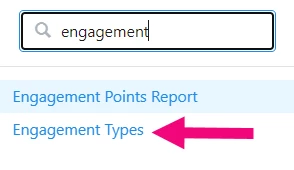
You should see the default types listed on the page. If you do not see any system default options available, please contact your Administrator or contact the Support team.
Click on the Engagement Type you want to update and then assign the total points for that action.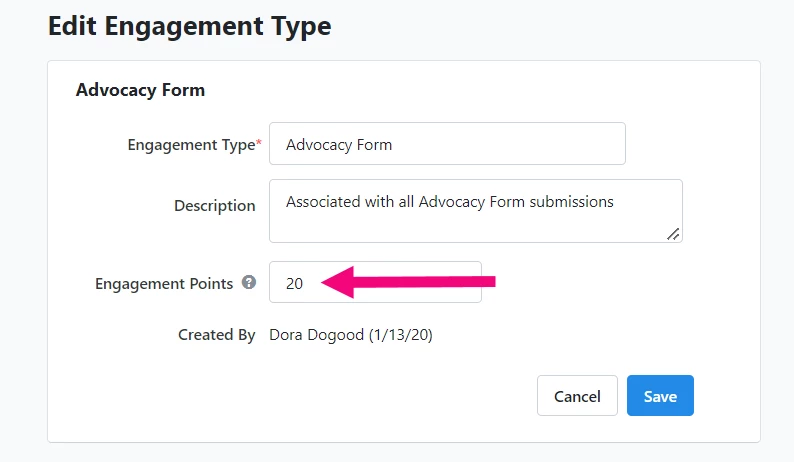
Creating new Engagement Types
To create your own Engagement Type, select Add New Engagement Type from the top right of the list page.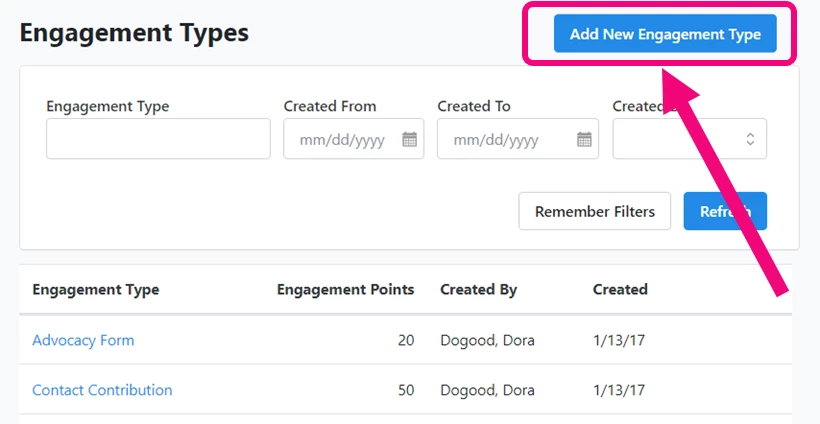
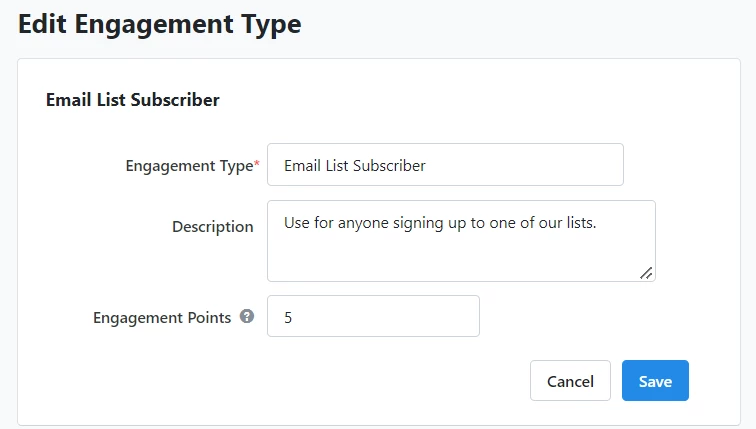
Enter the name and description of your Engagement Type and assign the number of Engagement Points.
Viewing on a Contact Record
Engagement Points are displayed as Percentile Rank on each contact record. The percentage is calculated against other records that have at least one Engagement Point in the committee (or, if in a data-sharing committee, against all contacts in the data-sharing hierarchy). Engagement Points as displayed on a contact record are updated overnight.
You can see the engagement points on a contact record in two places.
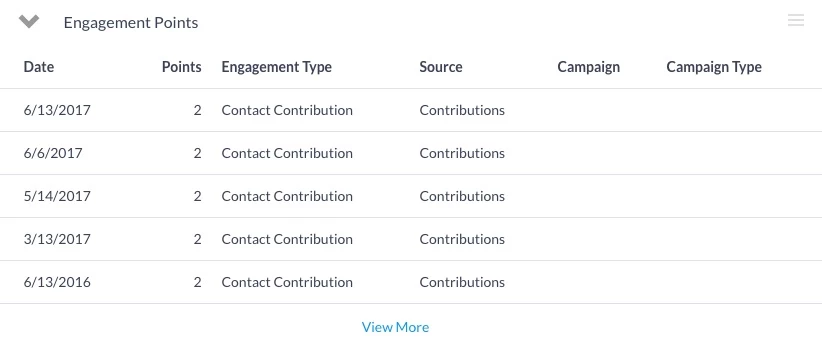
The Engagement Points section on the contact record breaks down each engagement, including when and how the contact record earned points. You will see the five most recent Engagements. You can see the full report by selecting View More. The full report can be filtered and grouped to determine the ways in which a contact is most actively engaged.
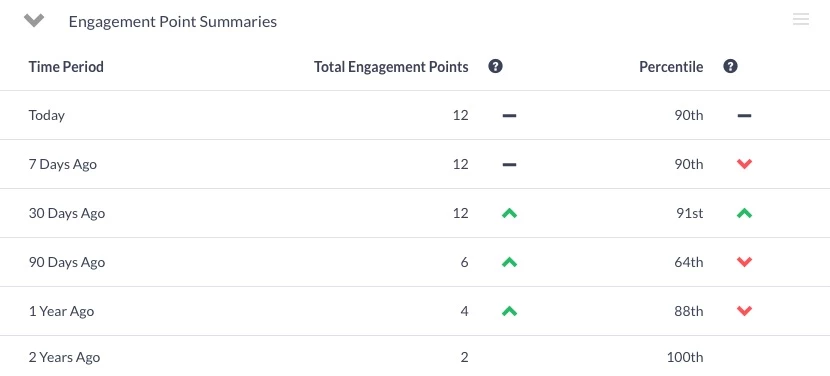
The Engagement Point Summaries Section of the contact record displays the Total Engagement Points and Percentile for a contact over time, including:
- 7 Days Ago
- 30 Days Ago
- 90 Days Ago
- 1 Year Ago
- 2 Years Ago
Trend arrows allow you to see at a glance whether your supporter or donor is becoming more or less engaged over time.
Searching on Engagement Types and Points
In Create a List, you can search on the raw number of Engagement Points, or on the percentile.
The Engagement Point Summaries section allows you to find people based on their total points or percentile either in general, or at one of the following points in time: 7 Days Ago, 30 Days Ago, 90 Days Ago, 1 Year Ago, and 2 Years Ago.
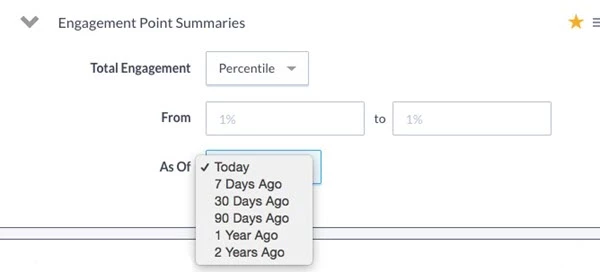
With a multi-step search, for example, you can find people who were in the 50th percentile for Engagement points as of 90 days ago but are in the 90th percentile as of today. This will show you people increasingly engaged by the organization. Or you can search for people who were in the 90th percentile as of 90 days ago but are in the 50th percentile today. This would show you the people who are at risk of falling off and need to be reengaged.
If you have access to more than one Committee using a data sharing arrangement, these point totals and percentiles are based on Engagement across the data share.
You can also use the Engagement Points section to find people based on the points they've earned, when they've earned them, and the activities that have driven their Engagement (including Contributions).
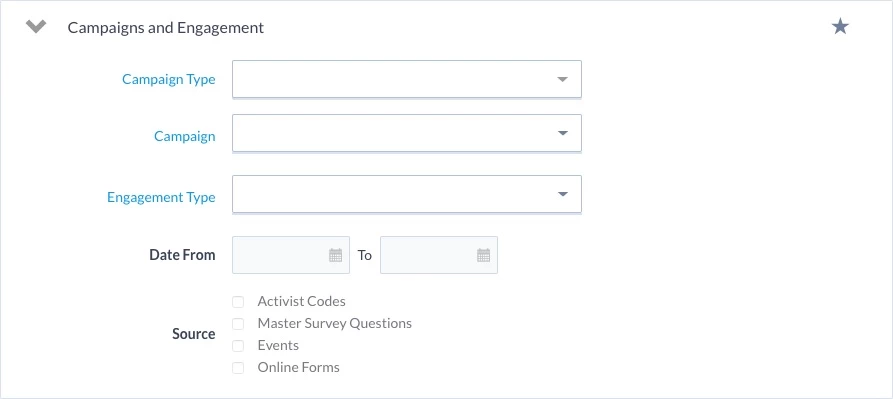
For example, you could search for people who have been earning a lot of points recently from a particular Campaign. This will help you target these people with more effective messaging related to that Campaign.
For clients in a data-sharing setup, you can search based on the committee that generated the Engagement.
Reporting on Engagement Types and Points
You can use the Engagement Points Report to help you track your total engagement.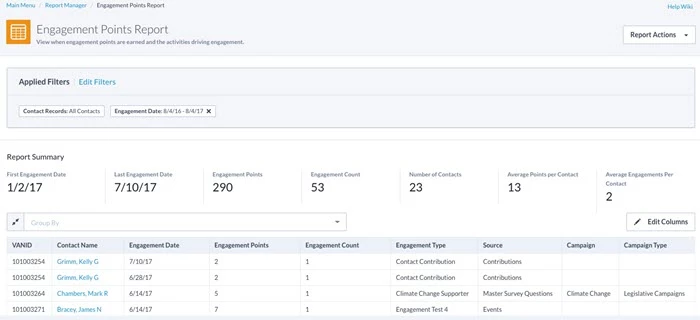
You can also add engagement point numbers by customizing your Standard Text export from My List.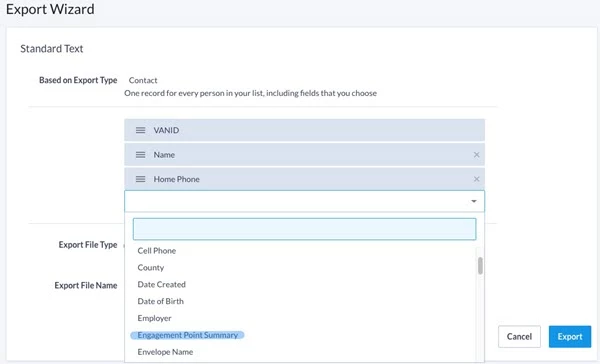
Troubleshooting
I see that people are submitting forms and taking other actions, but their record their Engagement Points & Percentile Ranking is not changing. Why not?
It's possible that either the overnight process has not yet run to assign those points or that some of your Engagement Types lack any points.
I can search by all the Online Form Engagement Types using the Campaigns and Activities page section, but I cannot search for Contribution Engagement Types. Why not?
Campaigns can be assigned to Online Forms whereas Campaigns have not been added to Contributions. This page section allows you to search by Campaigns & Campaign Types in conjunction with Action Types, and therefore adding in Contribution Engagement Types could cause users to run searches that returned inaccurate or misleading results.
Why aren't points being assigned for contact that are scheduled for Events and the Event Roles?
We only count points where the person's status for that Event='Completed.' If the points are not being applied this is the first place to check
Why aren't Engagement Points being applied when donations are made?
Contributions must have a status of settled in order for the points to be applied. If they are marked as settled and are still not applying points, double-check that you have points assigned to the Contribution Engagement Type.
What else do you need help with?
Navigate back to the Feature Overview.
How do I use engagement points & types? | How does use engagement points & types work in EveryAction? | Why can't I use engagement points & types? | Where do I use engagement points & types in EveryAction? | What is use engagement points & types in EveryAction? | How to use engagement points & types? | Can I use engagement points & types in EveryAction?