



FastAction connects your organization with an entire network of supporters, making engagement faster and easier by pre-filling forms so supporters can contribute or take action with as little as one click.
When supporters visit Online Actions forms with FastAction enabled, they can create or log in to their FastAction profile.

FastAction works for all Online Actions forms, regardless of who creates each form. If your supporters signed up on another form you created, or even on a form from another organization that uses FastAction, they can still use the same profile for one-click action on any forms with FastAction enabled.
How do I enable Fast Action on Online Actions forms?
Signing in to FastAction
Your supporters can sign in or create FastAction profiles using an email address or ActionID credentials.
Once your supporter has created a FastAction profile and logged in, any FastAction-enabled form will autofill with their contact and credit card information, allowing them to donate with just one click. Additionally, supporters will see their information pre-filled on forms they access through a Smart Link in an email sent via Targeted Email. Supporters will remain logged into their FastAction profile until they log out or clear their browser's cache.
If a supporter chooses not to create a FastAction profile, they can still fill out the page and contribute as usual. Once they have submitted their contribution, they will be asked again if they wish to create a FastAction account, encouraging them to save their information to expedite their contribution process in the future.
Read more about managing FastAction profiles
Switching on FastAction Auto Fill and Auto Processing for forms
While it's generally best practice to enable FastAction on all your forms, you can decide whether to include it on a form-by-form basis. When creating your form, you will see the option to Enable One Click Conversions with FastAction from the Basics step of your form setup.
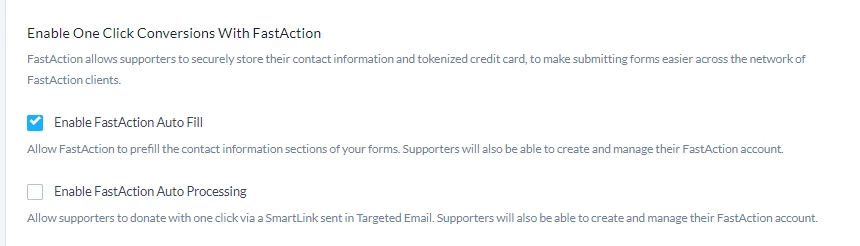
Enable FastAction Auto Fill is checked by default. If your supporter is logged in to FastAction when they visit your form or they reach the form from a Smart Link in an email, this will prefill the form with contact information (and credit card information, if available) using their supporter's FastAction profile.
Checking this box also enables FastAction on the form generally, allowing supporters to create a new FastAction profile or manage an existing one.
Using FastAction with Contribution forms
On Contribution forms, you can also Enable FastAction Auto Processing if you wish to turn on automatic payment processing (one-click contribution) for the form using Smart Links in a Targeted Email. Supporters will be able to donate right from your email message in one click if they are already logged into FastAction in their browser. A supporter not logged into their FastAction profile will see their information pre-filled on the form to confirm and process the donation with one additional click.
Turning on either or both of these options does not require supporters to use FastAction; they can always uncheck Remember me or Update my profile when filling out a form.
Credit Cards and FastAction
There are a few important things to note about credit cards and FastAction:
- We do not store credit card numbers in FastAction. We partner with an industry-leading payment processing company located in the United States, which uses a secure token-based credit card system.
- For validation and fraud prevention purposes, we store transaction history but no record of the actual card number on a donor’s FastAction profile page.
If a supporter begins typing their credit information on a form and is prompted to use a saved credit card, that is a browser setting unrelated to FastAction. For any related questions or concerns, they should consult online documentation and forums for the browser in question.
How do I use FastAction for one-click contributions?
How do I enable Fast Action on Online Actions forms?
Alternate search terms: autofill, smartlinks, smartlink, one click, oneclick, one-click, fast action, enable on contribution forms