


Which form fields are supported in Connect and Intake?
This article lists the supported and unsupported fields in Connect and Intake with other limitations.
Note: Default Values are not currently supported in Connect or Intake forms. If you include a field with a Default Value, that value will not pre-fill when the form is sent to a client. For more details, see our Connect FAQ article.
Supported Fields
-
Address
-
Address Global Lookup
-
Address Lookup
-
Canada, U.S., and U.K.
-
Attach Doc
-
Checkbox
-
Currency
-
Date
-
Decimal
-
Dropdown
-
Email
-
Email Trigger
-
Image
-
Label (Simple)
-
Label (HTML)
-
Likert Scale
-
Masked Dropdown
-
Masked Radio Button
-
Milestones/Goals
-
Multi-Line
-
Multi-Select Dropdown
-
Name
-
Numeric
-
Phone
-
Radio Button
-
Signature
-
Social Security Number
-
State
-
Text
-
Time
-
Zip
Note:
-
Multi-Select Dropdown fields will show as checkbox fields.
-
The Date fields' format will be determined by your site settings:
United States: MM-DD-YYYY
United Kingdom: DD-MM-YYYY
Canada: YYYY-MM-DD
-
Address Lookup will not suggest an address when data is entered
Unsupported Fields
-
Append Only
-
Auto Populate
-
Calculations (all types)
-
Dropdown Date
-
Dynamic Fields
-
Grant
-
Grant Invitation
-
Link
-
Record Lock
-
Review Assignment
-
Scheduler
-
Smart Lists
-
Universal Address Lookup
-
User Creation
-
User List
-
Website
Note: The field property 'Hint' is not supported.
Form Logic
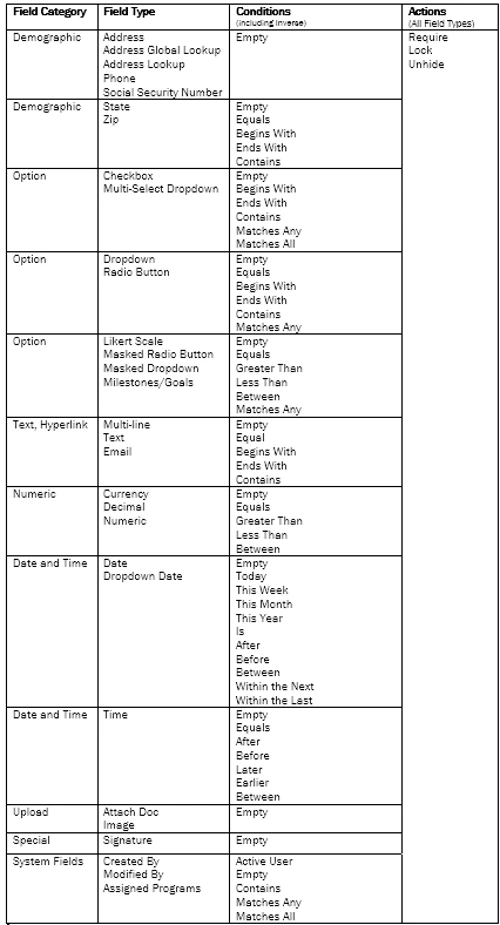
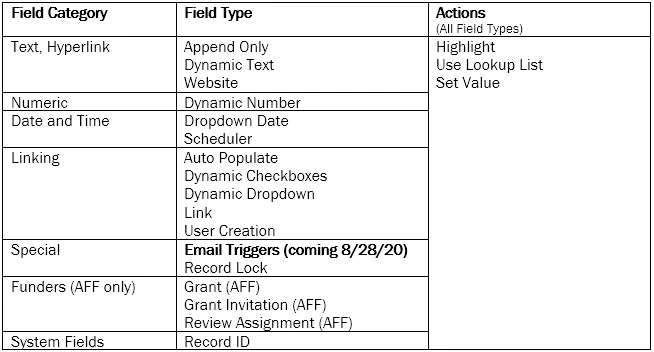
Supported Fields, Conditions and Actions
Limitations
Form/Record Permissions:
-
A Tier 1 form must be associated with a program for it to be used as a Participant Type when setting up a new type under Connect -> Participants
-
A participant record must be assigned to the program for which the Connect administrator has granted participants access to in order for the participant to view and fill out any Tier 2 forms associated with their record
-
Email triggers are supported in some capacity. Please refer to this article for additional details.
Which form fields are supported in Connect and Intake? | What field types can I use in a Connect intake form? | Why is my form field not supported in Apricot Connect? | How do I choose supported fields for an intake form? | How do supported fields affect Connect form submissions? | Where do unsupported fields appear in Connect forms? | How do I update my form to use supported fields in Connect?