


How do I configure a custom logout URL?
Follow the steps listed below to learn how to configure a custom logout page for users to land on when they log out of Apricot.
Step 1: Navigate to your Apricot settings
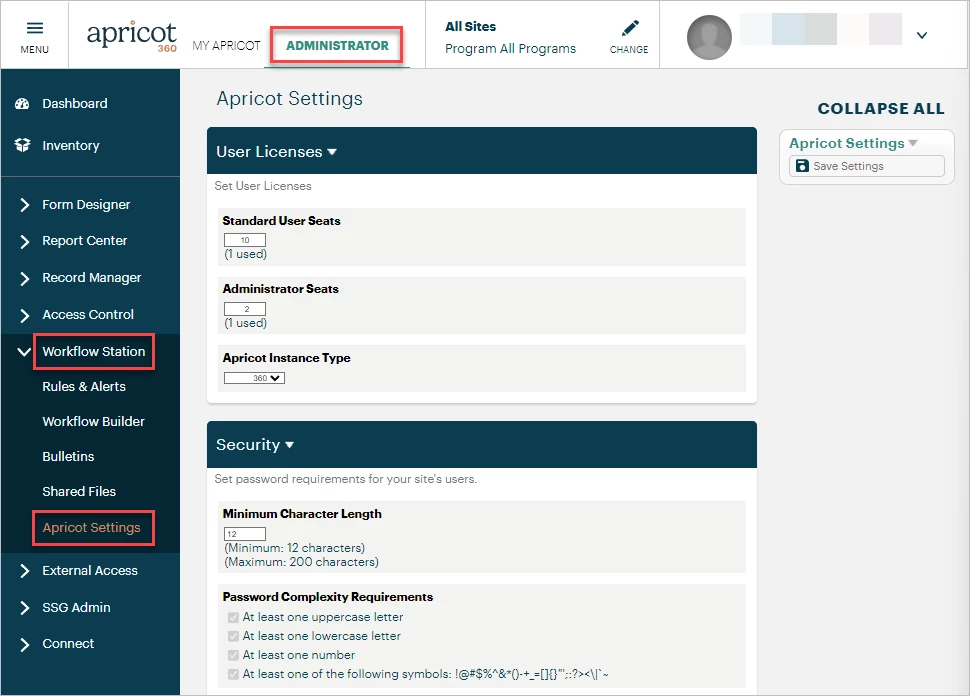
In the Administrator view of Apricot, expand the Workflow Station category in the navigation bar and select Apricot Settings.
Step 2: Enter the Logout URL
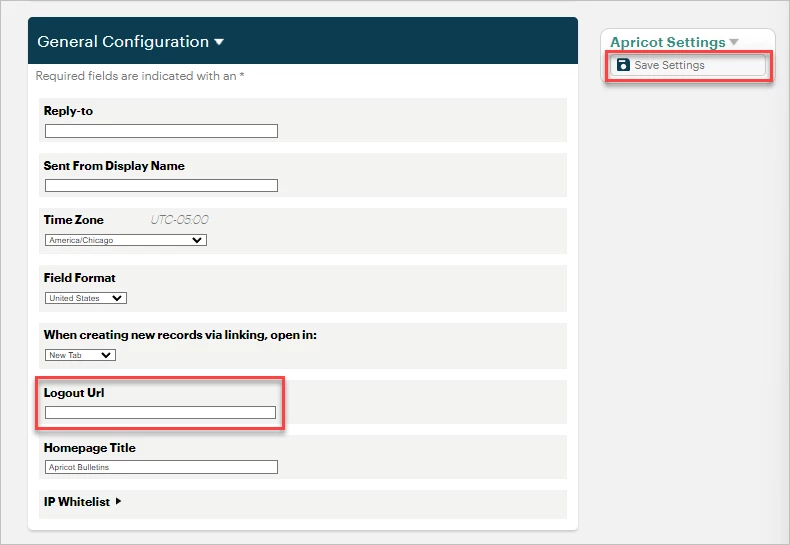
Next, scroll down the page to General Configuration section, and insert the page's URL in the 'Logout Url' text box. Click 'Save Settings' to confirm your changes.
Where Do I Set a Custom Logout URL in Apricot? | How Do I Change Where Users Go After They Log Out of Apricot? | Why Am I Redirected to the Wrong Page After Logging Out? | How Do I Configure a Logout Redirect in Apricot? | Can I Send Users to a Different Page After Logging Out of Apricot? | Where Do I Enter a Custom Logout Link in Apricot Settings? | Why Won’t My Custom Logout URL Save in Apricot?