


How do I report on the number of Tier 2 records associated with a Tier 1 form? (ARR)
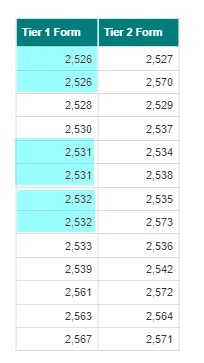
Step 1: Bring in the Record IDs for both the Tier 1 form and associated Tier 2 form
There are Tier 1 forms in this case that have multiple Tier 2s associated with it.
Step 2. Add a Count() to the Tier 2 column
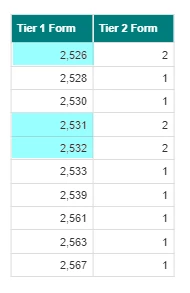
Select the column containing the Tier 2 Record ID, and add a Count() function via the formula bar.

Results will then minimize the number of rows to create a single row for each Tier 1 Record ID.
How do I count Tier 2 records for each Tier 1 record in ARR? | How do I use the Count() function in Apricot Results Reporting? | How do I show the number of associated Tier 2 forms? | How do I create one row per Tier 1 record with a Tier 2 count? | Why do I see multiple rows for one Tier 1 record in ARR? | How do I summarize Tier 2 records by Tier 1 form? | How do I report on related records in Advanced Results Reporting?