


How do I change sites or programs?
Looking to navigate to another site or program in Apricot? Check out this video that walks you through how to view all the sites or programs you have access to.
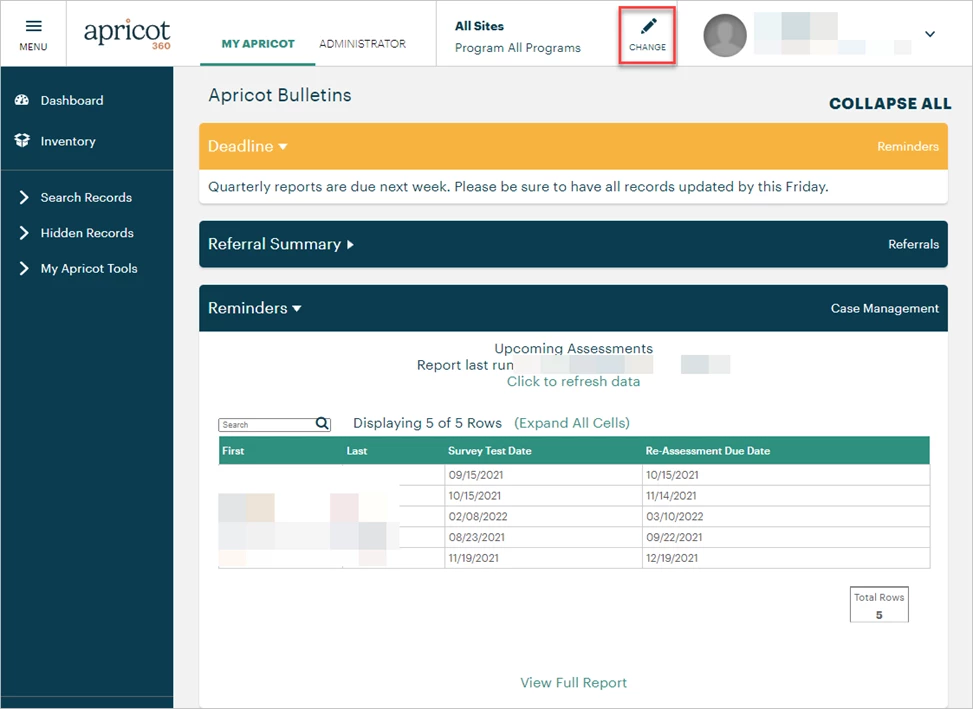
Users with access to only one site and program will be brought to that program’s home page by default upon logging in. On the other hand, users with access to multiple sites or programs may view Apricot in an ‘All Sites All Programs’ view. This can be seen at the top of the Apricot page to the left of the user badge.

Your current program affects which information you’re able to access and where the data you enter into Apricot is stored. Our recommended best practice is to confirm you’re in the appropriate program before entering data or making changes to your database.
Follow the steps listed below to learn how to change which program you’re working in.
Step 1: Click the pencil icon
In the example screenshot below, we are in the ‘All Sites All Programs’ view. The information available on this page will change depending on the program, as will the forms and records your users can work with.
Click the pencil icon in the Programs badge to view other sites and programs you have access to.
Step 2: Select a program
In the Sites & Programs pop-up, type in the search field or scroll to locate the program you want to work with. Click on the program name to navigate to it.

Continuing the previous example, the bulletins displayed on this page have changed after switching to a new program.

If you do not have access to data that you believe you should have access to, double-check that you are currently in the right program. Learn more about adding or adjusting access for users within your programs here.
What else do you need help with?
Navigate to the following overview pages depending on your organization's permission model:
How do I switch programs in Apricot? | How do I change sites in Apricot? | Why can’t I see my data in another program? | How do I view all programs I have access to? | How do I navigate between sites in Apricot? | How do I select a program from the Programs badge? | How do I know which program I’m currently in?