

How do I mark two records as not duplicates?
Overview
If Que flags two records that are really different people, you can dismiss the pair so it isn’t flagged again. Here’s how, and how to reverse it.
Step 1: Open the pair
In the For Review tab, click the pair.

Step 2: Mark as not duplicates
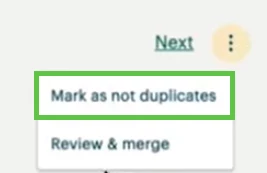
Click the ⋮ menu in the top right and select Mark as not duplicates. The pair moves to the Not Duplicates tab and won’t be flagged again.
Step 3: Reverse it if needed
If you marked a pair by mistake, open the Not Duplicates tab, click ⋮, and select Mark for review. The pair returns to For Review.
What else do you need help with?
Not what you’re looking for? Navigate to back to the Data Integrity Index.
How do I dismiss a duplicate in Apricot? | How do I mark two records as not duplicates? | Will a pair I marked as not duplicates be flagged again?