How do I filter exported date values in Excel?

  • February 4, 2026
  • 0 replies
  • 3 views

Forum|alt.badge.img

While Apricot .xls and .xlsx report exports do not allow for date filtering at this time, you can use this guide to enable this type of filtering.


Why do these date values need to be converted?

Excel allows filtering based on Month, Day, Year, etc. when a date value is formatted a certain way. Without this formatting, your options for filtering are extremely limited, as you can see in the following screen shot.
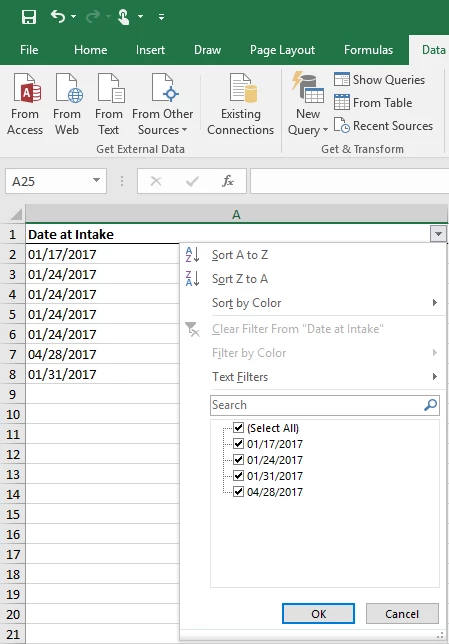
 

11475310-How_do_I_filter_exported_date_values_in_Excel-1.png


Converting exported date values to allow for filtering within Excel

Please follow the steps below to allow for date filtering within Excel.
 

11475310-How_do_I_filter_exported_date_values_in_Excel-2.png


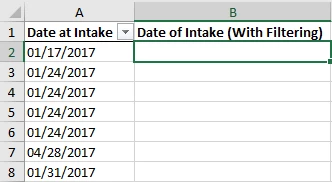
  1. Select the first row from an empty column. This column will be populated with your date values once you've completed the steps below.?
     
11475310-How_do_I_filter_exported_date_values_in_Excel-3.png


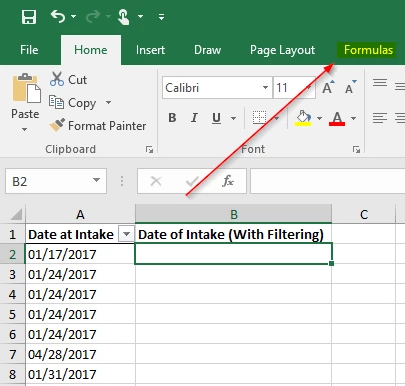
2. Click the "Formulas" tab.


11475310-How_do_I_filter_exported_date_values_in_Excel-4.png


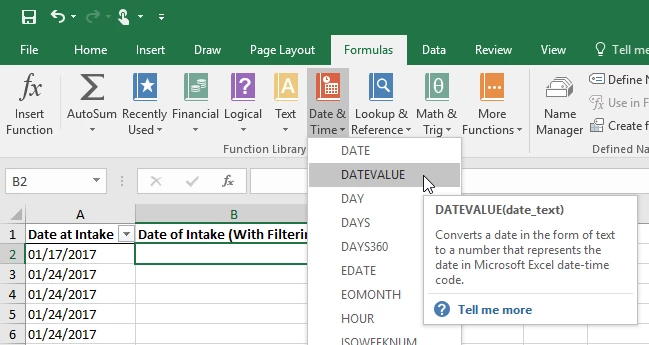
3. Click "Date & Time" and then select "DATEVALUE".


5.png-expires%3D1749783600-req%3DdSgjEst-2FnoNcFb4f3HP0gHGgHAHUu3GOzhM7NlI7tIclVzFMplCVwMlQYcZa-0ArhI-3D-0A-signature%3Dea5f8649cae9c037653c101c7a53c52e86a02bac8dca3364a28a4f5536bcdf58?expires=1771007400&signature=56945635e435646318b915d625d658d54260d5ab395c50a7391a13ba9ccbbaf5&req=dSUhHsF8lIFdX%2FMW1HO4zYEgIMrYrX58HDDuMoPYGiNRve8005y9jlqZnGoe%0AckcFmxDLOSMHrkKJtNo%3D%0A


4. Click the date value from the same row and then click "OK".


6.png-expires%3D1749783600-req%3DdSgjEst-2FnoRWFb4f3HP0gApZ4gzQH1KpQbtJ00NisD0law6RpdlD4GeAcq0H-0Az4I-3D-0A-signature%3Db084bf4dc53bbd1d89cb86d188a5abbb0c9f11aa6a6f3e96ef61c2a626c4e380?expires=1771007400&signature=7a533a071ea532e2bc015b39f0cdf9a2148baf73b6538e6a6e7027380bba9ff0&req=dSUhHsF8lIFcX%2FMW1HO4zQbKQrp3717BogRokfYksIkHu2opRK7TsMIioQCe%0Av%2BvbfPTrU2d8iHLX3pY%3D%0A


5. Select the cell that has been transformed by the formula and then click and drag the green square all that way down to the bottom row of the table.


7.png-expires%3D1749783600-req%3DdSgjEst-2FnohYFb4f3HP0gHowd7CGmPYYJUw6dDqBnAFNvofK-2BULEq0vHVnOm-0ArOk-3D-0A-signature%3D5f93267b319a92a67990283ad2ec7eac0669bd9b355675bc6b16157b84e480b4?expires=1771007400&signature=a5ad8bcd227fc6ebf9b800f2dfbcc358b872fdd72cabd483abd17ae39c554cb1&req=dSUhHsF8lIFbX%2FMW1HO4zU2hCu6Uzp87ohJh01Dd4amJHZhqJLjnKHoC5%2BOk%0AO1u6RLzuR7%2F1xytrL4I%3D%0A


6. With these values still selected right click and select "Format Cells"...


8.png-expires%3D1749783600-req%3DdSgjEst-2FmYJaFb4f3HP0gFtSCdZ5sgeYYU5IlD-2FkzPaU-2FC6vvz5TvAJ8-2FHJ5-0A5II-3D-0A-signature%3D2c6e2eedf5d734a9bef3432ac8d2170fba7cc4e67dd4ce32f03a87dd97584491?expires=1771007400&signature=ad41f14837ad3e45a2178604f197eb2dd7baba7d912b9ab7fe923bb5917ee361&req=dSUhHsF8lIFaXfMW1HO4zeWPSrQVvXe4bpw0DlVHxIP2rflUyAJIFcRj027r%0AfGU9GN7%2Fi1NXQATJbHM%3D%0A


7. ...and then select "Date" and click OK.

9.png-expires%3D1749783600-req%3DdSgjEst-2FmYdXFb4f3HP0gB1jV7qKFK8Csw1w4Eo4NgcXBmBY-2BKJJrAnMR0tW-0Aml4-3D-0A-signature%3D0a3b840b43576101b5d1b90fb69117469be033ccf9add2568411845d87927526?expires=1771007400&signature=30f6cdcf7632e03267c080ec3194109c86bc8ef681b471e887b4981af7ef551a&req=dSUhHsF8lIFZXPMW1HO4zbYFof5GpKz3b%2F9phy50IB%2BMDEghZdwDe9Nlqraa%0A8R%2FTEYtN46jmzY44Ki0%3D%0A


8. Done - Date filters can now be applied as needed. 


How do I convert exported date values for filtering in Excel | How do I use DATEVALUE to filter dates in Excel | How do I format Excel cells to filter by month day year | Why can’t I filter dates from Apricot exports in Excel | How do I apply Excel date filters after export | How do I fix Excel date values for reporting | How do I enable filtering on exported Apricot report dates