


How do I sort tables and columns in Results reports?

  • February 4, 2026
  • 0 replies
  • 4 views

Forum|alt.badge.img

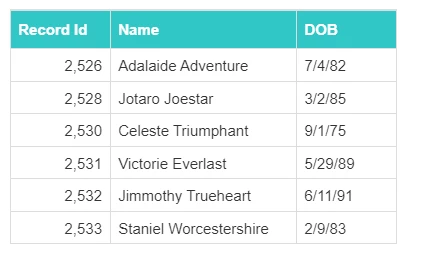
Apricot Results will sort a table by the left-most column by default.
11475230-How_do_I_sort_tables_and_columns_in_Results_reports-image.png

This table is sorted by Record ID because it is the first column in the table.
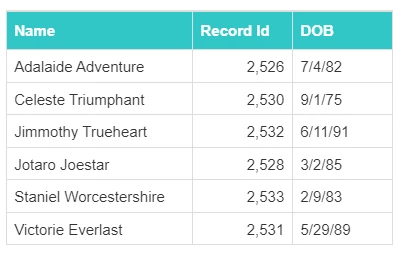
 

11475230-How_do_I_sort_tables_and_columns_in_Results_reports-image_1.png

This table is now sorted by Name after moving the column to the left.


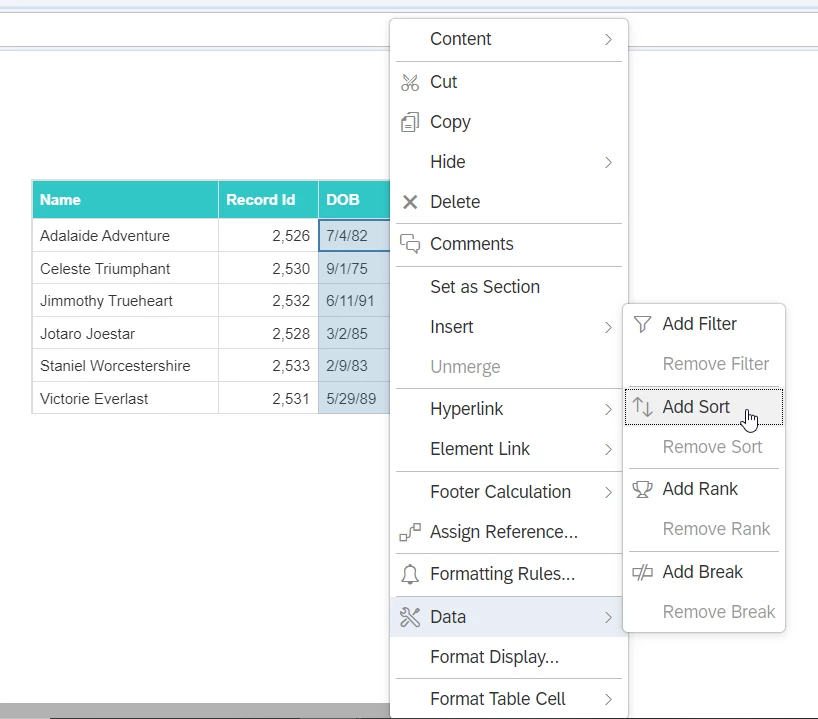
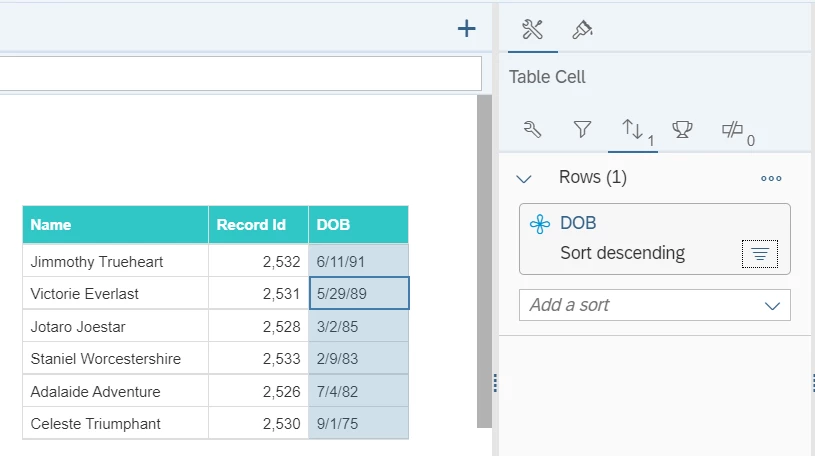
You can also change the sort of the table by right-clicking in the column, selecting Sort, and choosing Ascending or Descending in the Report Element Data panel.
 

11475230-How_do_I_sort_tables_and_columns_in_Results_reports-image_4.png


11475230-How_do_I_sort_tables_and_columns_in_Results_reports-image_3.png

Now the table is sorted by DOB in Descending order.


Custom Sorting

The custom sorting option will let you choose a custom sort. Create your sort in the Report Element Data panel > Click on the 3 circles next to the name of that sort > Select Create Custom Order.
In this window, select Add under Sort: > Select the object you want to apply the custom sort to > OK


image.png-expires%3D1749783600-req%3DdyghFMl2nIhYFb4f3HP0gNVRBDEzEoTDTiB39pYsnp3Ypdbs4J8TEWOZ-2BIyz-0AgcA-3D-0A-signature%3D93db1b817067c7634ee463850965ef1a8b2d2e540f8e20a4ffe7232579b62fff?expires=1771011000&signature=a70bedab2f4bcb06633995cd0ff3dd6c7371f0be4ef3838f107b4d3a333710c0&req=dSUhHsF8mIlYWvMW1HO4zWLNnlIdSL41s5G7%2FRPeLhGpQ%2BKpWkgGvu2M2fDR%0AeBDmaLFIYoq0avgpdXk%3D%0A


image.png-expires%3D1749783600-req%3DdyghFMl2n4lWFb4f3HP0gGLSfOZQpGz2pHkiX-2FtSJZyTfCAIBFxuNnB1dQde-0AHCc-3D-0A-signature%3D99480837a23596bf2b19b1f01b497433d09787aa017fb9bc1a273cd63dda1da7?expires=1771011000&signature=be54bacbea0490df897c916e947a7d7207403223c153b3e7dd6f03ba90c0eb1b&req=dSUhHsF8mIlXWPMW1HO4zRZLCVflCe9WHZYpTRPcZIYiRm1EPM4g%2BZgYS0pI%0A8sGxcleFius0nNRj3O0%3D%0A

You'll open a window that shows all of the values for the selected object. Move the arrows up or down to change the position and select OK when you are done. Or add your own values to the list.

image.png-expires%3D1749783600-req%3DdyghFMl2mIRWFb4f3HP0gA4CEhvwjWdK-2B6w1MAg0-2Fs0GQH4ON-2BERWIRXxoWS-0Ac-2F4-3D-0A-signature%3D6f97ce1aadefc188f867625432ee40642095cd6bfb9e1718152f90f05a3be913?expires=1771011000&signature=980502684b303daf9a17a0669a4247488eec094ab136614365e096a11cad84ad&req=dSUhHsF8mIlXUPMW1HO4zZ5aSXor6MgaT49lI4NA4%2B9VA7yzJVS7x1h0xMv9%0AnV7fwlYjNJjkltcEGaY%3D%0A


How do I sort columns in a Results report | How do I change table sort order in Apricot Results | How do I sort a report by a specific column | How do I create a custom sort in a report | How do I apply ascending or descending order in a report | How do I move columns to change sort order | How do I manually reorder values in a report sort