

How do I report impact on a volunteer event or project?
Did your volunteer event or project serve meals, plant trees, or reach people? If your corporate partner uses Impact Measurement in Deed, you can report the results on the events and projects you run. Your partner sees the outcome in its impact totals without having to re-enter it.
You can report only against Impact Indicators your corporate partner has set up. You can't create indicators or units, and you can't see or set up your partner's company goals.
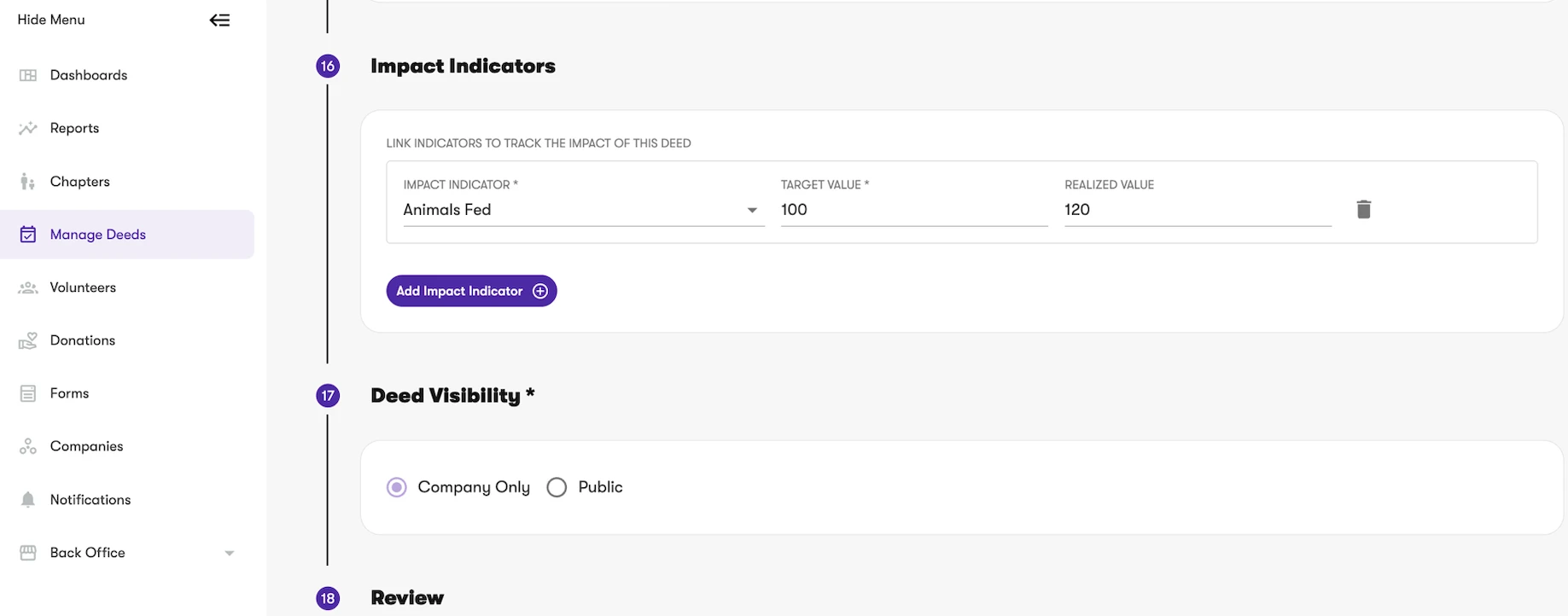
Step 1: Open the event or project
Log in to Deed, open the Manage Deeds tab, and find the volunteer event or project.
Step 2: Go to the Impact Indicators step
On the event or project form, go to the Impact Indicators step. You'll see the indicators your corporate partner has set up.
Step 3: Add the indicator and realized amount
Once the event or project is complete, choose the indicator and enter the realized amount, the actual result, such as 500 meals served. You can add more than one indicator, but each indicator only once.
Step 4: Save your changes
After entering the realized value, republish the event or project to save your changes.
What else do you need help with?
- How to set up giving opportunities on Deed - Volunteer Events
- How to set up giving opportunities on Deed - Projects
How do I report impact on a Deed volunteer event? | How do I enter results for a volunteer project? | What is a realized value? | Why can't I see any Impact Indicators? | Can nonprofits create Impact Indicators? | How do I report meals served or trees planted to my corporate partner? | Can nonprofits see company impact goals?