

How do I print a list?
Step 1: Navigate to Your List
Once you've created a list using Create a List, you can print the results directly from My List. To begin, select your current list by using My List from the Sidebar or select one of your saved lists from My Folders (which you can open from Contacts > Searches & Lists > My Folders ).
Step 2: Select Print from the Top Banner
Step 3: Choose a Format and Preview Your List
You can then select the Report Format you want to use for your printout. You can use the Preview link to make sure this is the correct format for your list.
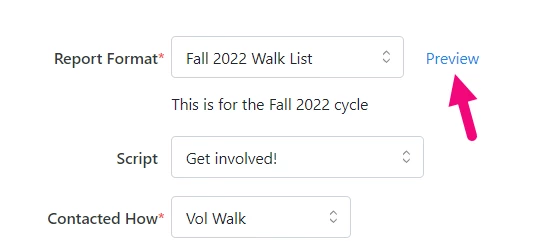
Add any additional information you need such as Script, sort order, header and footer information, and other details.
Step 4: Create a PDF File
To create your PDF, select Next. You should see a confirmation screen that your file is being created.
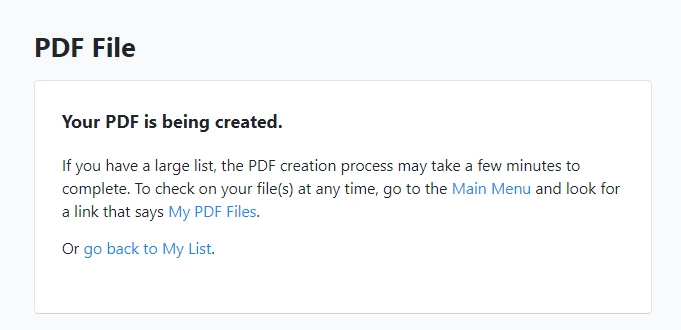
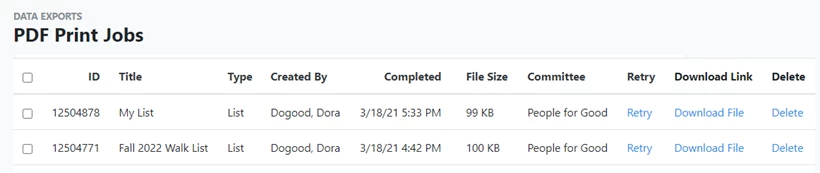
To see your downloaded files, search for My PDF Files in the Sidebar, open the list from the top of your dashboard home page, or use the link from the Main Menu.
Not what you’re looking for?
How do I print a list? | How does print a list work in EveryAction? | Why can't I print a list? | Where do I print a list in EveryAction? | What is print a list in EveryAction? | How to print a list? | Can I print a list in EveryAction?