

How do I search using Phone Numbers?
EveryAction allows you to search for contacts based on their phone numbers and related attributes. This feature helps you create targeted lists for phone banking, SMS campaigns, or other outreach efforts.
Step 1: Navigate to Create a List
-
Start on the EveryAction home page.
-
From the left-hand menu, go to Contacts > Create a List.
-
Or use Search for a page and type Create a List.
Step 2: Expand the 'Phones' section
Here you can refine your list to include contacts whose phone numbers fit specific criteria.
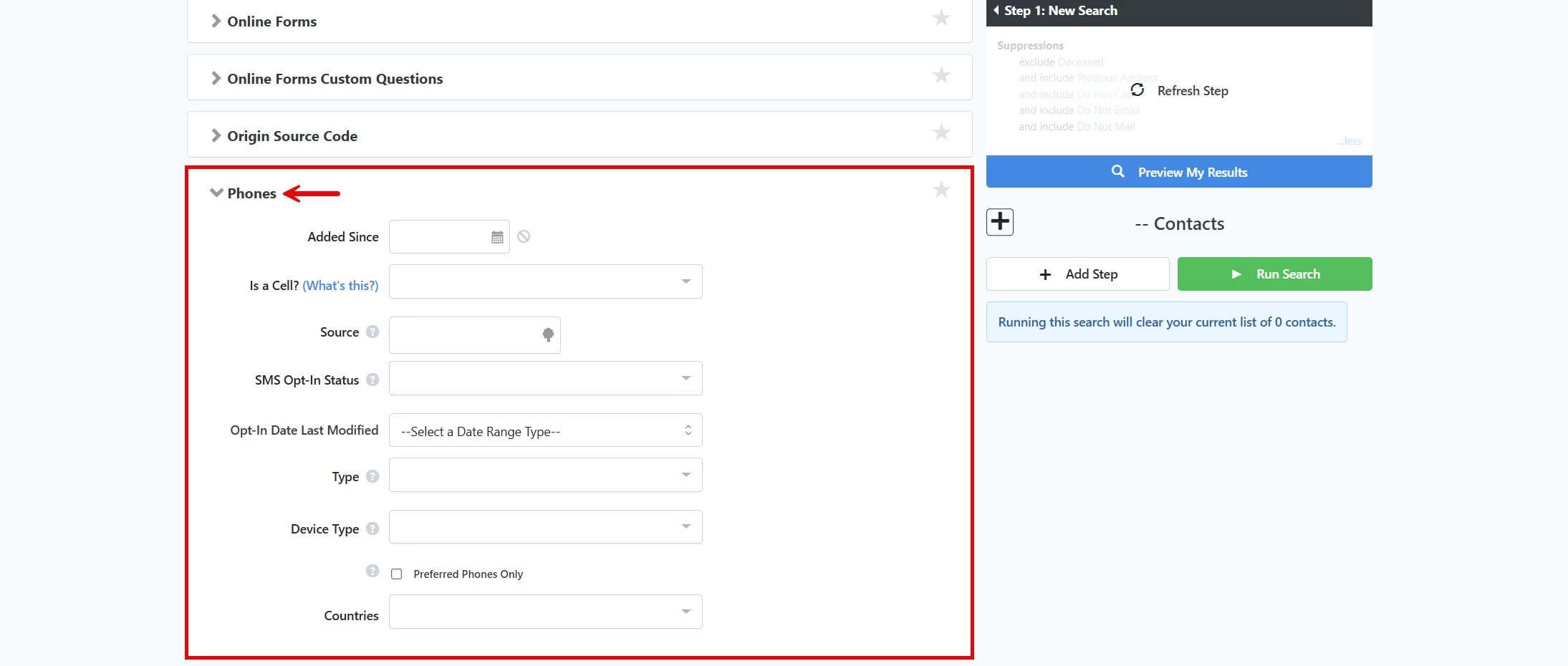
Available search criteria
- Added Since - This option allows you to select contacts whose phone numbers have been added since a particular date.
- Is a Cell? - With this field, you can select contacts based on whether their numbers are mobile numbers or not. Your options here include Verified Cell, Likely Cell, Likely Not a Cell, and Not a Cell.
- Source - The source field allows you to specify how the phone number was added to the record. The options here are Bulk, Mobile, User Added, Voter File, or Check All.
- SMS Opt-In Status - You can choose contacts based on whether they agreed to receive SMS messages from you. The options here are Opt-In, Opt-Out, and Unknown.
- Type - This field lets you select records based on the type of phone number listed. The options here are Cell, Fax, Home, Main, Other, and Work.
- Device Type - Cell, Landline, Unknown, Fax, VoIP
- Preferred Phones Only - Checking this box limits your search to include the phone numbers that your contacts prefer to use. For example, if your contact prefers for you to contact them at home but you also have a work number for them, they would be excluded from any search on work numbers and only be included in searches on home numbers. If this box is checked but no number is marked preferred in a contact record, the system defaults to the most recent phone number and type entered to determine if it should be included in your search.
- Countries - This field allows you to narrow your search to phone numbers from particular countries.
Not quite what you were searching for?
- Navigate back to the Lists and Saved Searches Resource Index.
How do I search using phone numbers? | How does search using phone numbers work in EveryAction? | Why can't I search using phone numbers? | Where do I search using phone numbers in EveryAction? | What is search using phone numbers in EveryAction? | How to search using phone numbers? | Can I search using phone numbers in EveryAction?