


Overview: MiniVAN
We’ve made some updates to our login experience! If you come across references to “ActionID” in our help resources, those are being updated to reflect the new name: Bonterra Account. Nothing changes on your end as we tidy up the documentation.
The free MiniVAN mobile app replaces your paper turf packets and gives your canvassers everything they’ll need to knock doors, survey people on the street, gather petition signatures, organize workplaces, or make calls and then send the results directly back to your CRM. It’s easy to use and is the most efficient way to run your canvass.
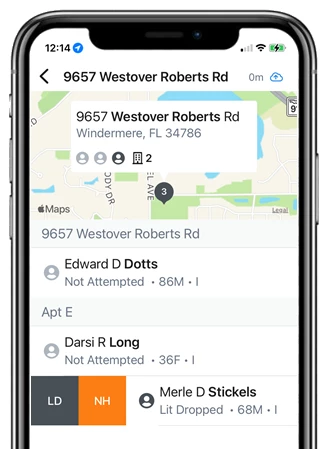
What’s available in MiniVAN?
MiniVAN is designed to be intuitive to use and to automatically sync everything back to your CRM.
Canvassers will have access to:
-
Interactive maps and lists that will help them optimize their routes and easily see the next target
-
Branching scripts that can help them ask the right questions depending on the responses they get
-
Contact histories and details that will give them more context about the person they are speaking with
-
An easy way to record their results, notes, and any email or phone updates
-
A progress screen that will show results from the entire team
-
Identification of anyone who has already Voted
-
Automatic syncing that will send in their results whenever they have a data connection
-
Integrated help and training videos
Checklist for managing a canvass with MiniVAN
 For most canvasses, you’ll begin by cutting turf or creating a list of voters and then generating a list number to share with your canvassers.
 Once your list is ready to go, your canvassers will download the MiniVAN app and log in with their Bonterra Account. They will then use the number you generated to download the canvassing list to their device.
 Canvassers will use the maps and list to find the right addresses and begin their canvass. As they follow your scripts and begin entering results, everything will sync back to your database automatically. You can also remind volunteers to manually sync their results if needed.
 When your canvass is done, you’ll need to review your auto-committed MiniVAN data. You can use the roll back feature to roll back committed data.
 You can use the information you gathered in your canvass for creating lists and generating reports. In the Report Manager, you will find specific reports for Counts and Crosstabs as well as for tracking Canvass Results.
MiniVAN app compatibility and best practices
The MiniVAN app is compatible with most iOS and Android mobile devices. Before purchasing mobile devices to hand out to canvassers, make sure they meet the minimum operating software, which can be found in the MiniVAN app description in the app stores. We do not support MiniVAN on devices that are no longer supported by the maker. Most notably, this includes Amazon Fire devices.
To ensure that canvassers have the best experience possible with MiniVAN, it's best to make sure your canvassers do the following before they begin:
-
Update their mobile device software
-
Update the MiniVAN app to the latest version possible
More ways to use MiniVAN
Enhance your canvassing efforts in MiniVAN in the following ways:
-
Add the Street Teams package to canvass individuals without a predetermined list. Survey people on the street or gather signatures while you add new contacts in My Campaign or EveryAction or search the voter file (My Voters) for people to add to your respondent list.
-
Collect donations as part of your canvassing or Street Team efforts using the MiniVAN Contributions add-on. You must have a Digital package to purchase and use this feature.
-
Run a workplace organizing effort using the MiniVAN Jobs feature. Your canvassers will be able to sort their lists by employer, worksite, and department.
-
Use MiniVAN as a part of a decentralized phone banking, email, or texting tool.
-
Purchase MiniVAN Manager to monitor your canvassers in real-time, ensuring they are on the correct turf and moving through their lists appropriately. View canvass responses as they come in and determine if you need to correct training issues or make immediate adjustments so you aren’t gathering bad data or results.
-
Link to Mobilize so your volunteers can find and schedule their next shift in-app at the conclusion of their canvass.
Not quite what you were searching for?
- Navigate back to the MiniVAN Resource Index.
How do I create a minivan? | How does minivan work in EveryAction? | Why can't I create minivan? | Where do I create a minivan in EveryAction? | What is minivan in EveryAction? | How to minivan? | Can I create a minivan in EveryAction?