

501(c)(3) Onboarding
Getting Access to a Deed Profile:
To get started, you’ll need to claim your Deed profile:
- Go to our Claim Your Profile page.
- In the Organization Name field, enter your EIN to quickly locate your organization.
- Select your organization and provide the required information, including your email address.
- Check your email for a link to set your password and log in to Deed.
By completing this process, you will be attached as a user to your organization’s Deed account.
FAQs
- What if I can’t claim my organization’s profile?
-
- If the profile has already been claimed, email nonprofits@joindeed.com with:
- Organization name
- EIN
- Email address you’d like added as a user
- Our support team will add you to the existing account.
- If the profile has already been claimed, email nonprofits@joindeed.com with:
- What if my organization is a 501(c)(3) but doesn’t appear in search?
-
- If your 501(c)(3) status is newly granted, it may take 1–2 months before appearing on Deed.
- To speed this up, we recommend registering with our partner PayPal Giving Fund (PPGF).
Onboarding on the Deed platform:
User Verification
- One user must complete verification for your organization.
- You’ll be directed to log into your PayPal Giving Fund (PPGF) account.
- Ensure the account name matches your organization’s name on Deed.
- After submission, the review process takes 2–3 days.
Disbursement Set Up
- Deed partners with PayPal Giving Fund to disburse funds.
- Organizations can receive donations via:
- Electronic disbursements (direct deposit through PPGF), or
- Checks (if direct deposit is not set up).
- To set up direct deposit in PPGF, you will need to:
- Provide your organization’s EIN
- Link a bank account to your PayPal account
- Upload supporting documents (e.g., IRS determination letter) if requested
Affiliation
- You will be prompted to request affiliation with Deed’s partner companies.
- If the company you’re seeking is not listed or already added, you can skip this step.
Profile Information
- Complete your organization’s profile by adding:
- Mission statement
- Logo
- Chapter contact details
- These can be updated anytime from the Settings tab in Deed.
FAQs
- How can I receive support from PayPal Giving Fund?
-
- Submit a request for support directly to the PPGF support team.
- Why was my user verification unsuccessful?
-
- Make sure you’re logging into your organization’s PPGF account (not a personal account).
- Using a personal PPGF account will cause the verification to fail.
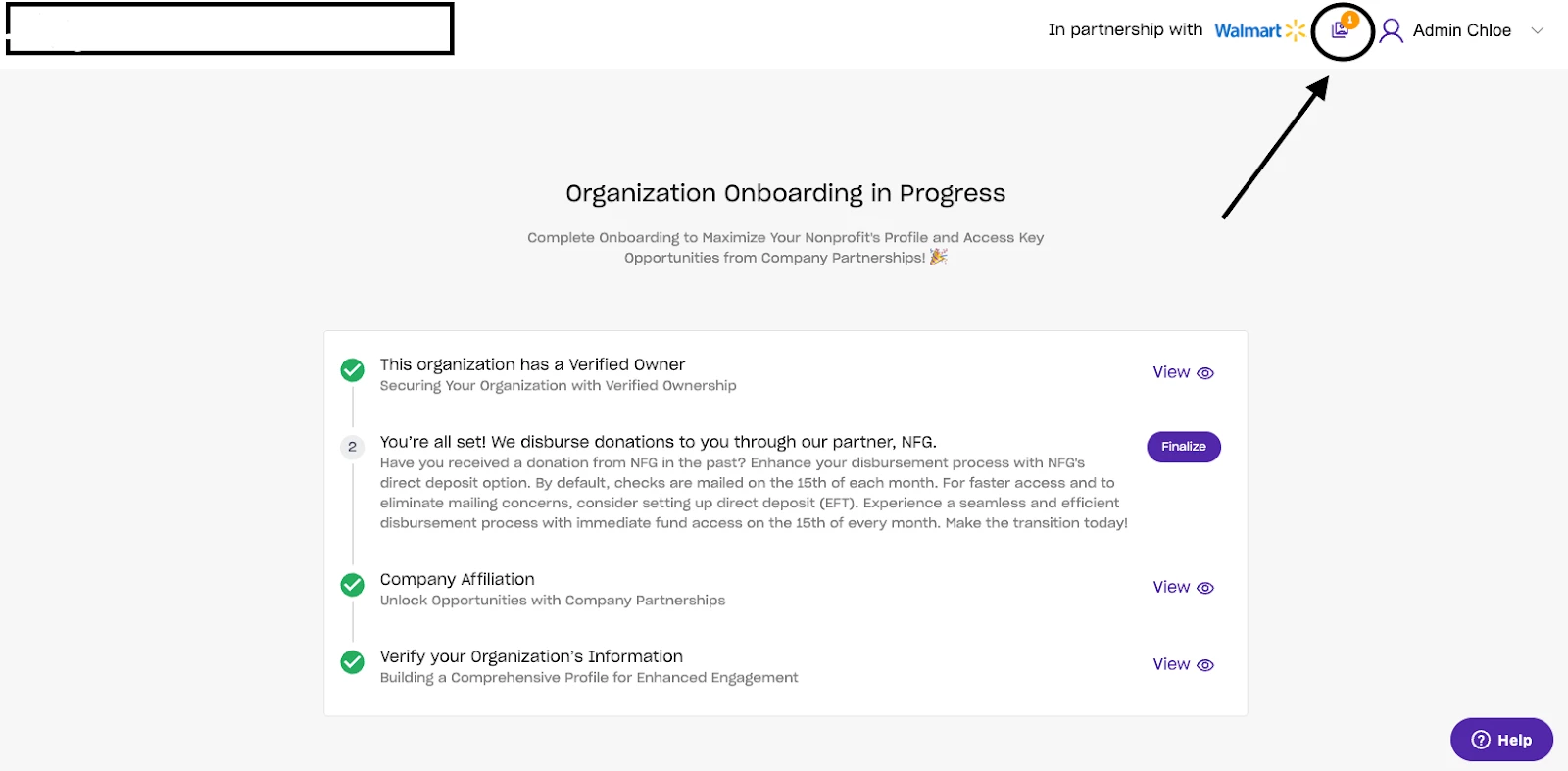
- How do I know if my onboarding is complete?
-
- Use the Onboarding Tracker in the upper right-hand corner of the Deed platform.
- Any step marked with a “Finalize” button still requires action.
How do I 501(c)(3) onboarding in Deed? | How does 501(c)(3) onboarding work in Deed? | Why can't I 501(c)(3) onboarding in Deed? | Where do I 501(c)(3) onboarding in Deed? | What is 501(c)(3) onboarding in Deed? | How to 501(c)(3) onboarding in Deed? | Can I 501(c)(3) onboarding in Deed?