


How do I track Online Actions forms using Google Analytics?
EveryAction provides integrations for both Google Analytics 4 (GA4) and Google Tag Manager (GTM). You can use Google Analytics and Google Tag Manager to track forms and use insight about their performance to improve form engagement.
Google Analytics is a web analytics tool that can analyze website traffic and supporter behavior. The latest version of Google Analytics (Google Analytics 4) can collect both website and app data. It allows you to run reports and analysis on the information gathered.
Google Tag Manager is a management system for marketing tags include those for Google Analytics. GTM allows you to track and store information. You can track a supporter's path from a an online ad to an EveryAction custom contribution form and through the "checkout" process. You can also send information from GTM to Google Analytics for analysis and reporting.
Visit the Google Analytics webpage
Step 1: Navigate to the Basics Page of Your Online Actions Form
Scroll to the Google Analytics Section.
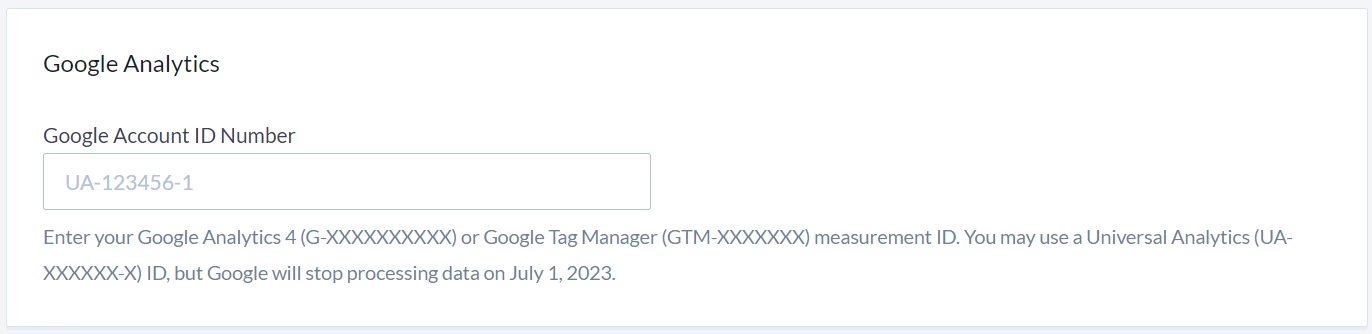
Step 2: Paste your Google Analytics property to the Text Box
The property should follow this format: G-XXXXXXXX.
Step 3: Save and Re-Publish Your Form
How do I track online actions forms using google analytics? | How does track online actions forms using google analytics work in EveryAction? | Why can't I track online actions forms using google analytics? | Where do I track online actions forms using google analytics in EveryAction? | What is track online actions forms using google analytics in EveryAction? | How to track online actions forms using google analytics? | Can I track online actions forms using google analytics in EveryAction?