


How do I Enable PayPal on a Contribution or Ticketed Event form?
To select your PayPal gateway on a Contribution or Ticketed Event form:
Step 1
- From the homepage, navigate to the left-hand menu. Click Engagement > Communication Tools > Online Actions.
- Or use the Search for a page field and type Online Actions.
Step 2a
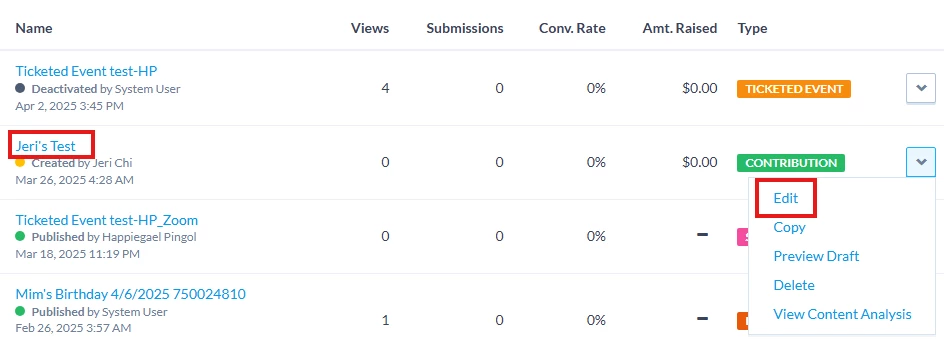
Navigate to your Contribution or Ticketed Event form in the drafts
Or
Step 2b
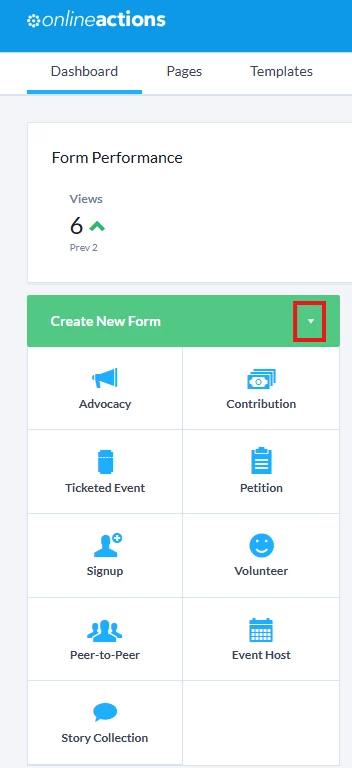
Create a new Contribution or Ticketed Event form by clicking Create New Form and choose your preferred form type.
Step 3
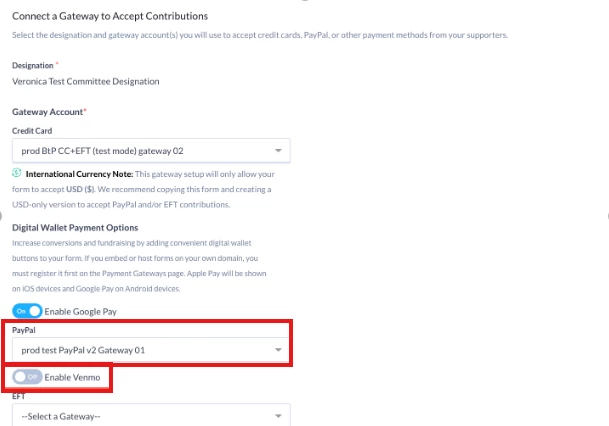
On the Basics page of your form, scroll down to the "Connect a Gateway to Accept Contributions" section.

Step 4
Under "Digital Wallet Payment Options" select your new PayPal gateway.
Step 5
In the same section, you can also toggle "Enable Venmo" on or off to allow your donors to pay with Venmo.
Not quite what you were searching for?
-
Navigate back to the Paypal Resource Index.
How do I enable paypal on a contribution or ticketed event form? | How does enable paypal on a contribution or ticketed event form work in EveryAction? | Why can't I enable paypal on a contribution or ticketed event form? | Where do I enable paypal on a contribution or ticketed event form in EveryAction? | What is enable paypal on a contribution or ticketed event form in EveryAction? | How to enable paypal on a contribution or ticketed event form? | Can I enable paypal on a contribution or ticketed event form in EveryAction?