

🔄 Request changes on donation match requests, without re-submission

🎯 Who it’s for: Company admins and employees
📅 Release date: Nov. 17, 2026
A donation match request that’s wrong in one detail no longer has to start over. Admins can now ask employees to fix their submission instead of rejecting it, and employees can correct and resubmit without uploading their receipt again.
🆕 What’s new
-
🙋 Admins can request changes. On a match request, choose Request changes instead of Deny and tell the employee what needs fixing. It’s available one at a time or in bulk. In Organizer, go to External Donation Match Requests and look on the Pending tab
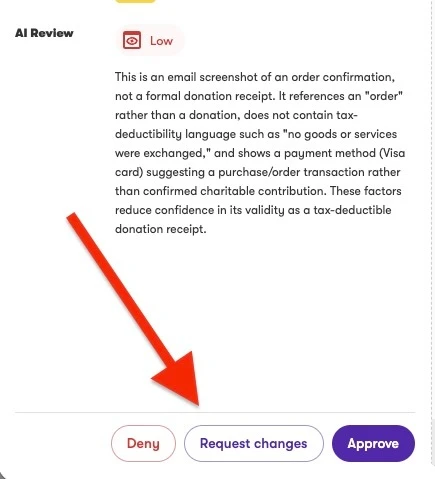
- 📧 Employees get an email. It includes the reason for the change and a link to their submission in the app.
- ✏️ Employees correct and resubmit. Choose Make changes and resubmit, update the prefilled details, and send it back. The receipt is reused, so there’s no need to upload it again.
- 🔍 Admins see what changed. The resubmission returns to your queue marked as a resubmission, with the date changes were requested, your reason, and what the employee changed. You can approve it, deny it, or request changes again.
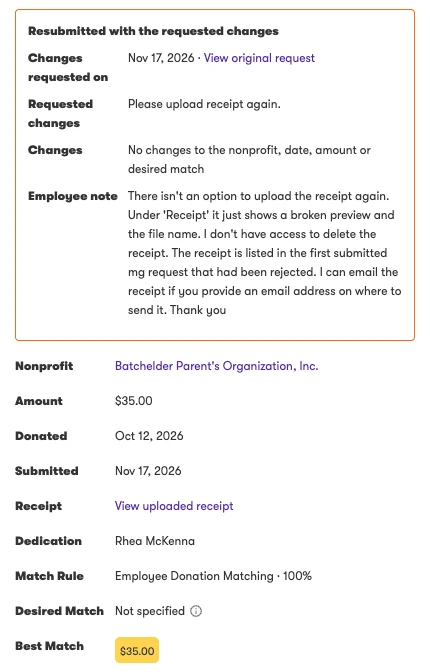
- 🏫 Match AI checks the right identifier. Match AI now compares each nonprofit identifier on a receipt only against the organization’s identifier of the same type, such as EIN with EIN. A receipt from a school’s PTA no longer passes as the school.
- 📊 See the Match AI confidence level on decided requests. It’s shown on approved and denied requests, and it no longer changes after a decision is made.
- 🔎 Search every tab. Search match requests on the Pending, Approved, and Denied tabs.
- 🏷 More accurate eligibility labels. Approved and denied requests no longer show a false “Not Eligible” label in the detail view.
💡 Good to know
- Employees can change the nonprofit, donation date, and donation amount. The receipt itself can’t be replaced.
- A resubmission arrives as a new request linked to the original. The original is cancelled, and the gift is counted once.
- Requests you’ve asked changes on don’t expire. You can still deny them later.
- If a receipt doesn’t show a nonprofit identifier, matching works as it did before.
- Reviewing match requests, including Request changes, requires the match-donation privilege. Admins without it can view requests but not review them.
👥 Who is affected
Company admins who review external donation match requests, and employees who submit off-platform donations for matching, at companies with external donation matching enabled.
✅ Action required
None. This is live for every company that already has external donation matching enabled, with no opt-in or configuration.
✨ Why This Matters
A denied match is no longer a dead end. Admins resolve fixable requests in one round trip instead of a support conversation, and every decision is easier to find and explain, with search on every tab and the confidence level kept visible afterward.