


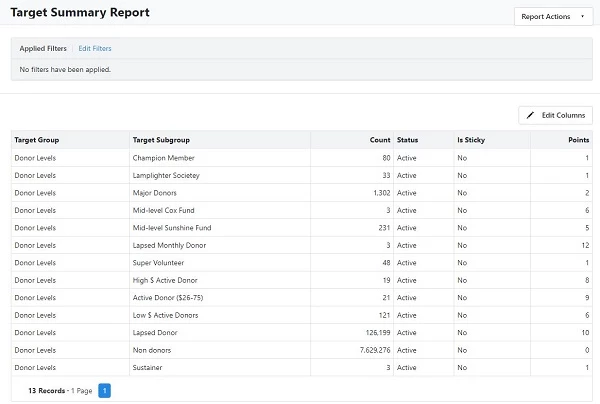
How do I get a summary of Donors in each level?
Step 1: Navigate to the Report Manager
Step 2: Select Default Reports
Step 3: Run the Target Summary Report
Locate and run the Target Summary Report. This report will give you an overview of how many donors are in each donor level within your system.
Not quite what you were searching for?
- Navigate back to the Reporting Resource Index.
How do I get a summary of donors in each level? | How does get a summary of donors in each level work in EveryAction? | Why can't I get a summary of donors in each level? | Where do I get a summary of donors in each level in EveryAction? | What is get a summary of donors in each level in EveryAction? | How to get a summary of donors in each level? | Can I get a summary of donors in each level in EveryAction?