

How to: Search and report on phone numbers
When reaching out to voters, volunteers, donors, and other supporters by phone it can be helpful to identify people with phone numbers, see the phone numbers you have in your database, view their SMS opt-in status, and export phone numbers. Our tools allow you to collect and manage more details about the numbers that you can use to create meaningful segments or track your results in a number of ways.
Searching on phone numbers
You may want to create lists of people with phone numbers when using Virtual Phone Bank, RoboCalls, RoboSurveys, Mobile Messaging, SMS API integrations, Distributed Contacts phone campaigns, or Direct Response telemarking campaigns.
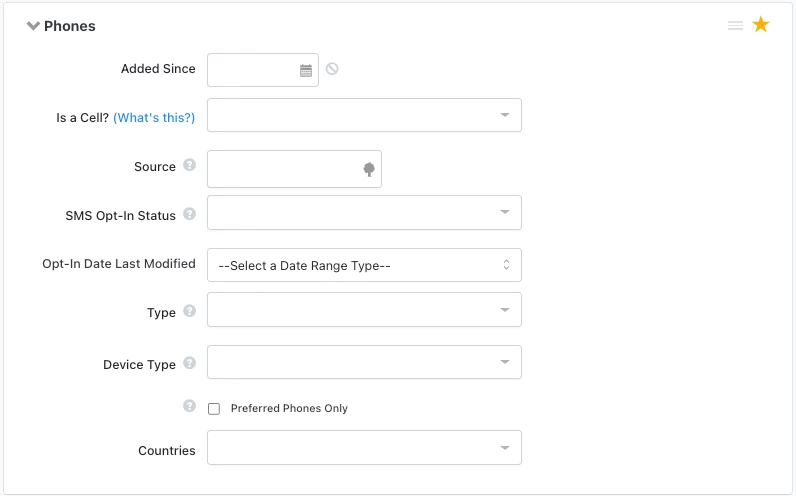
From Create A List > Phones, you can refine your list to contacts whose phone numbers fit specific criteria.
Available search criteria include:
- Added Since: This option lets you select contacts whose phone numbers were added since a particular date.
- Is a Cell?: With this field, you can select contacts based on whether their numbers are mobile numbers or not. Your options here include Verified Cell, Likely Cell, Likely Not a Cell, and Not a Cell.
- Source: The source field lets you specify how the phone was added to the record. The options here are Bulk, Mobile, User Added, Voter File, or Check All.
- SMS Opt-In Status: You can choose contacts based on whether they agreed to receive SMS messages from you. The options here are Opt-In, Opt-Out, and Unknown.
- Type: This field lets you select records based on the type of phone number listed - Cell, Fax, Home, Main, Other, and Work.
- Device Type: This field lets you select records based on the device type of the number - Cell, Landline, VoIP, Fax, Unknown
- Preferred Phones Only: Checking this box limits your search by only including the phone numbers that your contacts prefer to use.
- For example, if your contact prefers for you to contact them at home but you also have a work number for them, they would be excluded from any search on work numbers and only be included in searches on home numbers.
- If this box is checked but no number was manually marked preferred in a contact record, most databases default to the most recent phone number and type entered to determine if it should be included in your search. For VoteBuilder, contact your administrator regarding how Preferred phones are determined.
- Countries - This field lets you narrow your search to phone numbers from particular countries.
In some cases, you may want to household your list by phone number to avoid duplicates.
Keep in mind that if you are using Virtual Phone Bank, you should enable householding in the phone bank settings rather than householding your list. Enabling householding on your phone bank will ensure that your callers can accurately track responses from each person in the household, and you can choose whether to include people in the household outside of your targeted list. However, householding your list can inadvertently exclude some individuals from your phone bank.
You can household your list from Create A List using Add Step > Householding > Narrow List to one person per > Phone number.
Reporting on phone numbers
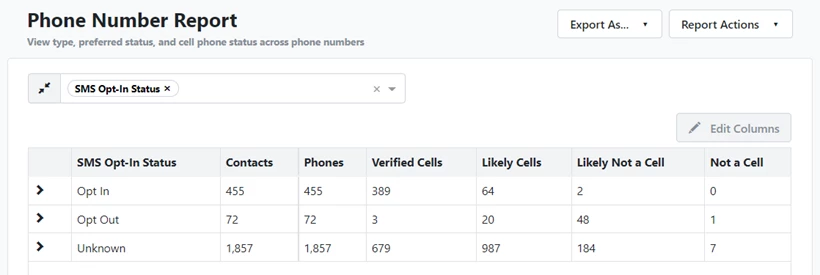
The Phone Number Report allows you to view phone type, preferred status, SMS Opt-In Status, and cell phone status across phone numbers and is a great way to get a sense of how many phone numbers you have to work with. This report shows one row per phone number.
Like with other reports in Report Manager, you can Group By various columns to identify trends in your phone numbers. For example, you could group by SMS Opt-In to see how many contacts can receive your broadcast text messages.
Exporting phone numbers
You have a few different options for exporting phone numbers:
- Phone Number Report: This is the easiest way to view and export phone numbers and the people they are associated with. Remember that this report contains one row per phone number.
- Standard Text Export: This export option is recommended if you need to add columns for information other than name and phone, or if you would like one row per person instead of phone number. Be sure to customize your Standard Text Export and include the types of phone numbers you'd like. To avoid duplicate phone numbers, see the instructions above about householding your list.
- Householded Phone List: This is similar to exporting the Phone Number Report in that it includes one row per unique phone number. It's a quick option t use from My List, but the columns cannot be customized like the report. If the phone number exists on more than one voter file record, the ID and name will be the first record the phone number was added to. In addition to the phone number and VAN ID, the export contains name and Phone Source.
Not quite what you were searching for?
- Navigate back to the Reporting Resource Index.
How do I search and report on phone numbers? | How does search and report on phone numbers work in EveryAction? | Why can't I search and report on phone numbers? | Where do I search and report on phone numbers in EveryAction? | What is search and report on phone numbers in EveryAction? | How to search and report on phone numbers? | Can Isearch and report on phone numbers in EveryAction?