

Fundraising Essentials Coaching Welcome Guide
Welcome to the Fundraising and Engagement Coaching Program
Thank you for joining the Bonterra community - a group of thousands of nonprofit organizations from across the country, spanning countless locations and myriad mission areas, sharing one common goal: to increase their fundraising and the impact they are having to make the world a better place. We're happy you're here!
As a forward-thinking organization, you have gone one step further and joined our Fundraising and Engagement Coaching Program, which will match you with a seasoned fundraising professional and provide you with a unique opportunity to dream bigger and to develop a personalized plan to reach your goals.
To help you make the most of your experience in the Coaching Program, we have put together this Welcome Guide & Checklist to help you hit the ground running.
Getting to Know Your Network for Good Team
-
Fundraising and Engagement Coach
-
Your champion for developing new fundraising strategies, brainstorming ideas for new campaigns, and motivating you to achieve your goals.
-
-
Onboarding Team Member
-
Your helping hand to learn the technical aspects of your new software. You will have a welcome call with one of our colleagues to introduce you to your system and answer your logistical questions about working with the software.
-
-
Data Import Specialist
-
Your guide to learning how to prepare your data (contacts, donation history, etc.) to be imported into the software.
-
- Global Support
-
Your software in-app support is typically the swiftest method to reach our Global Support team. Once you have logged into your new software, you can open a ticket by clicking "Contact the Support Team" under the top-right menu.
If you are unable to submit a ticket via your new software, you can email Global Support: success@networkforgood.com.
Bonterra’s Customer Support Service Level Agreement (SLA) may be found on the legal guidelines page.
If you are not sure who to contact with your question, you can submit a request for help with any Bonterra need or department by visiting this link.
-
Completing Your Fundraising Assessment
Your coach will be excited to get to know your organization and your specific challenges and goals regarding fundraising. To help your coach get to know you more quickly, they will be sending you a "Fundraising Assessment" - an easy to complete survey of the most important aspects of your fundraising efforts. Remember that we want you to be honest, and that there are no wrong answers or silly questions. We're here to help! We encourage you to complete your Fundraising Assessment as soon as possible, within 24 hours of your first session, if timing allows.
Using Your Coaching Time
You should be aware of the specific number of hours that you have available to work with your coach and the date by which to complete (use/lose) those hours. If you are unsure how many hours you have available, be sure to check with your coach by email or during your first session. We also recommend adding a reminder to your calendar so that you know when your use-by date is approaching, as well as spending some time thinking about how you want to utilize your time available, which can be done in the following ways:
-
Sessions: Live, virtual meetings with your coach via our web conferencing software Zoom (or over the phone if you prefer).
-
Desk Time: Time that your coach will use to work independently on a project that you have requested. Examples include reviewing an appeal letter or communications plan.
-
Administrative Time: Time your coach will use to contact you to schedule sessions, check your hours, take and review discussion notes, or send follow-up resources.
Sessions
Organizations meet with their coaches regularly to keep them informed about their current fundraising efforts, to brainstorm new campaigns, and to troubleshoot any fundraising strategy- related questions they may have. Sessions are available in 30-minute or 60-minute increments and can be scheduled one at a time or be set up on a recurring basis, for instance monthly. Individual sessions can be rescheduled or canceled as needed, or alternatively, you can opt to transfer one of your upcoming sessions to Desk Time if you have a specific communication that you would like your coach to write or review for you. (Learn more about Desk Time in the next section.)
Scheduling sessions takes place right in your Fundraising Essentials software. Simply log in and click on "My Tools" in the top right-hand corner of your screen before choosing the item with your coach’s photo from the drop-down menu. There you will see your coach's photo, email address, and scheduling page. Remember to change the time zone in the space provided if necessary, so that you see options in the correct time zone.
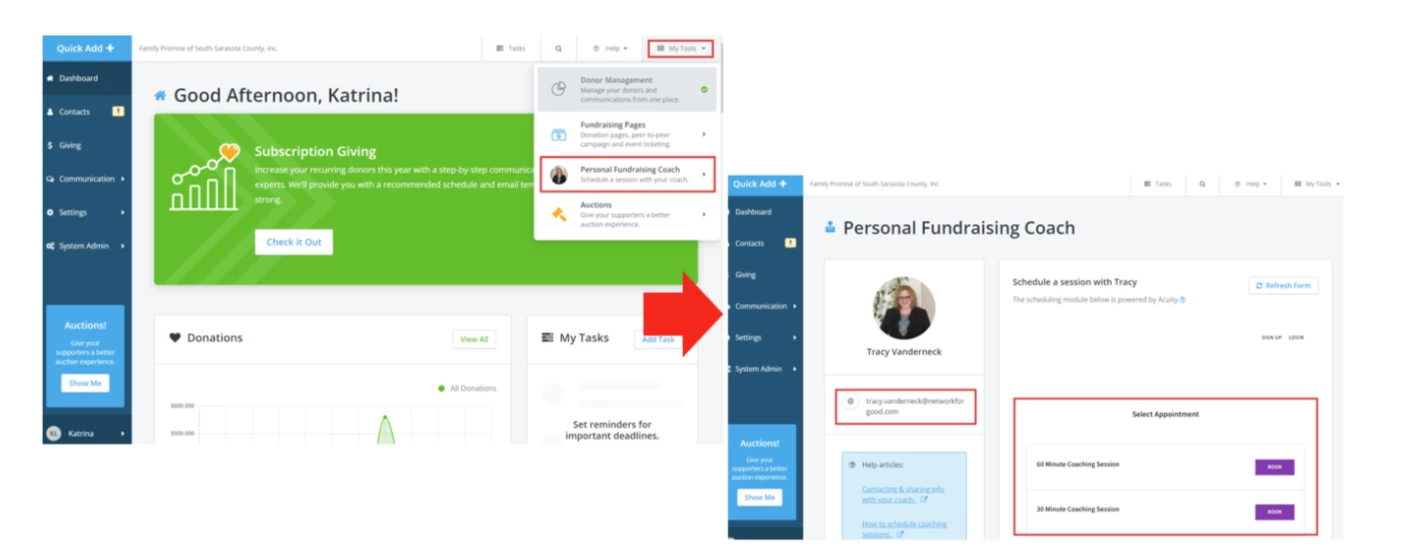
We encourage all organizations to schedule their sessions through their fundraising software rather than by emailing their coaches directly. Your coach will have already input their availability into the system, including any dates that have already been booked by other organizations or when they are planning to be out of the office.
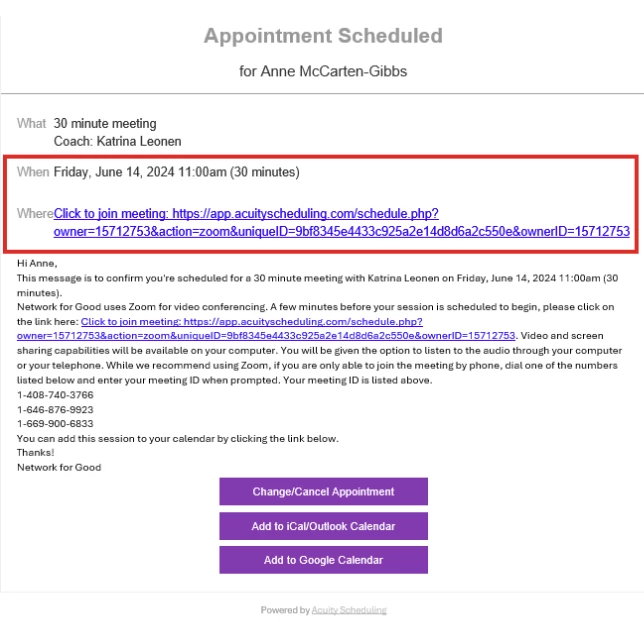
Once your session has been scheduled, you will receive an automatic confirmation email directly from the scheduling system. This confirmation email will include information needed to join your session at the appropriate date and time. We encourage all customers to join the session via Zoom. If you have not used Zoom before, you can find detailed information about using Zoom at www.zoom.us. However, if you need to join by telephone due to technological limitations, we are happy to accommodate you. Your confirmation email will also include instructions to join by telephone, if needed.
Want some of your colleagues to join you for your next session?
No problem! You can include colleagues or board members in your session if they are involved in your fundraising efforts and you would like them to join a discussion with your coach. We recommend no more than three total individuals unless you have discussed the larger number with your coach. They will also need instructions to join a session. To ensure they receive the instructions as well, you can include their email address in the relevant field when scheduling the session (add their email address next to yours and separate them with a comma). Be sure to let your coach know in advance so that they know who they will be meeting with.
Need to make changes to your session?
You can do that via the confirmation email that you will receive from the system. You can either reschedule your session for a new time or cancel it completely. However, you will be unable to schedule a new session or make changes to your session if it is less than 24 hours away. If you are within this 24-hour window, please contact your coach directly to notify them of the change and they will be able to assist you.
Your first session will focus on the information that you provided in your Fundraising Assessment. Your coach will be happy to share their initial recommendations and answer any questions that you may have. Your first session is also a great time to talk about the aspects of fundraising you would like to focus on during your next few sessions. Do you have a fundraising event coming up, or is there a particular campaign that you are planning? Are there issues with your board you would like to resolve? Let your coach know what your priorities are so that they can help meet your individual needs.
Desk Time
In addition to meeting with your coach during your sessions, you have the option to use some of your coaching time as Desk Time. This means that your coach will reserve time on their calendar to work on a project independently and then send it to you via email once it's ready for you.
Examples of popular Desk Time projects include content drafts. Coaches work with you to incorporate best practices, improve storytelling, and highlight impact. They do not typically draft the content for you. Our Fundraising and Engagement Coaching Library has practical, easy-to-use guides and templates that can help get you started. Your coach will use Desk Time to review your draft communications and plans:
- Appeal Letters
- Appeal Email Blasts
- Social Media Posts
- Acknowledgement Templates
- Stewardship Plans
- Communication Plans
To request a Desk Time project, please email your coach directly or speak with them during your next coaching session. If you have not yet saved your coach's email address, you can find it by logging into your fundraising software, going to My Tools in the top right-hand corner, and selecting the item with your coach’s photo from the drop-down menu.
Please note that coaches can only assist with Desk Time projects that can realistically be completed within the number of hours you currently have available and that directly relate to the focus of the Coaching Program, which is individual giving. Coaches are therefore unable to assist with grant writing, prospect research, capital campaigns, and other more time-consuming projects.
Keeping Track of Your Hours
One-on-one coaching sessions are the core of this program. While many organizations also use some Desk Time, it is certainly not necessary. But it's a helpful option for those that have a reason to use some of their time in this way.
As organizations begin using their time, they should keep a record of the number of hours they have already used so they know how many hours are remaining; however, you can always check with your coach if you are unsure. You can plan with your coach how to best use your hours by the use-by/completion date.
If you run out of hours before your completion date and wish to purchase more, ask your coach to notify our sales team. Alternatively, if you find that you have ample time remaining when your completion date is nearing, you should contact your coach to talk about how to make use of your available time before it is lost.
Additional Resources
You also have access to additional resources designed by our expert coaches just for you. Visit the Fundraising and Engagement Coaching Library for helpful e-guides, sample communications, and other documents.
Any Questions?
Congratulations! By joining the Coaching Program, you have made a first step on an exciting journey, and we're here to help you along the way. If you have any technical issues with your fundraising software, please contact success@networkforgood.com. If you have questions about scheduling a session, requesting Desk Time, or you need strategy tips, please contact your coach directly.
We look forward to working with you!
- Complete the fundraising assessment that has been sent to you by email and return it to your coach before your first session.
- Make sure that your computer and/or smartphone are ready to use Zoom, our web conferencing software, before your first session. Visit www.zoom.us for further information to help you get started if you have not used it before.
Getting Started Checklist
First 3 Months in the Coaching Program
Month 1
-
Be sure to add your coach's email address as a contact in your email account so that you never miss an email from them. You can find your coach's email address by logging into your fundraising software, clicking on “My Tools” in the top righthand corner of your screen, and then clicking on your coach’s photo.
-
Schedule your coaching session well in advance and build routine by opting to schedule recurring sessions. Include any specific questions for your coach in the space provided on the scheduling form. Plan to meet with your coach for at least one hour per month, either in one 60-minute session or two 30-minute sessions.
-
Make sure that your computer and/or smartphone are ready to use Zoom, our web conferencing software, before your first session. Visit www.zoom.us for further information to help you get started if you have not used it before.
-
Familiarize yourself with the support features in your fundraising software, including the Knowledge Base (full of helpful articles and videos), live trainings and office hours with the support team, and how to reach out to the support team with direct questions. Schedule time to attend a live training or watch a pre-recorded training to learn more about a specific aspect of the software.
-
Upload your data to your fundraising software. If you have any questions about uploading your data, contact success@networkforgood.com.
-
Begin setting up your new Everyday Giving Page.
-
Set up donation acknowledgement templates so that you are ready to thank your donors when they make a gift.
-
Set up your email blasts to show that they are "from" your organization. Follow these instructions to have your emails come from one or your organization’s email addresses.
Month 2
-
Continue meeting with your Fundraising and Engagement Coach every month throughout your time in the FEC Program. Begin thinking about desk time projects that you would like to request.
-
Finalize your new online giving page. Ask your coach for feedback if necessary. Connect this page to a donate button on your homepage as soon as possible.
-
Learn how to segment your contacts once they have been uploaded to your fundraising software, and how to add additional contacts and/or offline donations through the bulk import process when needed.
-
Begin preparing and sending communications out from the system if you have not already done so, such as email blasts and/or text messages.
-
Identify new aspects of your fundraising software that you want to learn more about. Participate in live trainings and office hours with the support team as needed and reach out to them directly with any technical questions that you may have.
Month 3
- Begin promoting the link to your everyday giving page in your social media posts. We recommend doing so at least once every two weeks.
How do I fundrais essentials coaching welcome guide? | How does essentials coaching welcome guide work in EveryAction? | Why can't I fundrais essentials coaching welcome guide? | Where do I fundrais essentials coaching welcome guide in EveryAction? | What is essentials coaching welcome guide in EveryAction? | How to fundrais essentials coaching welcome guide? | Can I fundrais essentials coaching welcome guide in EveryAction?