

bwiggins
Explorer
Oct 12, 2026 8:35 PM UTC
Solved

Deed Verification with Paypal

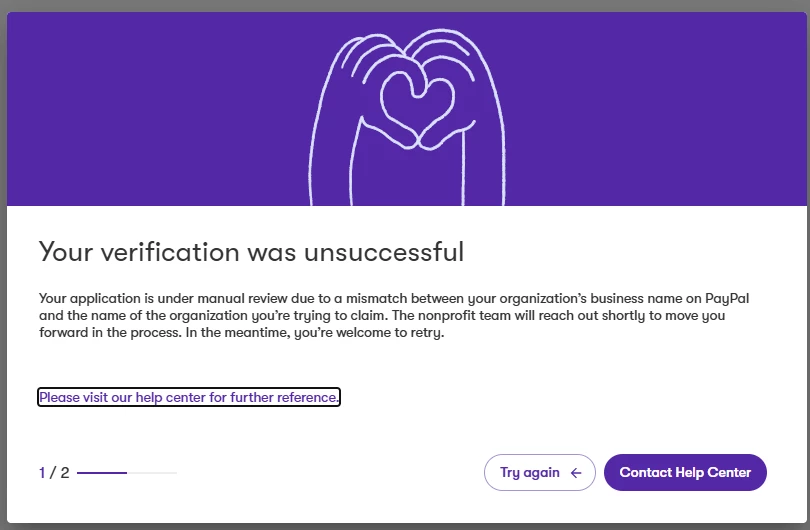
I am having difficulty getting my Deed account set up. I am asked to verify our identity through Paypal, but we keep getting a mismatch of name, though I am not sure why. I am given a notification that someone will reach out to us about it, but it has been weeks and we have heard nothing.

Any suggestions or any way I can actually speak to a human to ensure that my account gets set up properly?


    Rebekah Eslao
    Community Manager
    Oct 13, 2026 3:41 PM UTC

    Hi there ​@bwiggins! Here’s what’s likely going on: your organization is categorized as an Other Nonprofit (501(c)(4), 501(c)(6), or 501(c)(19)) rather than a 501(c)(3)). Organizations in these categories need a PayPal Business account to complete verification.

    The key thing to check: the name on your PayPal Business account must match your organization name in Deed exactly. Deed pulls organization info directly from the IRS database based on your EIN, so even small differences (extra spaces, punctuation, abbreviations) can cause a mismatch.

    Start by double-checking that your organization name is identical across both accounts. If the names match and you’re still hitting the error, our support team can dig into this directly: Click Contact Support inside your Deed profile or  Submit a request – Bonterra


    Hope this helps!

    Rebekah at Bonterra

    1 reply

    Rebekah Eslao
    Community Manager
    Oct 13, 2026 3:41 PM UTC

    Hi there ​@bwiggins! Here’s what’s likely going on: your organization is categorized as an Other Nonprofit (501(c)(4), 501(c)(6), or 501(c)(19)) rather than a 501(c)(3)). Organizations in these categories need a PayPal Business account to complete verification.

    The key thing to check: the name on your PayPal Business account must match your organization name in Deed exactly. Deed pulls organization info directly from the IRS database based on your EIN, so even small differences (extra spaces, punctuation, abbreviations) can cause a mismatch.

    Start by double-checking that your organization name is identical across both accounts. If the names match and you’re still hitting the error, our support team can dig into this directly: Click Contact Support inside your Deed profile or  Submit a request – Bonterra


    Hope this helps!

    Rebekah at Bonterra