


How do I give standard users Report Center access? (Role-Based Permissions)
Follow the steps listed below to learn how to give standard users Advanced Access to Report Center tasks in their navigation bar.
Step 1: Navigate to the user
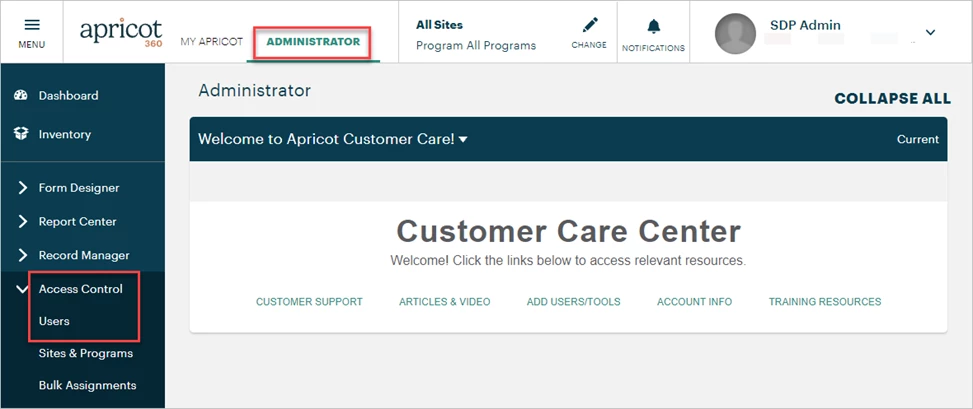
In the Administrator view of Apricot, expand Access Control in the navigation bar and select Users.
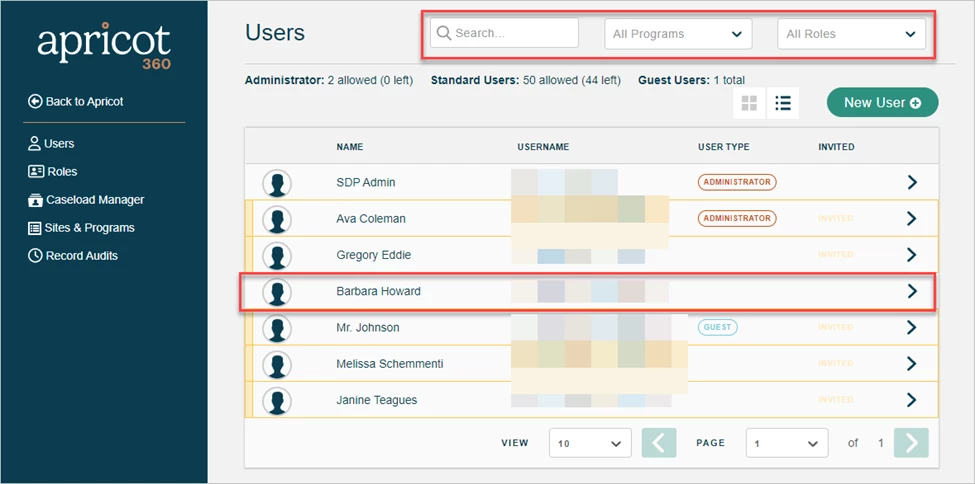
A list of users in your Apricot site will be displayed in the Account Management app. You can type a name in the Search Field or use the Programs or Roles dropdowns to filter the results. Select the standard user you want to edit access for.
Step 2: Select Advanced Access tasks
Scroll to the Advanced Access section at the bottom of the User Details page. Click the ‘+’ icon to expand the Report Center category and check the box next to each task you want to assign the standard user.

Once a task is selected, the gray toggle to the right of the category name will turn yellow, indicating that the standard user has access to some administrative tasks.

Clicking the toggle itself will select every task within the category. The toggle will then turn green to indicate the standard user has all available administrative access.

-
Reports: The user can create and edit reports using the Report Builder tool.
-
Note: You must first create a Category for the user to place reports into or give them ‘Edit’ permission to an existing Category within their Role(s), as they will not have access to create a new Category. They will only be able to create new reports by default.
-
Note: Granting ‘Edit’ permission to an existing Category will also give the user access to edit any reports within that Category.
-
-
Aggregate Reports: The user can create and edit Aggregate Reports.
-
Note: The user must also be granted Advanced Access to Reports to edit Aggregate Reports using the Report Builder tool.
-
-
Data Archives: The user can export data from forms they have ‘View’ permissions for within their role(s) through the Data Archives tool.
Step 3: Update their Advanced Access
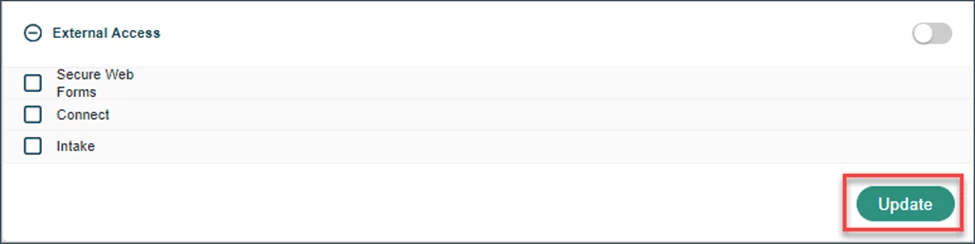
To save the adjustments made to a standard user's Advanced Access, click the "Update" button at the bottom-right of the page.
What else do you need help with?
-
Not what you’re looking for? Navigate to overview
How do I give standard users Report Center access in Apricot? | How do I assign Advanced Access tasks to a user? | How do I let a user create and edit reports? | How do I give a user access to Aggregate Reports? | How do I let a user export data through Data Archives? | Why can’t a user create a new report category? | How do I update a user’s Advanced Access in Apricot?