

How do I prepare before creating Facebook ad audiences?
While you cannot remove a group of contact records without the assistance of our Support Team, the steps below will help you take steps to resolve this efficiently and smoothly.
Step 1: Determine which records to keep and which ones to remove
This may seem like an obvious step - but, sometimes making these decisions is not as simple as asking, "Who has never donated to our organization?"
A couple of other groups to consider:
-
contacts who have not attended an event ('Donor Management' does not count tickets or sponsorships as donations)
-
contacts who are (or are not) engaged with your organization
Step 2: Create a filter to segment contacts to remove
We recommend creating a custom filter under your 'Contacts' tab that looks similar to the one below:
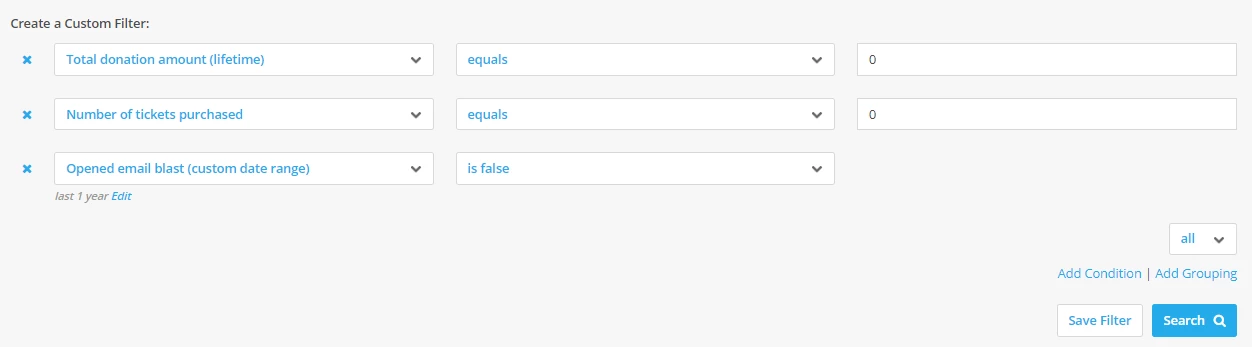
This filter includes the following conditions:
-
Total donation amount (lifetime) > equals > 0: this condition will pull any contacts that have no donation records associated with their profile
-
Number of tickets purchased > equals > 0: this condition will pull any contacts that have never bought tickets for an event
-
Opened email blast (custom date range = 1 year) > is false: this condition will pull any contacts that have not opened any e-mails you have sent through 'Donor Management'
Step 3: Create a group to segment contacts to remove
Once you have created the filter, you can add all resulting contact records to a new group, titled: 'TO BE DELETED'
To add multiple contacts to a group, follow the instructions in this article.
When this is all set, you can contact our Support Team and they can remove the contacts within that group from 'Donor Management'!
Note: We recommend exporting a copy of the contact records you plan on removing and saving it within your records for recordkeeping purposes.
Not quite what you were searching for?
Navigate back to the Feature Overview.
Not quite what you were searching for?
- Navigate back to the Digital Ads Resource Index.
How do I delete contacts in bulk in Donor Management? | Why can’t I bulk delete contact records myself? | How do I create a filter to find inactive contacts? | How do I remove contacts who have never donated? | What is the best way to clean up old contact records? | How do I export contacts before deleting them? | How do I ask Support to remove a group of contacts?
How do I prepare before creating facebook ad audiences? | How does prepare before creating facebook ad audiences work in EveryAction? | Why can't I prepare before creating facebook ad audiences? | Where do I prepare before creating facebook ad audiences in EveryAction? | What is prepare before creating facebook ad audiences in EveryAction? | How to prepare before creating facebook ad audiences? | Can I prepare before creating facebook ad audiences in EveryAction?