

Success Guide: Record-keeping for compliance
(9 min read)
I’ve been helping campaigns and PACs file their reports for many years and when I’m working with treasurers, compliance officers, and finance directors, my biggest piece of advice is:
Don’t let things build up, have a plan for everything, and file early!
Tracking transactions in your database can simplify the process of filing your disclosure reports. Political organizations need to reconcile their accounts to the penny. Making a plan before you get started will help ensure that you’re recording everything you’re supposed to and keep you from cramming to reconcile your data in the last days before a report is due. Creating a strong process upfront will save a ton of pain later.
Begin by understanding what you need to track
It helps to begin by writing down each of your revenue streams and mapping out how they need to be reported on your disclosure reports. Then, make sure you know how to record them in your database. For example, contributions received from ActBlue may have additional reporting requirements and some states may even require specific tracking of pledges or event contributions.
If you’re uncertain how a transaction should be classified, ask the entity that you receive the revenue from. For example, if something is coming from ActBlue, they’ll probably tell you to record it as an Earmarked Monetary Contribution at the Federal level. Just run it by your filing entity or legal team before inputting or committing it on your final report. Your regulatory entity will have the final word on what you need to report everything and how everything should be reported.
The other thing you can do is look at our state and federal filing guides. They're wildly helpful for showing you how to enter your information into the database correctly so that it appears on the report the way you expect it to.
Read more about filing state reports
Read more about filing federal reports
Watch out for these gotchas when setting up your database
 Once you’re clear about how you will record your transactions, you can set up your database for auditing data and filing disclosure reports.
-
Set up your Cycles and Limits
Setting your Cycles and Limits lets you track things like campaign limits and transactions to be included in your disclosure report. You’re going to need to set them before you begin adding any contributions or disbursements. Once they're added, update any existing Online Actions forms with your new Period and Cycle.
Read more about setting up your records for the next election cycle
-
Send us your committee ID
As soon as your committee or campaign is assigned an ID, send it to Support so that we can add it to your designation. In many federal and state jurisdictions, you can't actually transmit your report to your reporting authority if you don't have your committee ID in your designation.
Do frequent, consistent data entry
Even before you begin adding any contributions or disbursements, develop a plan for how you're going to get everything into your database.
-
Create Bulk Upload templates for all expense and revenue streams
 You’re probably going to be regularly uploading transactions from various channels. Creating and saving a Bulk Upload mapping template for each of your revenue and expenditure streams will simplify your process and make it faster to upload your new transactions without remapping things every time. Consider creating templates for things like:
-
ActBlue donations
-
Cash or check contributions
-
Credit Card charges or payments
-
Bank Processing fees
Read more about creating Bulk Upload templates
Watch a quick Bulk Upload tutorial
-
Use Financial Batch Manager to add and track contributions
The Financial Batch Manager can be a good way to input and track your contributions in your database. It will also let you close a batch once you’ve reconciled your data for that week or that month with your bank statements, so no one can edit the contribution entries.
Read more about managing batches
Read more about adding contributions
-
Regularly add your disbursements
You can add disbursements individually or as part of a bulk upload. While you can add a batch number to your disbursements, they cannot be locked in the same way. So you should plan to regularly run your disbursement reports to make sure they match your external bank records.
Read more about adding disbursements
You can also use our QuickBooks Disbursements Integration to connect your QuickBooks Online account to our system to easily import, review, and modify disbursements.
Read more about using the QuickBooks Disbursements Integration
-
Be sure to enter your debts and loans the right way
While there are similarities between Debts and Loans, they are handled slightly differently when adding the transaction to your database. Loans are usually legally binding agreements with a financial organization or individual while debts are usually less formal arrangements of temporary loans by businesses or individuals. Make sure you understand how to record each of these in your database so any payments on them are correctly tracked for your disclosure reports.
Read more about entering debts and loans
 Once you’ve figured out how to get all your transactions into the database, you can start working with your Finance Team to figure out how you want to handle things like creating and assigning source codes and how often you’ll be uploading your disbursements and contributions into the database. You’ll probably want the compliance team to handle the import of these transactions, but you should make sure the frequency matches the needs of your Finance team for their reporting and follow-ups.
Read more about creating source codes
Check your work as you go
You don’t want to be in the place where you're spending the week before a filing is due trying to track down errors from 3 or 6 months ago. Run reports regularly and follow up on any potential problems or missing data every week.
-
Contribution reports are your friend
 You should plan to run your contribution reports all the time to make sure that you know what you're looking at and that everything's there that you’re expecting.
If you're uploading your contributions and disbursements, running contribution reports can help you make sure that what you've uploaded looks correct and that it matches everything in your bank account up until that point in time.
If you’re using the Financial Batch Manager, it can be helpful to Group by the Batch in your contribution report, especially if you're looking at contributions as they come in weekly. You can, for example, check the entire week and compare it to your ActBlue file to make sure you’ve gotten everything uploaded.
Read more about using contribution reports
-
Have a system to track down missing employer or occupation
It’s important to have a system to track down missing employers and occupations or anything that's required for your state or federal report that you might be missing.
 One helpful tool we have for this is an Automation template that walks you through a workflow and identifies and reaches out to any donors with missing employer or occupation information. You can then direct them to an Online Actions signup form where they can update the missing information. This can be a huge time-saver and the branching workflow helps you customize the messages you are sending to your donors.
Read more about Automation templates
I also recommend that you set up a custom self-service page where donors can correct any missing personal or payment information. This allows donors to feel in control of their information and saves you the extra effort of data entry.
Read more about self-service pages
Watch more about self-service pages
-
Save and schedule an Over Limit Report to be emailed weekly
Since our system does not automatically notify you or your donor when they reach their campaign limit and will continue to process their donations, I recommend saving and scheduling your Contribution Over Limits Report and Disbursements Over Limit Report (available in the Report Manager) as soon as you’ve set up your Cycles and Limits.
I usually suggest you schedule weekly reports to cover the previous week's contributions, but you can also choose for, it to be bi-weekly or whatever frequency you'd like. The goal is to be sure that if anyone is over the limit, you learn that quickly and either move funds to the next period, if that's applicable, or refund them.
Read more about reporting for compliance
-
Use Data Integrity reports
In Report Manager, you have access to some pdf Data Integrity reports which can help you track debts or loans and any payments made on them. When you run the reports, you can easily see how much you have left to pay or if you are missing any payments that should be recorded.
We also have a really good Independent Expenditure Data Integrity report for you to use. Independent expenditures can be pretty difficult to track down if you're looking in multiple places in the database, but these reports are excellent and make it easier to see if you are missing anything.
Read more about reporting for compliance
The secret to your success: Run draft compliance reports and reconcile monthly
The secret to successfully filing disclosure reports is to plan for everything that you can possibly plan for and file early so that if something goes wrong you have time to fix it.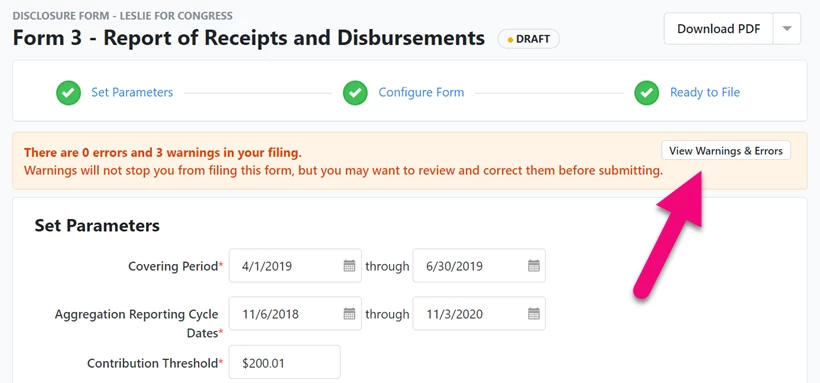
If you’re already filing monthly - keep it up! Even if you’re not required to, I think it’s a good idea to run a rough draft of your compliance report at the end of every month. Filings typically happen at the end of each quarter. Reconciling and running your report every month makes it easier to prep your final report and track down any last-minute errors or omissions.
When you have 15 days after the end of the quarter to finish your data entry for the previous month, prepare your report, and fix any problems, you will know that any errors you are getting are probably in the latest month’s filings, since earlier months already passed without issue.
If you are also tracking transactions or expenditures elsewhere, such as in Excel or an accounting system, creating a draft report every month lets you compare what’s in your database to your other records and spot discrepancies.
Finally, make a habit of filing your report well before the deadline. Filing early gives you time to receive the confirmation that the submission was received and, if for some reason you need help from the filing agency, you’ll have time to get help.
Read more about creating disclosure reports
Where to find help
We want to make sure you’re always able to file, so if you really get stuck, you can always contact our Support team. While they can’t legally tell you how your contributions or disbursements should be classified, they are great at answering things like, “I need this to be on this line. How do I get it there?” Don’t hesitate to reach out if you are encountering problems.
How do I success guide: record-keeping for compliance? | How does success guide: record-keeping for compliance work in EveryAction? | Why can't I success guide: record-keeping for compliance? | Where do I success guide: record-keeping for compliance in EveryAction? | What is success guide: record-keeping for compliance in EveryAction? | How to success guide: record-keeping for compliance? | Can I success guide: record-keeping for compliance in EveryAction?