
Start Here to Grow Your Donations
Welcome!
This quick product walkthrough video is your introduction to Network for Good — a few minutes that will help you get familiar with the platform as you dive in.
Now that you’ve seen NFG in action, let’s talk about your first steps…
Getting started can feel like a lot, but here's the thing: you don't have to figure it out on your own, and you don't have to do everything at once. The goal right now is simple — get familiar with what's ahead, plan out your first steps, and build momentum from there.
Think of this post as your playbook to getting started the right way. By the time you're done reading, you'll have a clear picture of the path ahead and the confidence to take the first steps.
Every organization gets to its first NFG donation on a slightly different path, but the milestones are the same. I’ll introduce each milestone and include links to the relevant Academy trainings, part of the Network for Good Learning Path.
First things first, bring the right people into your NFG account. Invite your teammates and set them up with the access and permissions so that the right people have access from day on and protect sensitive donor data.
📖 Learn how to setup your team in Getting Started with NFG as a New Admin.
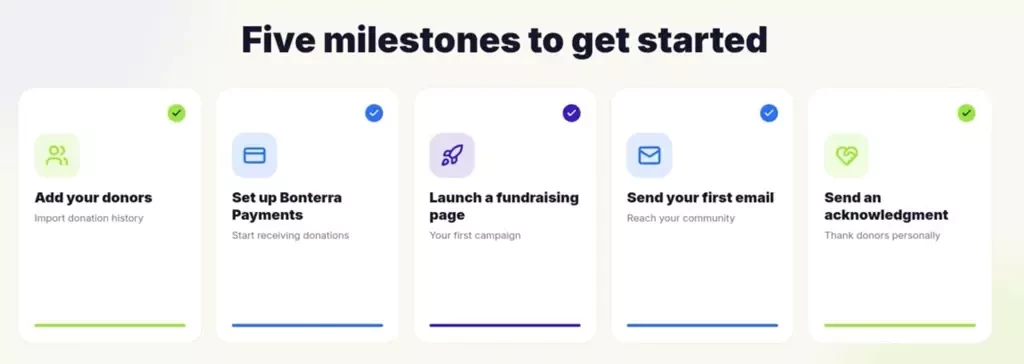
Add your donors
Adding your donors means importing your existing donor and contact records into NFG, so all your giving history, contact details, and relationships live in one place from day one. Getting this step right matters — it's the foundation for accurate reporting, personalized communications, and a donor experience that feels seamless rather than like you're starting from scratch.
Fair warning: this is typically the most time-intensive step for new customers, and that's completely normal. First, you'll prepare your data by gathering it from your current systems and formatting it correctly. Then you'll either send it to the Bonterra team or self-import using the tools available to you.
If you run into questions along the way, Office Hours is a great place to get real-time help from an NFG expert.
📖 Learn how in Successfully Completing Your Data Import
Set up Bonterra Payments
Bonterra Payments is NFG's built-in payment processor powered by Stripe, so your organization can securely accept online donations and have funds deposited directly into your bank account.
Without this step, none of your campaigns or fundraising pages can collect a gift, so it's one of the first things to get done. The good news is it's one of the quickest: most organizations complete setup in about 10 minutes. You'll link your organization's bank account, and from there, donations are processed and deposited within five business days.
📖 Learn how in Setting Up Bonterra Payments in Network for Good
Launch your first fundraising page
Your fundraising page is where donors land to actually give. It's your mission, your story, and your ask, all in one place. This is the page you'll share with donors, link on your website, and promote across your channels, so it's often the first impression someone has of your organization online.
A well-built page does more than collect donations. It builds trust, communicates urgency, and makes it easy for someone to say yes. NFG gives you the tools to create a page that reflects your brand and speaks directly to your donors, no design experience needed.
📖 Learn how to build your first page in Creating Highly Effective Fundraising Pages
🤖 Pro tip: Ask Que to ‘help me draft a smart every day fundraising page’
Send your first email
Once your fundraising page is live, email is how you can drive supporters to it and turn awareness into action. You can also send texts and direct mailers. Learning how to send an email blast from NFG is one of the most important skills you'll build, because it's how you'll communicate with donors, promote campaigns, and keep your community engaged year-round.
The drag-and-drop email editor that makes it easy to create professional, on-brand emails without any design experience and Que can generate on-brand drafts. You can build reusable templates, customize your content, and send to exactly the right people on your list.
📖 Learn how in Sending an Email Blast
🤖 Pro tip: Ask Que to ‘help me draft an email to my donors using my organizations brand and voice’
Send a donation acknowledgment
The moment someone gives, they should hear back from you. Quickly, warmly, and with the information they need for their records. A good acknowledgment is more than a receipt. It's the first step in building a lasting relationship with that donor and showing them their gift matters.
NFG makes it easy, personal, and efficient. You can build personal video acknowledgements, setup reusable templates that save you time, customize messages tailored to each type of gift, and more!
📖 Learn how in Saying Thanks with Acknowledgements
✅ That's it! Five milestones to kick off your fundraising journey with Network for Good. Work through them at your own pace and you’ll be raising money with confidence in no time.
Questions?
Drop them in the thread below, or join us for Office Hours to talk through anything with a specialist.
📖 Check out your resource guide — it rounds up everything available to you as a Bonterra customer to help you get the most out of Network for Good.
👋 And if you haven't already, now's a great time to introduce yourself and your organization to the NFG Community — say hello!