

🤖 Manage your nonprofit blocklist with Deed Engage AI chat
🎯 Who it’s for: Company admins
📅 Release date: Nov. 13, 2026
Company admins can now manage their nonprofit filters directly from the AI chat window. Block a nonprofit, unblock it, always allow it, or find out why employees can’t see it, all by asking in plain language.
🆕 What’s new
- 🔍 See what’s in place. Ask the AI to show your current filters: nonprofits that are blocked, nonprofits that are always allowed, and keywords that are excluded.
- 🚫 Block a nonprofit. Block a single nonprofit, or every nonprofit that shares its EIN.
- ✅ Always allow a nonprofit. Add a nonprofit to your always-allow list, which overrides every other filter.
- ↩️ Unblock a nonprofit. Remove a block, or remove a nonprofit from your always-allow list.
- 🔑 Manage excluded keywords. Add or remove keywords that hide matching nonprofits.
- 🕵️ Find out why a nonprofit is blocked. Ask why employees can’t see a nonprofit, and the AI will tell you the reason and offer the fix.
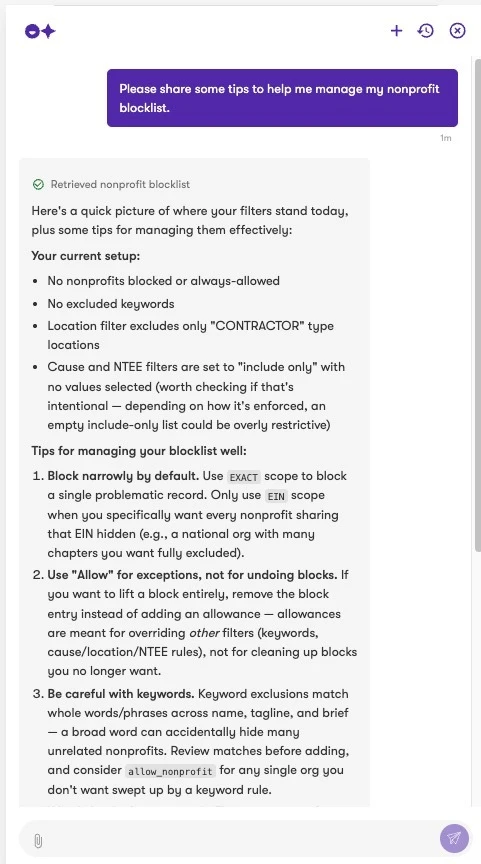
💬 Try asking
- "Block nonprofits focused on [cause]”
- “Explain how nonprofit filters work”
- “Why can’t employees see nonprofits in [location]?”
- “Which nonprofits are blocked right now?”
- “What keywords are excluded?”
💡 Good to know
- This builds on our earlier release of the self-service nonprofit blocklist UI.
- Cause, location, IRS, and NTEE-code filters are still managed in the UI. The AI can navigate you there.
👥 Who is affected
Company admins using AI features, who manage nonprofit filters for their employees.
✅ Action required
Admin users can access this feature only when AI features are enabled, and it is on by default.
✨ Why This Matters
Keeping your giving program aligned with your company’s values shouldn’t take a lot of clicks. With the AI chat, you can check your filters, make a change, or find out why employees can’t see a nonprofit just by asking, so you can make updates quickly and with confidence.