

How do I guide my event attendees in redeeming a promo code?
Once you have shared your promo codes with your event invitees, they will be able to redeem the promo code that they received during the normal check-out process.
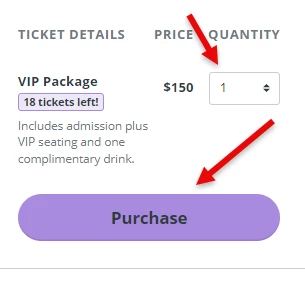
Step 1: Select the ticket type that they'd like on your Events page, then select "Purchase."
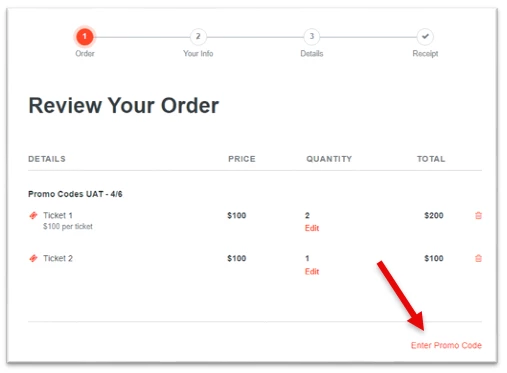
Step 2: Select the option to enter a promo code.
During the checkout process, the guest should be prompted to “Enter Promo Code” prior to finalizing their payment.
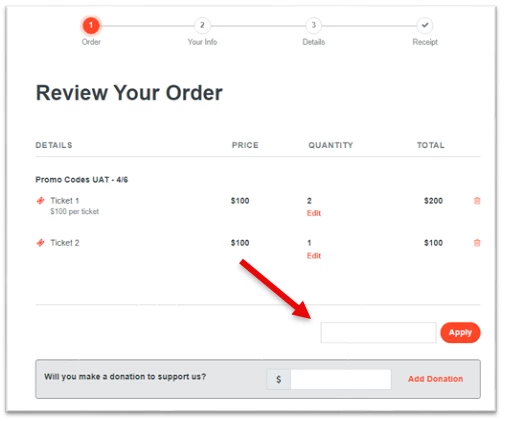
Step 3: Enter the designated promo code in the "promo code field."
At this point the guest should enter the complimentary promo code, and click “Next.”
On the next screen, the ticket should now reflect with a $0 value, and the promo code should be listed as “applied.” The guest can now complete the checkout process normally.
What else do you want to do?
Not what you're looking for?
Go back to the Feature Overview. How do guests use a promo code at checkout in Network for Good? | Where do attendees enter a discount code for event tickets? | Why isn’t my promo code applying to my ticket? | How do I redeem a coupon code for an event ticket? | What happens after I enter a promo code at checkout? | How do I apply a discount code before paying for my ticket? | How do I know if my promo code worked?