Getting Started
You can update recurring commitments through self-service pages that your donors can access themselves, or you can manually edit commitments from individual contact records. These changes help prevent donor frustration by allowing flexibility in their giving arrangements.
Feature Details
Making changes to recurring commitments is an essential part of maintaining a healthy sustainer program. The system allows you to update various aspects of a recurring commitment, including the amount, payment frequency, payment method, and end date. You can also track why donors end their commitments by using custom Cancellation Reasons.
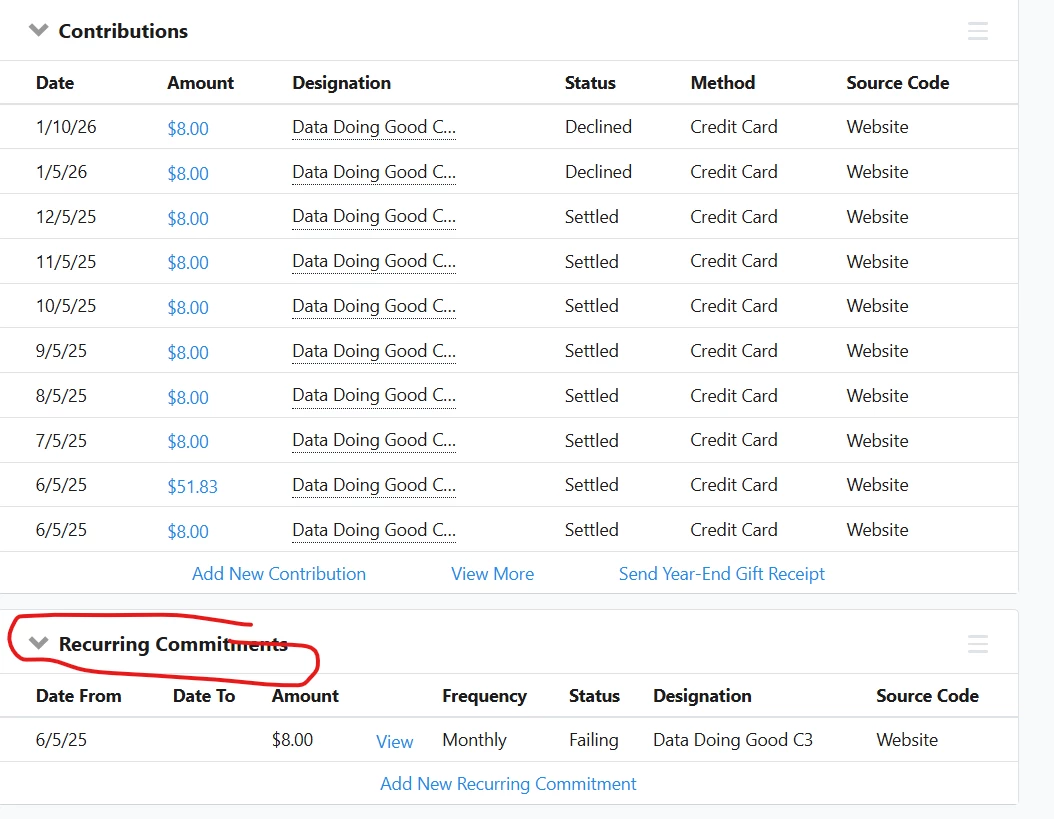
Donors can make changes themselves through customized self-service pages where they can view their giving history, update payment information, change commitment amounts, and address failing commitments. Staff members can manually edit commitments directly from contact records, accessing options to modify amounts, add end dates, change payment dates, update payment information, and add or change various tracking details.
All changes to recurring commitments, whether made by donors through self-service pages, by staff manually, or by automatic updates from payment processors, can be tracked using the Recurring Commitment Change Report.
Feature Navigation
Read more about:
- How do I update recurring commitments with self-service pages?
- How do I manually edit recurring commitments?
- How do I end a recurring commitment?
- How do I create custom cancellation reasons?
- How do I track changes to recurring commitments?
Tracking Your Success / Reporting
The Recurring Commitment Change Report is the primary tool for monitoring modifications to recurring commitments. This report shows all changes made manually, automatically by payment processors, or by donors through self-service pages. The Change Source column indicates who made the change, providing valuable insight into whether updates are coming primarily from donors or from staff interventions. By analyzing these changes, you can identify trends in upgrades or downgrades happening in your sustainer program.
Transition Statement
Understanding how to effectively manage recurring commitment changes not only helps maintain donor satisfaction but also provides valuable data to optimize your sustainer program and increase its long-term impact.
How do I understand recurring commitment changes? | How does commitment changes work in EveryAction? | Why can't I understand recurring commitment changes? | Where do I understand recurring commitment changes in EveryAction? | What is commitment changes in EveryAction? | How to understand recurring commitment changes? | Can I understand recurring commitment changes in EveryAction?