

How do I update a dynamic query for the updated permissions model?
Use this article to update a dynamic query that uses permission data. After your organization moves to the updated permissions model, the old Permission Sets tables stop updating. A query that reads from them shows old information.
📌 Action required: Dynamic queries that use the old permission tables will not be automatically updated. The old tables are not deleted on November 30, 2026, but they stop updating. Please update your queries to use the new tables for the most up to date information.
Before you begin
-
Your organization must be on the updated permissions model.
-
Make a list of your dynamic queries that use permission data. Look for queries that use the tables in the "Old table" column below.
-
Keep a copy of each query before you change it, so you can compare the results.
Which tables to use now
Permission sets no longer exist for organizations on the updated permissions model. Use role tables instead.
| What your query does today | Old tables | What to use now |
|---|---|---|
| Lists users with their permission sets and programs | permissions (permission_set_id) and users_metadata_view | Start from user_program_roles. Join to roles, so you can leave out archived or inactive roles. |
| Lists forms, roles, permissions, and programs | permissions, permission_sets_view, and programs_view | Use user_program_roles and role_permissions only. The program_override value is a column on role_permissions. |
| Finds permission sets that are tied to several roles | permissions grouped by permission_set_id | This does not apply. Permission sets do not exist for organizations on the updated permissions model. |
| Reads advanced access | data_4, data_8, and links | No change. Advanced access still reads from the same tables. |
Update a dynamic query
-
Open the dynamic query that uses permission data.
-
Find the old tables in the query. Compare them with the table above.
-
Replace the old tables with the new tables. Update the join conditions so they use role_id.
-
Join to the roles table, so archived or inactive roles do not show in your results.
-
Remove any part of the query that depends on permission sets.
-
Save the query.
-
Run the query. Compare the results with the copy of your old query. Check a few users that you know well.
Example: list users by program
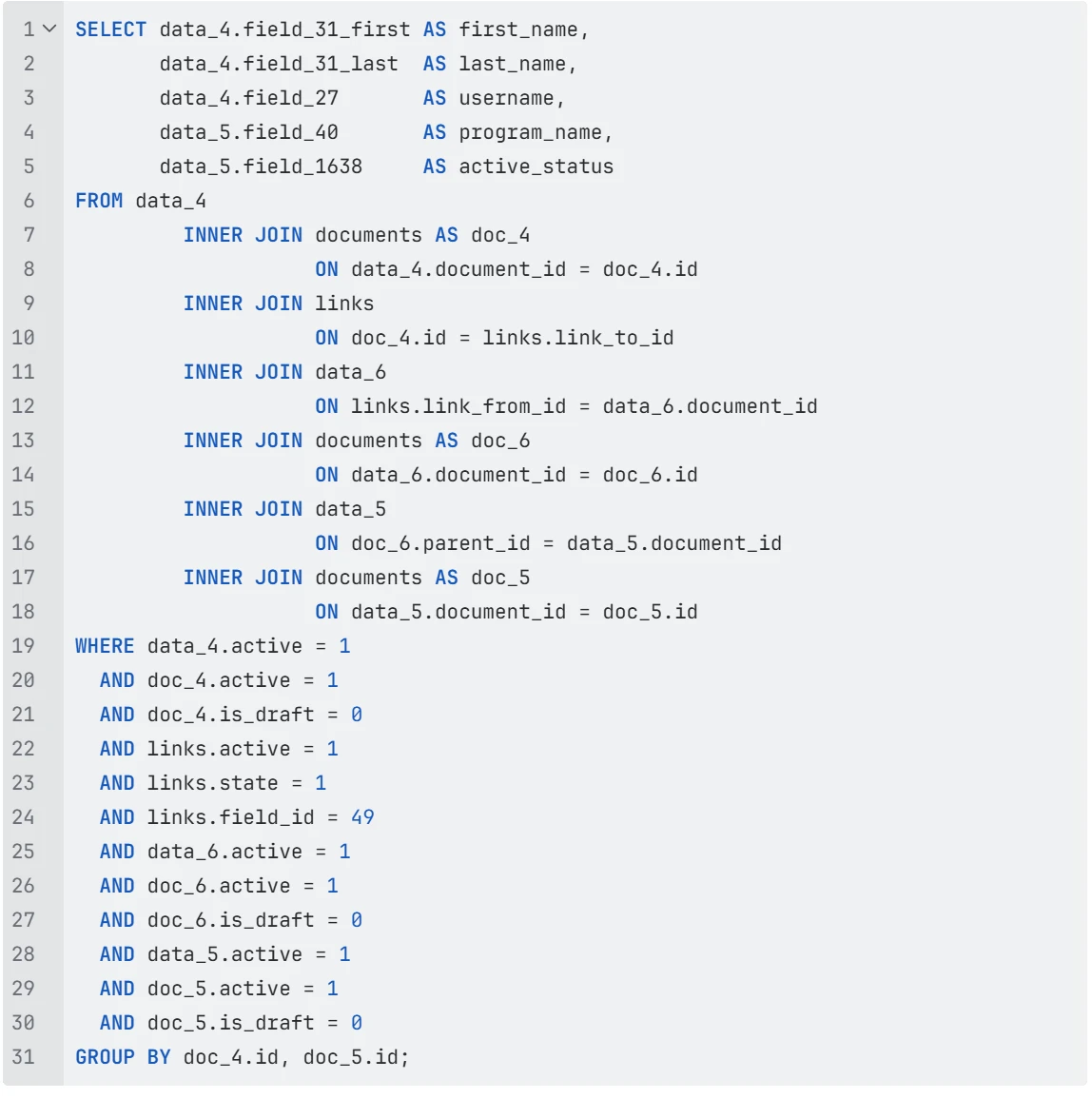
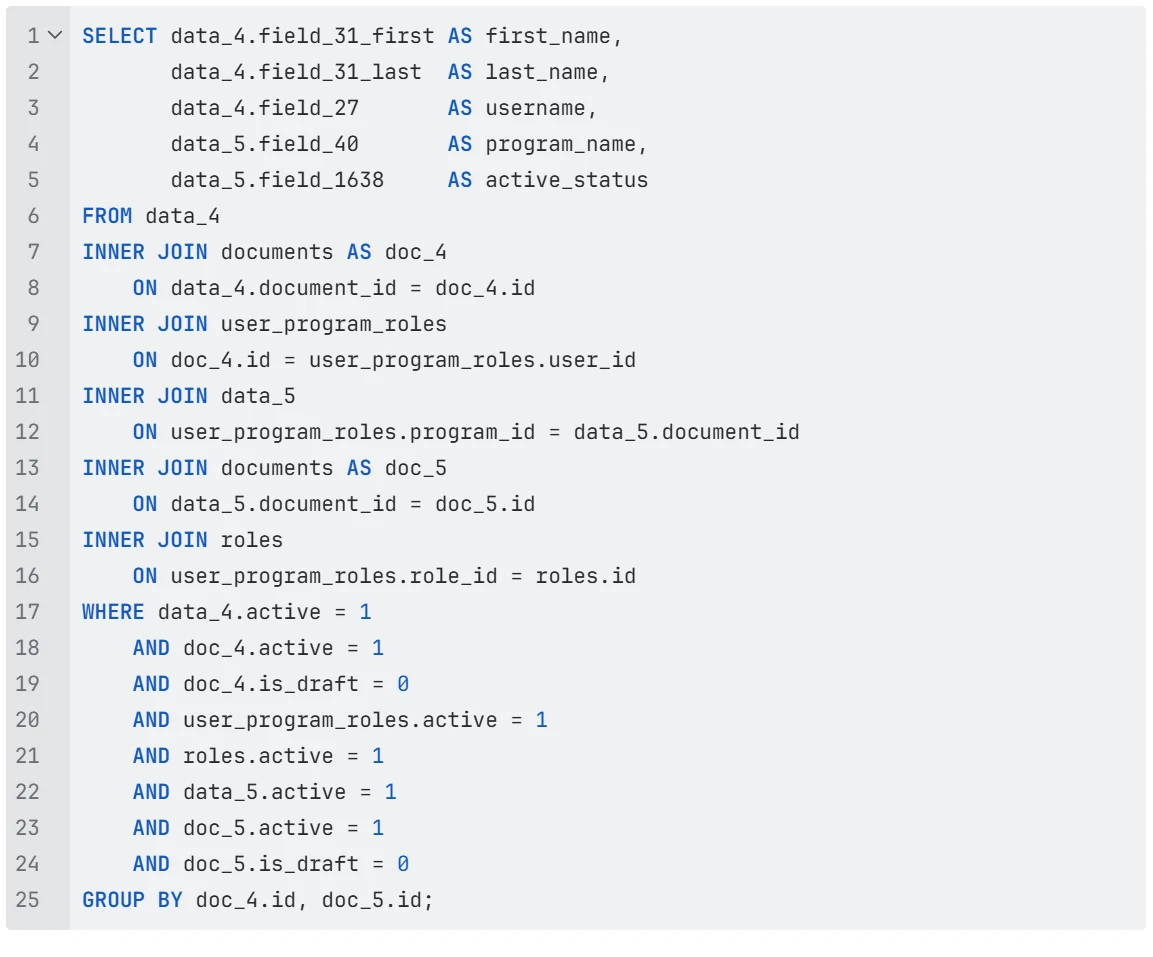
This example lists each user with the programs they work in. The first query is the old way. The second query is the new way.
Before: The old query joins through the links table and the permission set records (data_6).
After: The new query uses user_program_roles and joins to the roles table.
What changed:
-
The links table and the data_6 permission set records are gone. The query now starts from user_program_roles.
-
The query joins user_program_roles to the roles table by role_id. The roles.active = 1 filter leaves out inactive roles.
-
The user_program_roles.active = 1 filter checks that the user and program relationship is active.
-
The other filters check that the user and program records are active, not archived, and current. These filters did not change.
Note: Field IDs in Data_4 (Users) and Data_5 (Programs) are generally consistent, but may differ in some early organizations. Use your organization's field IDs and test the query to confirm the results.
Things to know
-
Update every dynamic query that uses permission data. Queries that do not use the old permission tables do not need to change.
-
If a Native Reporting report uses the old Permission Sets fields, see How do I rebuild a permission report with the Roles fields?
-
If your query returns an error or missing data after you update it, check that each join uses role_id and that the query reads from the new tables.
-
Permission data can also be inside a Report Custom Expression. This is not common, but it can happen, mostly on larger sites with complex reports. If report data looks old or wrong after your migration, check your Custom Expressions as well as your dynamic queries.
Related articles
How do I update a dynamic query that uses permissions? | Which tables replace permission sets in dynamic queries? | Why does my dynamic query show old permission data? | What is the user_program_roles table in Apricot? | How do I join the roles table in a dynamic query? | What happens to my dynamic queries after the permissions migration?