



Changing Your ActionID Email
Begin by logging in using your ActionID. Please note: You must be logged in with your ActionID in order to reset the email address.
Click on your name in the upper right hand corner of the screen. In the ActionID section of the menu select the option to “Remove link to (your username)”.
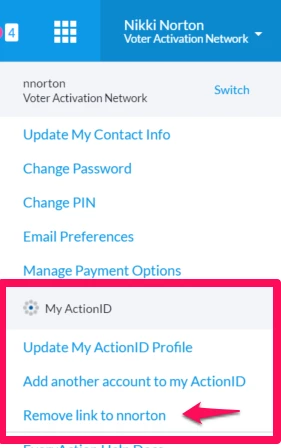
Then you'll see a message telling you that you’ve been logged out of your ActionID. However, you are still logged into the system under your account Username. At this point you will be returned to the Main Menu.>/p>
Click on your name again in the upper right hand corner of the screen. Under the ActionID section:
Select the option to “Use ActionID to log into....”
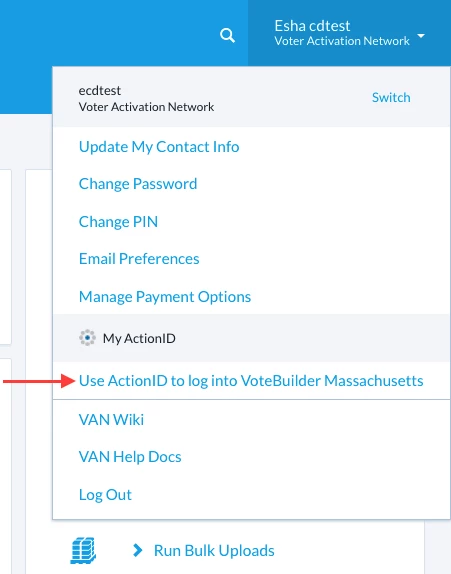
From here you will be directed back to the ActionID login screen.
Select "Create ActionID".
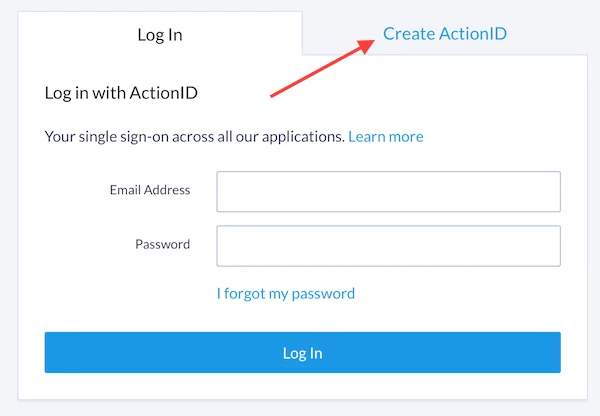
Once you’ve created your new ActionID, you will be redirected to the Main Menu and your new ActionID will be linked to your account.