

How do I remove contact records in bulk?
While you cannot remove a group of contact records without the assistance of our Support Team, the steps below will help you take steps to resolve this efficiently and smoothly.
Step 1: Determine which records to keep and which ones to remove
This may seem like an obvious step - but, sometimes making these decisions is not as simple as asking, "Who has never donated to our organization?"
A couple of other groups to consider:
-
contacts who have not attended an event ('Donor Management' does not count tickets or sponsorships as donations)
-
contacts who are (or are not) engaged with your organization
Step 2: Create a filter to segment contacts to remove
We recommend creating a custom filter under your 'Contacts' tab that looks similar to the one below:
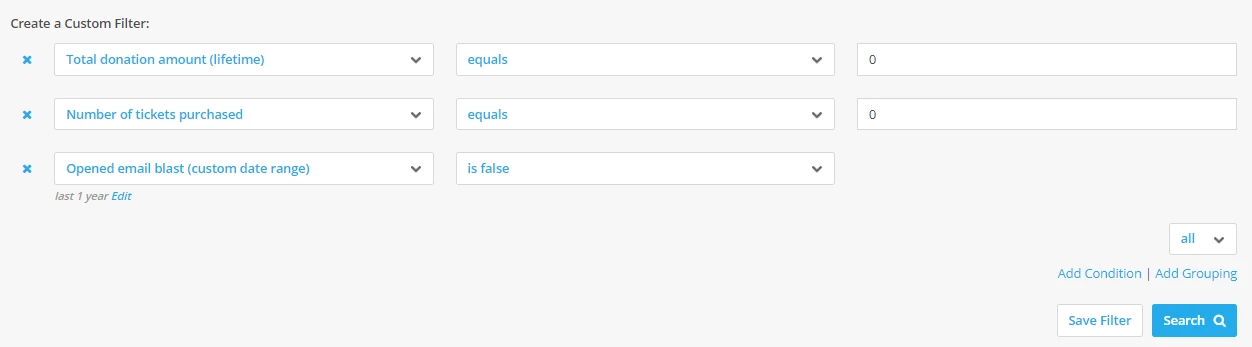
This filter includes the following conditions:
-
Total donation amount (lifetime) > equals > 0: this condition will pull any contacts that have no donation records associated with their profile
-
Number of tickets purchased > equals > 0: this condition will pull any contacts that have never bought tickets for an event
-
Opened email blast (custom date range = 1 year) > is false: this condition will pull any contacts that have not opened any e-mails you have sent through 'Donor Management'
Step 3: Create a group to segment contacts to remove
Once you have created the filter, you can add all resulting contact records to a new group, titled: 'TO BE DELETED'
To add multiple contacts to a group, follow the instructions in this article.
When this is all set, you can contact our Support Team and they can remove the contacts within that group from 'Donor Management'!
Note: We recommend exporting a copy of the contact records you plan on removing and saving it within your records for recordkeeping purposes.
What else do you need help with?
How do I manage individual contacts with multiple e-mail addresses?
How do I manually flag duplicate contact records?
How do I manage multiple contacts within a contact profile?
Not quite what you were searching for?
Navigate back to the Feature Overview.
How do I delete contacts in bulk in Donor Management? | Why can’t I bulk delete contact records myself? | How do I create a filter to find inactive contacts? | How do I remove contacts who have never donated? | What is the best way to clean up old contact records? | How do I export contacts before deleting them? | How do I ask Support to remove a group of contacts?
How do I prepare before creating facebook ad audiences? | How does prepare before creating facebook ad audiences work in EveryAction? | Why can't I prepare before creating facebook ad audiences? | Where do I prepare before creating facebook ad audiences in EveryAction? | What is prepare before creating facebook ad audiences in EveryAction? | How to prepare before creating facebook ad audiences? | Can I prepare before creating facebook ad audiences in EveryAction?