Solved

LYBUNT Report in Every Action

  • December 4, 2025
  • 2 replies
  • 31 views

Forum|alt.badge.img

What is the best approach to pull a LYBUNT Report in EveryAction? Gave Last Year But Unfortunately Not This Year Contribution Report. Is there a template already created? 

Best answer by torvic vardamis

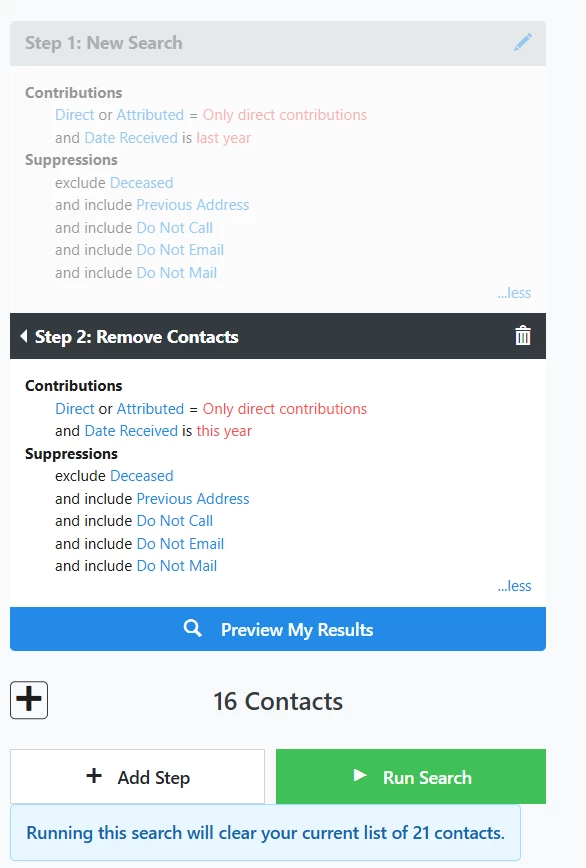
Hi ​@nicole The primary way to accomplish this is to create a 2 step saved search. The first step including people that gave within the previous year and then a remove step for people that gave this year. From there you can then send them an email or send that list to a report to get from analytical gift history about them (like the Contribution report). And since it’s a saved search, you can continue to use it moving forward. Please let me know if you have any other questions about this or if you’d like me to expand on it. Here’s an example search you can build from:


2 replies

torvic vardamis
Forum|alt.badge.img+2

Hi ​@nicole The primary way to accomplish this is to create a 2 step saved search. The first step including people that gave within the previous year and then a remove step for people that gave this year. From there you can then send them an email or send that list to a report to get from analytical gift history about them (like the Contribution report). And since it’s a saved search, you can continue to use it moving forward. Please let me know if you have any other questions about this or if you’d like me to expand on it. Here’s an example search you can build from:


Forum|alt.badge.img
  • Author
  • First Timer
  • December 12, 2025

Thank you. I pulled a list this way and narrowed it by our source codes. We used Salsa CRM before migrating into EveryAction and they had this type of report already built in.