



The Bonterra Nonprofit Hub's proposal generation tool produces a structured grant proposal draft tailored to a specific funding opportunity. Rather than starting from a blank page or a generic template, you get a first draft built from your organization's profile, the grant's requirements, and — when you've run a prior evaluation — the analysis of your fit and eligibility. This article explains how the system works and what each part of the output means.
How proposal sections are determined
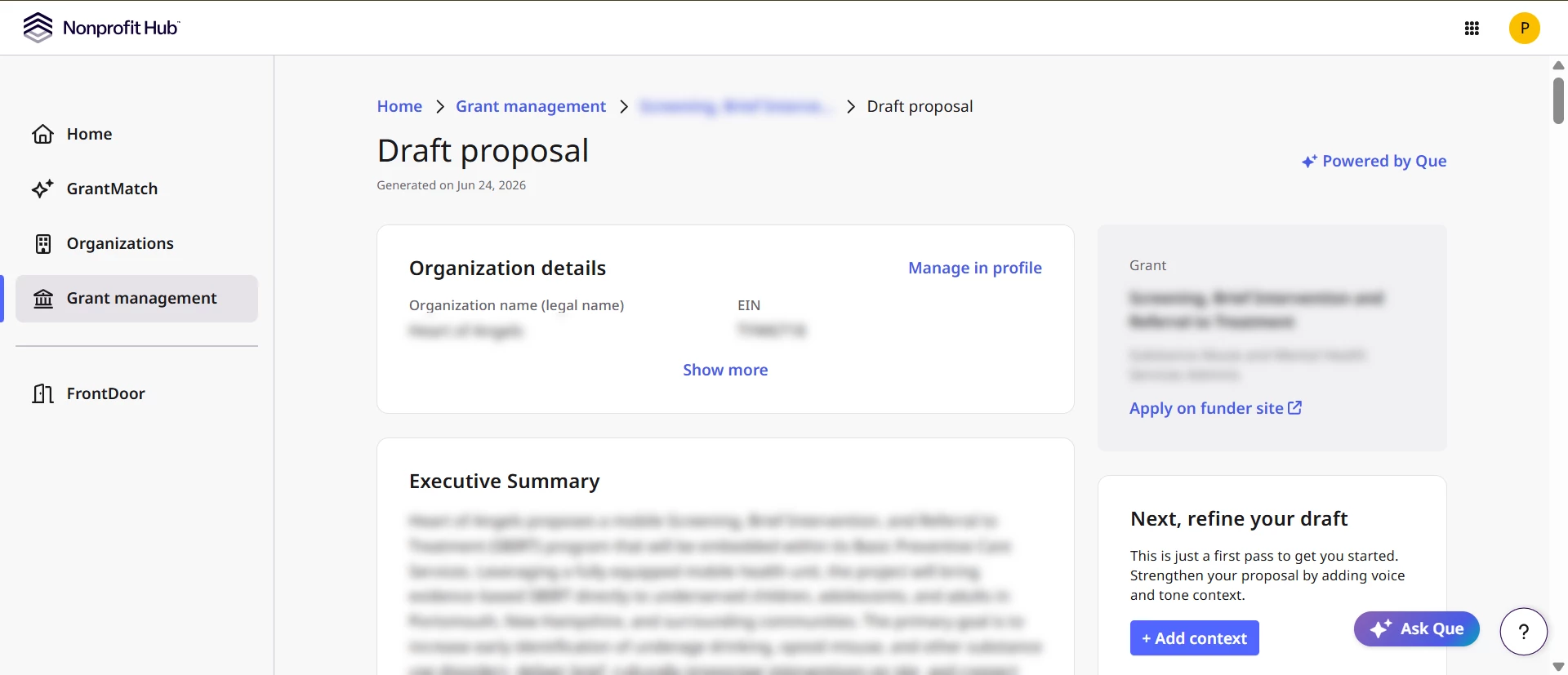
The system derives the proposal structure from the grant's actual requirements rather than applying a fixed template. It examines the grant description, application guidelines, and (when available) structured application forms to determine which sections your proposal needs and what each one should address.
When the grant description doesn't provide enough detail to derive sections confidently — for instance, a short overview with no detailed guidelines — the system falls back to a standard section set that covers the core elements most funders expect. Either way, the section structure reflects the specific grant.
What each draft is built from
Sections are generated from a combination of inputs assembled for your organization and the specific grant:
- Organization profile — Your mission, legal structure, service geography, and organizational background from your Nonprofit Hub profile.
- Program context — Details about the specific program you're seeking funding for, when program-level information is recorded in Nonprofit Hub.r
- Grant requirements — The funder's stated priorities, eligibility criteria, and application requirements extracted from the grant description and guidelines.
- Funder profile — When funder giving history and priorities are available, the system uses them to tailor the draft toward what the funder is known to fund.
- Grant evaluation results — When you've run a grant analysis for this opportunity, the system uses your eligibility assessment, effort estimate, and award profile findings to inform the draft — for example, framing sections around your alignment strengths or proactively addressing flagged considerations. Evaluation is not required; if no evaluation exists, the system generates from the other inputs.
- Voice context — Writing samples from past proposals you've uploaded, used to match your organization's tone and style. See Voice Matching below.
Add context
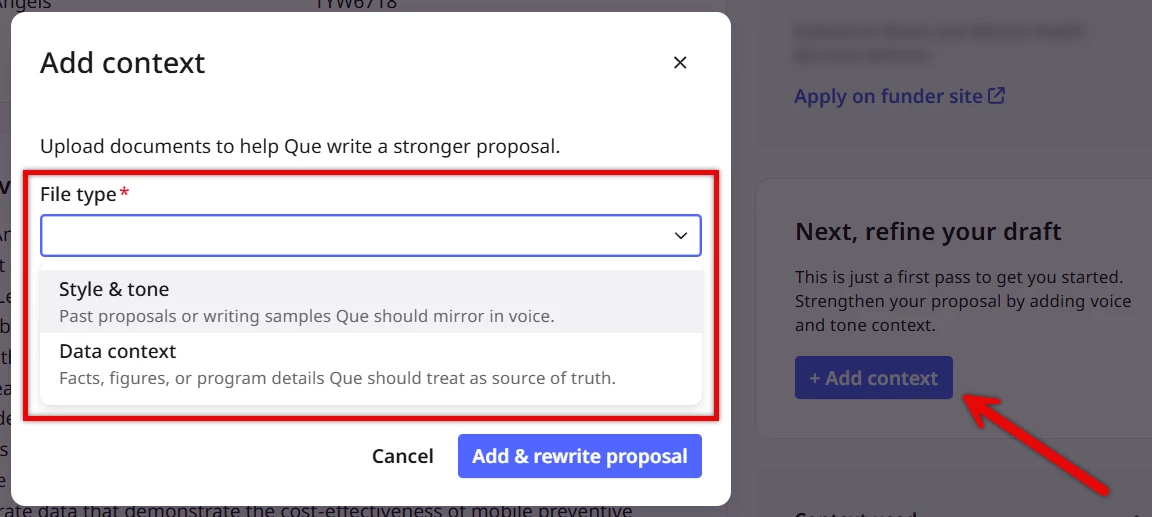
Style and tone
You can upload past proposals or other representative writing to help the system match your organization's style. When you add a file, the system extracts the writing characteristics and adds them to a voice library for that grant. All members of your organization share the same voice library, and it persists between sessions.
You can add or remove files at any time. Adding a file updates the library with that file's contribution; removing a file removes its contribution. The voice library is grant-specific — uploads to one grant do not affect others.
Voice matching is optional. If no files have been uploaded, the system generates content without style guidance from past proposals.
Data context
You can upload supplementary program information — such as impact reports, program outcomes data, annual reports, program-level statistics, or other organizational context — to provide additional depth about your work. When you add files, the system extracts relevant program details and adds them to a data library for that grant. This additional context helps the proposal draft address impact and outcomes questions with concrete organizational data rather than generic language.
You can add or remove files at any time. Adding a file updates the library with that file's contribution; removing a file removes its contribution. The data library is grant-specific — uploads to one grant do not affect others.
Data context is optional. If no files have been uploaded, the system generates content using your organization profile and grant requirements alone.
Source attribution
Every section includes a Sources indicator showing which inputs informed that section's content — for example, organization profile, grant requirements, funder profile, or past proposals. When a section maps to a specific grant application question, the attribution also references that requirement, helping you verify the proposal covers what the funder asked for.
The proposal as a whole carries a summary of all data sources used across the generation — consistent with how source attribution works in grant evaluation results.
Revision
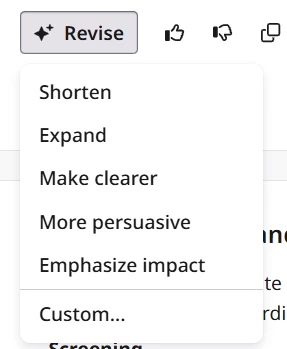
After a draft is generated, you can revise individual sections without regenerating the entire proposal. Five revision operations are available:
-
Shorten — reduces the section to a more concise version while preserving key points
-
Expand — adds depth and detail
-
Make clearer — simplifies language and improves readability
-
More persuasive — strengthens the argument and impact framing
-
Emphasize impact — brings outcome and mission impact language to the foreground
Each revision regenerates that section only, using the current content, the revision instruction, and context from other sections to maintain coherence. Revisions preserve voice matching and replace the section content in place — there is no version history.
Shared drafts, persistence, and refresh
The proposal for a given grant is shared across all members of your organization. When one team member generates or revises a section, all other members see the updated draft. Proposals persist between sessions — when you return to a tracked grant, the most recent version is available without regenerating.
If the grant's details change after you've generated a proposal, Nonprofit Hub detects the change and surfaces a Refresh option. Refreshing updates the proposal to align with the current grant data while making minimal changes, preserving your revisions and voice matching where possible. Refresh updates where needed.
Download
Once you're satisfied with the draft, you can download the proposal content to incorporate into your full application — copying sections into an application portal, formatting for submission, or using as the foundation for your final document.
What else do you need help with?
- How does Grant Analysis work?
- How do I interpret my Grant Evaluation?
- How do I make a Go/No-Go Grant decision?
- How do I generate and refine a Grant proposal?
Not what you’re looking for? Navigate to Understanding Grant Analysis and Proposal Writing