

How do I report on promo code usage?
There may be instances where you'd like to provide reporting or data on promo code usage, such as in a report to the board or to cross-verify RSVPs with collected payment.
There are two different ways you can report on promo code usage - we'll go over both below.
Step 1: Use the "promo code" filter in Donor Management to generate a report on promo code use
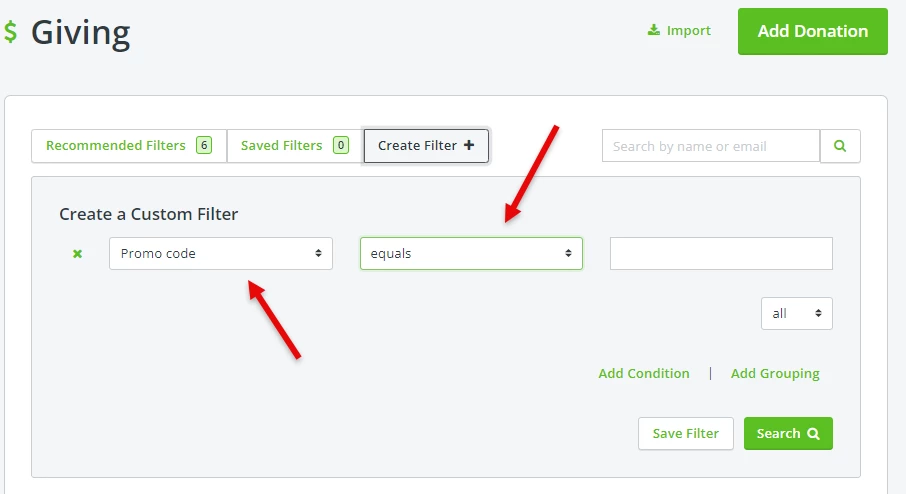
By using this option, you can not only build a report on the use of a specific promo code, you can also select the option for "is present" from the second drop-down menu to report on the use of all promo codes that have been created.
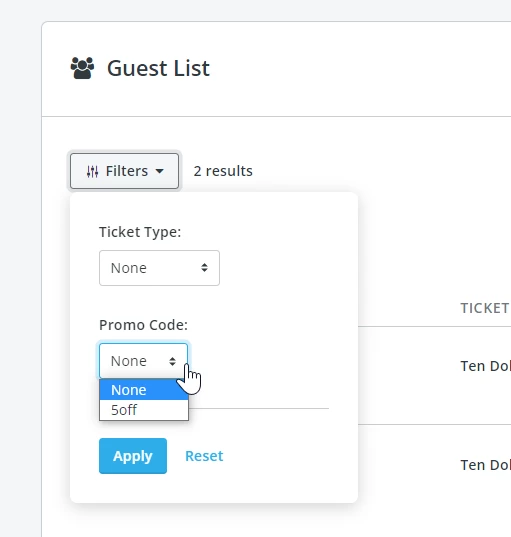
Step 2: Export out a copy of your event's "Guest List" and review the "Promo Code" column
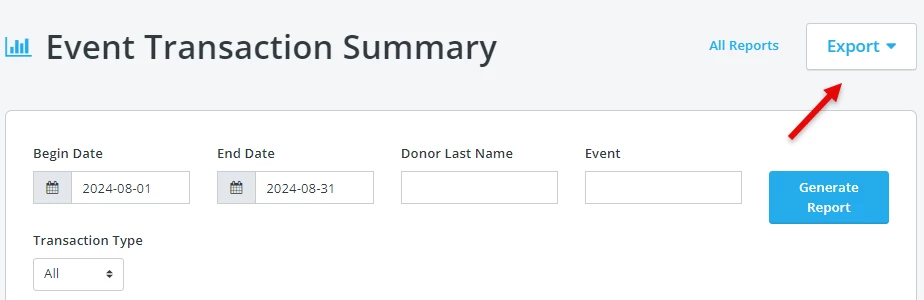
The “Event Transaction Summary” report under “Reports” will include each transaction for a date range and event, along with the promo code used. This can be exported as a report or printed by using the “Export” button.
What else do you want to do?
Not what you're looking for?
Go back to the Feature Overview. How do I run a report on promo code usage in Network for Good? | How do I see how many times a discount code was used? | Where can I export promo code data for my event? | How do I filter transactions by promo code? | How do I track event ticket sales by promo code? | Can I generate a report for all promo codes used? | How do I use the Event Transaction Summary report for promo codes?