


How To: Send Contribution Receipts
Contribution receipts are a common request from supporters who want to keep their own contribution records up-to-date. You can easily send a contribution receipt from a contact record if you have a Contribution Receipt published in Targeted Email.
Read more about Triggered Email
Sending contribution receipts
To send a contribution receipt to a contact, follow these steps:.
-
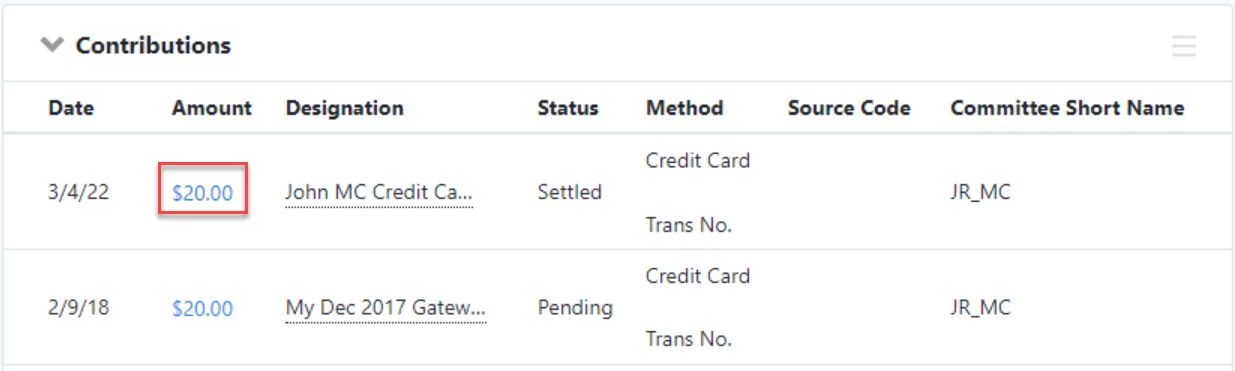
Navigate to the Contributions section on the contact record (All Details view) and click the contribution's Amount to open the Contribution Details page.
-
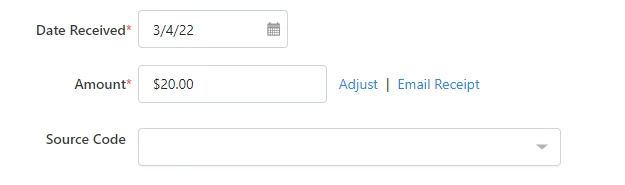
Select Email Receipt next to the Amount field.
-
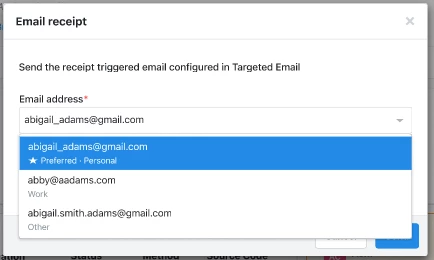
Select the correct email address from the drop down list.
-
You can enter up to 5 additional emails in the BCC field if you want to send the receipt to multiple people.
-
-
Click Send.
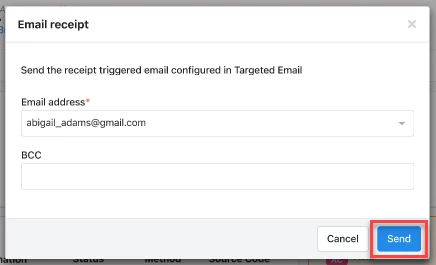
After clicking send, you will see a message displayed at the top of the page that the contribution receipt has been queued to send. You can view sent receipts in the Targeted Email section of the contact record.
How do I how to: send contribution receipts? | How does how to: send contribution receipts work in EveryAction? | Why can't I how to: send contribution receipts? | Where do I how to: send contribution receipts in EveryAction? | What is how to: send contribution receipts in EveryAction? | How to how to: send contribution receipts? | Can I how to: send contribution receipts in EveryAction?